Logging Cisco Switch Sessions

I have been working on setting up logging for Cisco switch sessions and finding that it is logging everything entered. So if you are typing and need to erase what you put to correct it it all shows up on the same line.
Example: Switch(config)#do show interface statusexit no shutswitchport mode trunkno switchport mode accessport-security mac-address stickyaccess vlan 4
Is there any option where to get a log more like Putty's All Session Output so only what command is actually entered is what gets recorded?
All Comments (7)
Hello,
At the moment, this is the expected behavior. We will see what we can do to improve this, I have opened a ticket.
Regards,
Hubert Mireault
Good day, I am new user to RDM so can you clarify please how to enable logging for ssh sessions?
so all my commands and configurations on network devices logged?
I managed to do that on the session level but could not find how to enable it globally and by default, there is a logging option on Terminal Tab but that didn't work for me
Hello Alex,
Thank you for your reply,
You can have the configuration set Globally under "File" -> "Options" -> "Types" -> "Terminal," as you've seen. However, to enable the logging, you would need to do it from your entry "Properties."
You can use the "Batch Edit" to perform this change on multiple entries simultaneously. For more details on using "Batch Edit," please refer to the knowledge base article here: https://docs.devolutions.net/rdm/windows/commands/edit/batch/batch-edit/.
Let me know if this helps,
Best regards,
Samuel Dery
Good morning Samuel, thanks for your kind reply.
Actually, I am not sure I got what you wrote, I came from network world and had no experience with RDM before.
What I am trying to achieve is enabling default logging for all my ssh sessions, like I used to do in putty and SecureCrt, you just add a path in Global setting and it is also possible to add some parameters so it logs every session to a separated file, and includes hostname and date in the name, it is also possible to add a time stamp to every line inside the log.
and I want to achieve something similar in RDM, I have 100 switches and routers added to which I ssh from time to time to do some networking tasks, and trying to find how to enable logging so every time, I access a device, a separated log file created with all my entered commands.
I found how to enable that on the active session but it is not convenient to do that every time I open a new session.
I enabled that in Types/Terminal and specified a path, but log files were created.
I not sure I understood this "you would need to do it from your entry "Properties." by entry you meant the active tab/session?, I could not find it there, I am not aware of batches.
Thanks in advance for your help
Hello Alex,
Thank you for your reply.
You can access your entry "Properties" by performing a right-click on the entry in the "Navigation Pane" and selecting "Properties."
Any changes made to the "Properties" will be kept if saved by pressing "Update." Unfortunately, there is no global setting to enable the logs only for the save path configuration as mentioned.
To enable logging in your entry "Properties," you can go under the "Logs" section and check the option. Since there is no global option for this, you will need to use the Batch Edit option to change the "Properties" of all entries you wish to enable the logs on. You can follow this knowledge base article for this:
https://docs.devolutions.net/rdm/windows/commands/edit/batch/batch-edit/
Let me know if this clarifies.
Best regards,
Samuel Dery
Hi Samuel, many thanks for your support.
I found the reason why I could not find it before, because it was invisible since we have all session in shared vault that is not managed by me. (screen attached) .
So seems for now the only option is to enable it via special commands/log settings, which need to be done every time I open a session.
is it possible to copy the sessions from the shared vault to my own own ? or I need to create them myself? 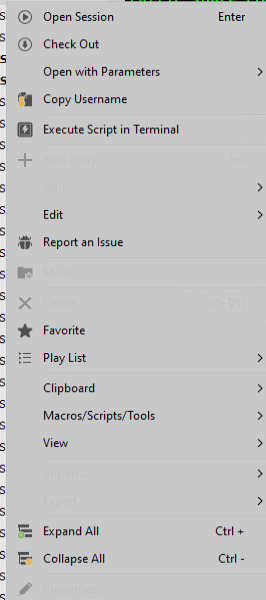
sessions properties.png
Hello Alex,
Thank you for your reply,
I see, under the "Clipboard" section do you have the "Copy" option available? If so you could use this option to copy the entry then move to your User Vault and use the Clipboard -> Paste option.
If not, I would recommend you discuss this with your administration as it would seem you do have the permissions to perform changes on this entry.
Best regards,
Samuel Dery