Modify Embedded Script on Powershell Session with Powershell

Hello
I want to modify Embedded Powershell Scripts in Powershell
Sessions with Powershell himself.
In GUI I can Edit like the following: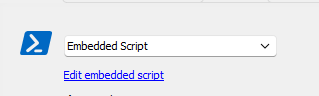
But I would like to be able to edit this myself using
Powershell, but I can't find a way to do it. Is this possible?
As with the other documents, I tried with
"-IncludeDocumentsStoredInDatabase", but this does not work with
Powershell scripts stored in the DB.
Best Regards Lukas
rd_embedded_script.PNG
All Comments (3)
Hello Lukas,
You can use the script from this forum post to set the embedded script in a PowerShell session - https://forum.devolutions.net/topics/31591/setting-the-embedded-script-in-a-powershell-session
Best regards,
Richard Boisvert
Hello Richard
Sorry i have not found this post. Now it works, after i have reformat the Function and removed # before Write-Output $byteOutArray in this Function.
I have modified it to Read a ps1 File directly, the Script works now with the follow Code:
#Variables
##############################################################################################################
$powershell_script_source_path = "c:\temp\test.ps1"
$rdm_powershell_session_name = "testps"
#Functions
##############################################################################################################
function Get-CompressedByteArray{
[CmdletBinding()]
Param(
[Parameter(Mandatory,ValueFromPipeline,ValueFromPipelineByPropertyName)][byte[]] $byteArray = $(Throw("-byteArray is required"))
)
Process{
[System.IO.MemoryStream] $output = New-Object System.IO.MemoryStream
$gzipStream = New-Object System.IO.Compression.DeflateStream $output, ([IO.Compression.CompressionMode]::Compress)
$gzipStream.Write( $byteArray, 0, $byteArray.Length )
$gzipStream.Close()
$output.Close()
$tmp = $output.ToArray()
Write-Output $tmp
}
}
#Main Script
##############################################################################################################
#Read Powershell File Content and Compress it
[Byte[]] $bytes = [System.IO.File]::ReadAllBytes($powershell_script_source_path)
$CompressedBytes = Get-CompressedByteArray $bytes
#Update RDM Session with Compressed Powershell Script
$s = Get-RDMSession -Name $rdm_powershell_session_name
$s.PowerShell.EmbeddedScriptCompressed = $CompressedBytes
Set-RDMSession $s
Thanks for your fast help.
Best Regards
Lukas
Hello Lukas,
Thank you for sending your updated version; I am glad to be of assistance.
Best regards,
Richard Boisvert