Azure Bastion inheritance

Hi Richard Markiewicz,
regarding the issue of Azure Bastion inheritance when "Use entry name as Resource name" is set, already talked about in the "megathreat" :) https://forum.devolutions.net/topics/37294/rdp-via-azure-bastion-native-client#184624
The issues I have:
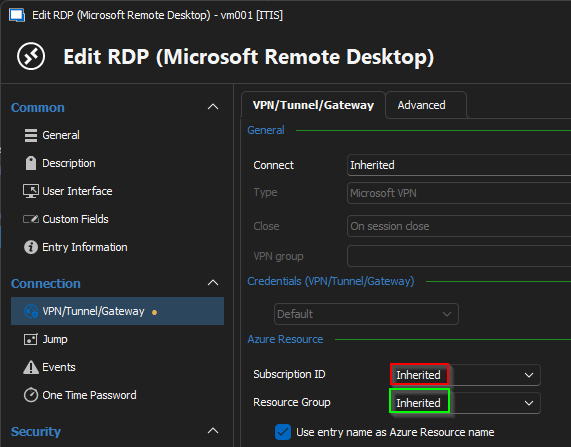
- "Use entry name as Resource name" does not work with Azure Bastion set to "inherit" (Bug Report)
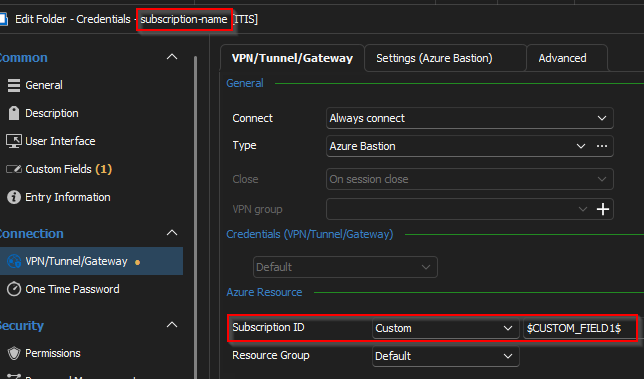
- Subscription ID field does not support variable (Feature request)
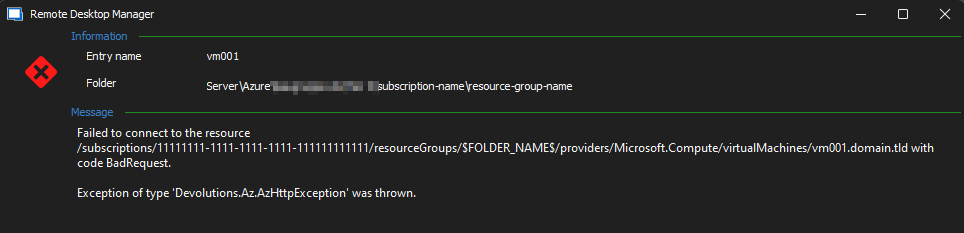
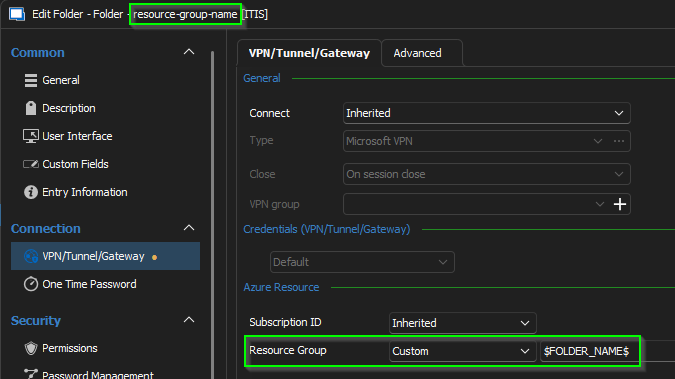
- Resource Group does not support variable (Bug Report)
- to 3.: Please decide on the best fitting implementation, as it changed a bit over the last versions:
- pre 2023.3.25.0: Variable was resolved on the resource finally opening the bastion (the VM entry) and could be inherited as variable name like "$FOLDER_NAME" set on the folder "subscription_name" (see Layer concept)
- 2023.3.25.0: Variable was only resolved when set directly in the Entry, otherwise it was considered as string
- 2023.3.31.0: Variable is not resolved anywhere
Here the reference to the original post together with the issues that changed in the new release marked in red.
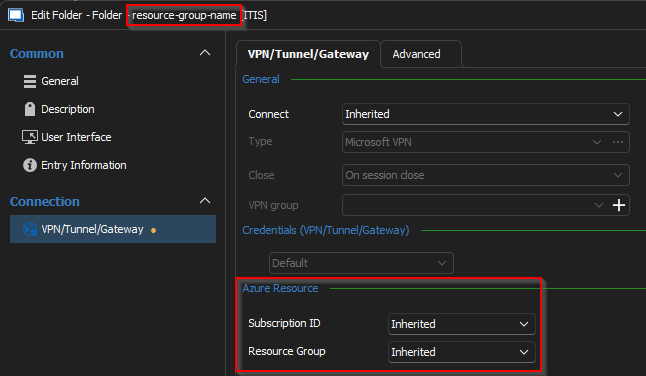
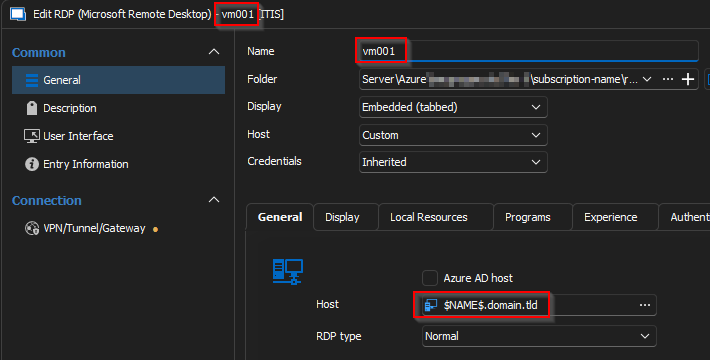
To the problem: The new setting "Use entry name as Azure Resource name" does not seem to work if you inherit the bastion connection. Referencing the bastion resource in the VM entry directly works (but breaks the $FOLDER_NAME$ inheritance shown below)
-> even does not work like this anymore. Variables are not useable anymore in the "Resource Group" field.
# Layer concept
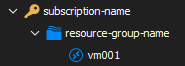
# subscription folder settings
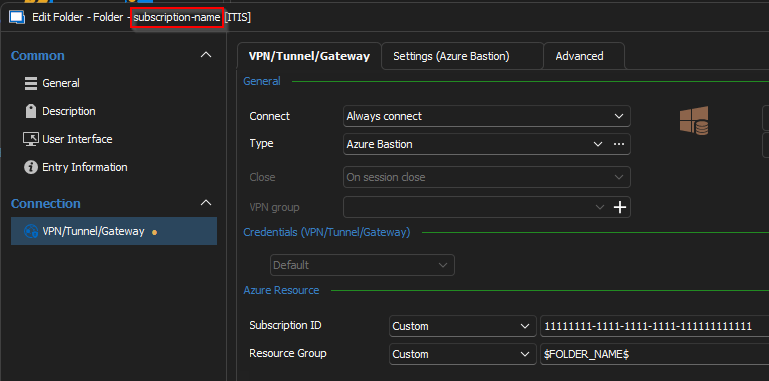

# Resource group folder settings
# resource entry settings
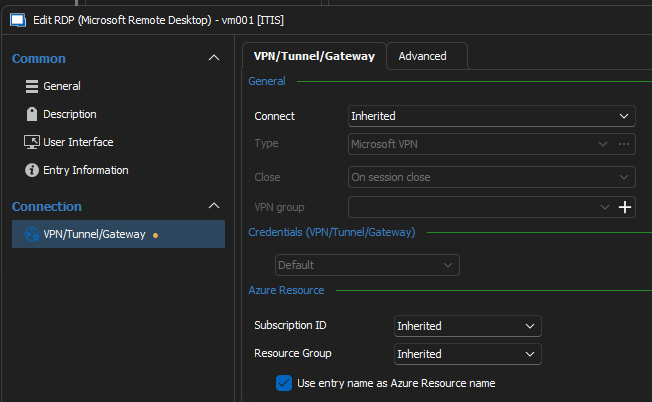
With 2023.3.25.0

With 2023.3.31.0
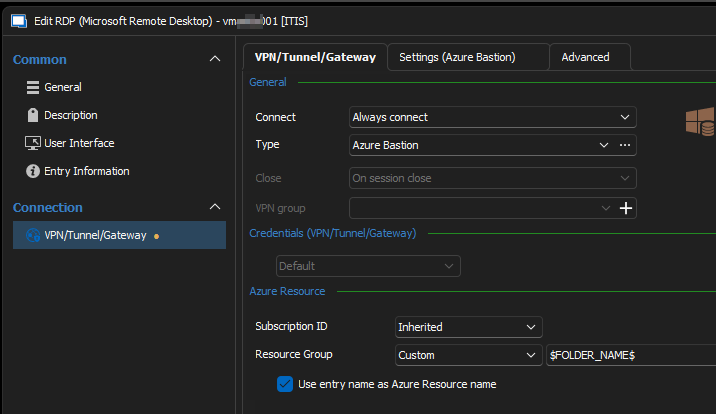
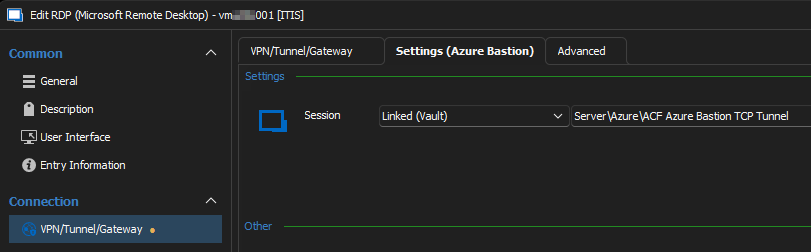
# This would be the working configuration
-> This does work in terms of the "entry name", but the "Resource Group" variable doesn't
01236a43-7e18-4fbe-b516-b6a23a5c7b4b.png
All Comments (9)
Hi Nicolas
Thanks for the issue report and thanks for starting a new thread to track this. The prior thread was getting too long to manage the different requests and issue reports.
With regard to "Use entry name as Resource name" not working when the Bastion VPN is inherited, I'm opening a ticket to track this. I expect the fix is straightforward and this was just missed in the last round of updates. I'll post back once I have an update for this.
With regard to variables not resolving for the subscription and resource group: if it was working (partially) before (at least for resource groups), that was actually a side-effect of the implementation and not something I'd considered at the time. Some internal changes in RDM broke the resource info overrides around the 2023.3 version, and that was what the last round of updates should have resolved - but in those changes we clearly lost the ability to use variables here.
That said, I do consider this to be a useful feature - I'm opening a second ticket for that and in both cases (subscription ID and resource group) I'm classifying it as a feature request. I will however try to get to this done the short term; I'll aim to have that implemented for a 2023.3 release rather than waiting for 2024.1.
With regard to the mechanism of variable resolution, I'll lease with the RDM team to see what they think fits best. I do think the pre-2023.3.25 behaviour is the proper one.
Thanks for your feedback and patience.
Kind regards,
Richard Markievicz
Hi Nicolas
I've just added the fix for the "Use entry name as Azure resource name" not working with an inherited VPN, and that will be available on the next release (2023.3.33). I do apologize for the inconvenience, that property was an oversight in the last round of fixes.
Out of interest - were you the customer we originally discussed that feature with over a related support ticket? We implemented it specifically to try and support Kerberos scenarios with Azure Bastion, but without a development setup on my side it was all theoretical. If that's what you're using this feature for, I'm curious to know if it's working well for you.
As always, if you have questions or comments please don't hesitate to post back.
Thanks and kind regards,
Richard Markievicz
Hi Richard,
thank your very much for implementing this for us very helpful feature and also this quick :)
Yes I initially created this request and will test and report back as soon as possible. I was already able to test this setup once and it work (I think it was around the Beta release for 2023.3). Important to know, as you suspected in the initial ticket, it is not the Bastion Service who does the Kerberos part (at least with the TCP Tunnel). You as a client need direct access to a domain controller.
Bastion itself does support Kerberos, but currently only for VMs not created by a custom image or azure migrate Azure Bastion Kerberos Support for non native VMs · Community and many other considerations.
I will test this behavior further with 2023.3.33 and also the native RDP.
Kind Regards,
Nicolas
Hi Nicolas
Thanks for the information. The 2023.3.33 release should be imminent (within the next few days).
I'm still working on prioritizing variable resolution for the Azure resource info, I will keep you posted.
Thanks once again and kind regards,
Richard Markievicz
Hi Richard,
long holidays, many other things to do :D Thanks for being patient with me :)
Here a small update from me regarding this topic
- Inheritance works as expected now. Thanks!!
- Only works with TCP Tunnel (known Microsoft issue with token length, where you already commented on the corresponding github issue). So I could not test it with native RDP
- Because of the missing possibility to use variables, I checked the Powershell Module to set the folder name to the VPN.AzureResourceGroup property. While doing that I found out that the Property "UseEntryNameAsAzureResourceName" is missing when retrieving the entry with "Get-RDMEntry"
-> I can do that via batch edit for now
Kind Regards,
Nicolas
Hi Nicolas
Thanks to you for your patience.
I'm still trying to find time to fix variable resolution in the Azure resource settings; I do apologize for this and will give you some feedback once this is available.
In the meantime, I'm raising that specific PowerShell issue with the relevant team internally.
Thank you for the feedback on the inheritance and the token length problem.
As always, please let me know any further questions or if something isn't clear
Kind regards,
Richard Markievicz
Hi Nicolas
I've fixed variable usage for both the subscription and resource group. That should be available in the next release.
ecause of the missing possibility to use variables, I checked the Powershell Module to set the folder name to the VPN.AzureResourceGroup property. While doing that I found out that the Property "UseEntryNameAsAzureResourceName" is missing when retrieving the entry with "Get-RDMEntry"
Thanks for bringing this up. It should be fixed on the next release of the PowerShell module.
As always, please let me know any further questions or if something isn't clear.
Kind regards,
Richard Markievicz
Hi Richard,
I was finally able to test it and it works as expected. Thank you very much!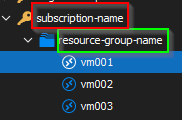

0b2993dc-1676-40a2-927d-49cf3728da80.png
e2e26452-4f7e-4909-b746-fbdb9648b90c.png
c31bd398-ec43-4cf8-9dd8-3ac0ac6359c2.png
195af384-00df-4d8e-9ff8-5921e9c4c244.png
d623a5f3-cbd2-47a4-805f-dc7fb9b53e28.png
Hi Nicolas
Great news. Thank you for the feedback and your patience.
As always, please let me know any further questions.
Kind regards,
Richard Markievicz