Microsoft l2tp/ipsec vpn split tunnel

So far we have used Shrew Soft VPN Client almost everywhere to connect to the hosts. Unfortunately, there are more and more problems with Windows 11 (Shrew Soft VPN Client still works with W11 when using Win10 network drivers).
We now use MS Client l2tp/ipsec natively. Until now we have set up the MS VPN connection manually, not automatically via RDM. To create the VPN connection once, I have a PS script, where I defined “Add-VpnConnectionRoute”. We now want to do this centrally via RDM. How can I solve this with RDM? I only see the option for Default GW.
# Prueft Admin Rechte
# Now, when running your script, it will call itself again and attempt to elevate privileges before running. The -elevated switch prevents it from repeating if something fails.
# You may remove the -noexit switch if the terminal should automatically close when the script finishes.

param([switch]$Elevated)

function Test-Admin {
    $currentUser = New-Object Security.Principal.WindowsPrincipal $([Security.Principal.WindowsIdentity]::GetCurrent())
    $currentUser.IsInRole([Security.Principal.WindowsBuiltinRole]::Administrator)
}

if ((Test-Admin) -eq $false)  {
    if ($elevated) {
        # tried to elevate, did not work, aborting
    } else {
        Start-Process powershell.exe -Verb RunAs -ArgumentList ('-noprofile -file "{0}" -elevated' -f ($myinvocation.MyCommand.Definition))
        # Start-Process powershell.exe -Verb RunAs -ArgumentList ('-noprofile -noexit -file "{0}" -elevated' -f ($myinvocation.MyCommand.Definition))
    }
    exit
}

'Ausf�hren mit Admin Rechten'


# Define VPN Connection settings
$VPNName = "VPN-HTAG"
$VPNServer = "46.12.34.56"
$VPNPSK = "thisisthepskxyz"
$VPNNetwork1 = "10.40.0.0/24"
$VPNNetwork2 = "192.168.100.0/24"

# Confirm VPN connection
Write-Host ""
Write-Host "    #### My VPN Creator ####"
Write-Host ""
Write-Host "    VPN Name:   " $VPNName
Write-Host "    VPN Server: " $VPNServer
Write-Host ""

# Wait for 2 seconds or until Enter is pressed
Start-Sleep -Seconds 2

# Prompt for VPN credentials
# $VPNUser = Read-Host "Enter VPN User"
# $VPNPassword = Read-Host "Enter VPN Password" -AsSecureString

# Convert password to plain text
# $VPNPassword = [System.Runtime.InteropServices.Marshal]::PtrToStringAuto([System.Runtime.InteropServices.Marshal]::SecureStringToBSTR($VPNPassword))

# Create VPN Connection
Add-VpnConnection -Name $VPNName -ServerAddress $VPNServer -TunnelType L2TP -EncryptionLevel Required -L2tpPsk "$VPNPSK" -AuthenticationMethod MSChapv2 -Force:$true -SplitTunneling:$true  -RememberCredential:$true

# Add route for subnet
Add-VpnConnectionRoute -ConnectionName $VPNName -DestinationPrefix $VPNNetwork1 -PassThru
Add-VpnConnectionRoute -ConnectionName $VPNName -DestinationPrefix $VPNNetwork2 -PassThru

# Connect to VPN
# Rasdial $VPNName $VPNUser $VPNPassword

# Confirm VPN connection
Write-Host "" -BackgroundColor White -ForegroundColor Black
Write-Host "------------------------------------------------------------------------------------------------------" -BackgroundColor White -ForegroundColor Black
Write-Host "-   VPN Verbindung wurde erfolgreich erstellt!                                                       -" -BackgroundColor White -ForegroundColor Black
Write-Host "-   Auf dem Desktop findest du eine Verknuepfung zu RASphone das dir alle VPN Verbindungen zeigt.    -" -BackgroundColor White -ForegroundColor Black
Write-Host "-   RASphone wurde automatisch gestartet, bei der ersten Verbindung kannst du den Login speichern.   -" -BackgroundColor White -ForegroundColor Black
Write-Host "-   Sie koennen das Fenster schliessen                                                               -" -BackgroundColor White -ForegroundColor Black
Write-Host "------------------------------------------------------------------------------------------------------" -BackgroundColor White -ForegroundColor Black

# Create Shortcut to rasphone.exe on Desktop
$ShortcutPath = "$env:UserProfile\Desktop\VPN Connection.lnk"
$WshShell = New-Object -ComObject WScript.Shell
$Shortcut = $WshShell.CreateShortcut($ShortcutPath)
$Shortcut.TargetPath = "rasphone.exe"
$Shortcut.Save()

# Open rasphone.exe
Start-Process "rasphone.exe"

# Wait for 60 seconds or until Enter is pressed
Start-Sleep -Seconds 60

# Close the script
Exit
All Comments (1)
Hello,
RDM can be configured to ask if you wish to open a session with a VPN before the starts of the session without needing a script.
To enable this feature, navigate to the properties of the entry in the connection menu. Click on 'VPN/Tunnel/Gateway,' and in the 'Connect' dropdown, select 'Ask for confirmation to connect.' You can then choose your type of VPN and enter the credentials in the settings tab.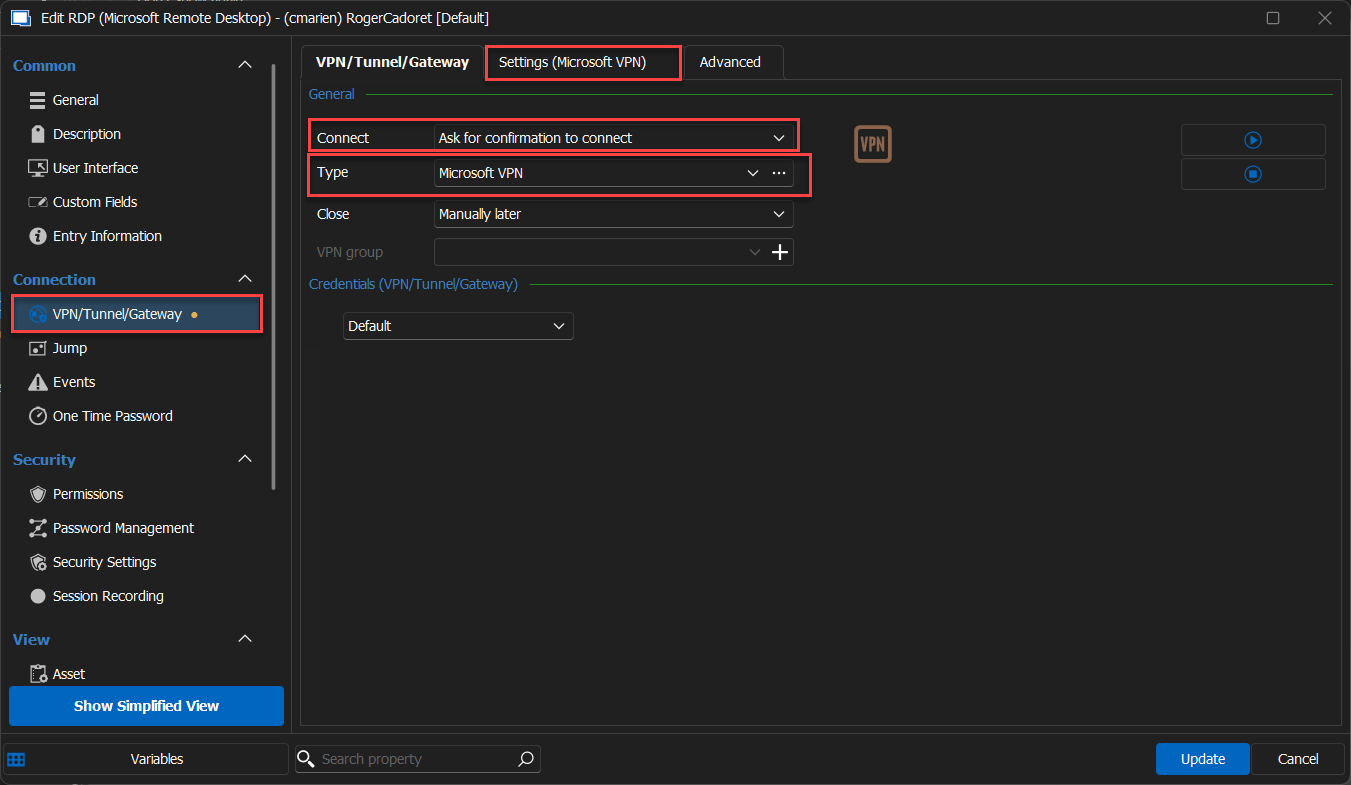
If you have any additional questions, concerns, or require further assistance, please feel free to reach out. I'm more than happy to help.
Best regards,
Carl Marien
2023-12-04_15-11-29.png