Problem with editing attachements

On every computer on which I use RDM and since many earlier versions of the program, I have noticed a problem that when I add an attachment, e.g. an Excel file, and when I want to edit it, the original file does not open, but a temporary file is created in the RDM directory. When i close the program, the temporary file is deleted.
Is it possible to make opening an attachment open the original file instead of creating a temporary one?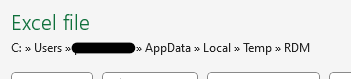
e14e77b0-8434-464f-b336-263e3b4a1325.png
All Comments (3)
Hello Rodney,
Thank you for reaching out to us regarding this,
My apologies for the delay, unfortunately, for attachments this would not be possible with Attachments,
Perhaps you could use Documents type entries with the "Mode" set to "Link to file" this would allow you to open the file outside RDM without having to store the file in the database.
Let me know if this helps,
Best regards,
Samuel Dery
Thanks for help... but this solution only works with files saved on folder not synced with OneDrive. When I make a link to a file on Desktop or Documents which are syncing with OneDrive then I getting access error when I want to save edited documents (ex. notepad, excel, word etc). If i make a link with file on , for ex. D: drive, then there is no problem.
Hello Rodney,
Thank you for your reply,
Could you provide me with a screenshot of this error message?
I'm also wondering if you encounter the same problem when starting RDM as an Administrator?
Let me know,
Best regards,
Samuel Dery