Synchronizers from AD - 4 issues

Is there way to have all newly synchronized servers have credentials set to inherited? To this end, can all newly synchronized servers have "Open Console session" ticked?
We've also noticed an issue where sometimes Synchronizers will create duplicate connections in a folder and upon resyncing those connections will persist.
Sometimes it seems the synchronizer will fail to sync as well during the set time.
All Comments (8)
Hello Ross,
For the first two points, you would need to use a template to set the credential and any other option you wish to use - https://docs.devolutions.net/server/web-interface/administration/configuration/system-settings/user-template/
You can then use that template in the AD Synchronizer, under Settings: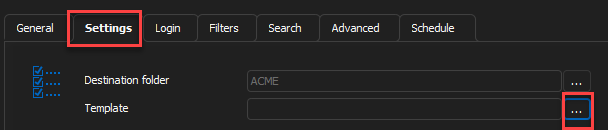
For the duplicates, you would need to go to the Advanced tab and select an "Action on entry mismatch":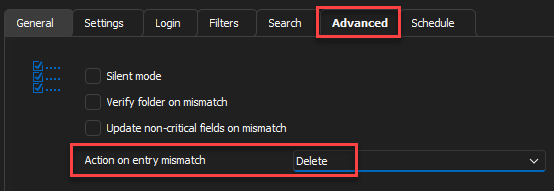
For the last issue, do you mean with the Schedule tab? If so, it means the Devolutions Scheduler failed to synchronize. Are there any relevant errors in the Data Source Logs, under Reports, for the time set for the schedule?
Best regards,
Richard Boisvert
e6e7ac48-32b8-4707-9c0a-4159dc2bf23b.png
cc1653dc-342c-4d8d-a6cc-f1ed64fe9ee1.png
That first link appears to be showing a template for users, where is the template for connections?
Also, we already have delete set as the action on entry mismatch. We will still occasionally duplicate entries. 
39d59a66-354d-4e56-b541-3aa34a4e1e6c.png
Hello,
Here is the correct link for the templates: https://docs.devolutions.net/server/web-interface/administration/templates/entry-templates/. It can also be done in RDM: https://docs.devolutions.net/rdm/windows/commands/file/templates/
Were there any changes for the duplicates, or are the entries the same? If you import the description, check the "Update non-critical fields on mismatch" above.
Best regards,
Richard Boisvert
I checked the box and there is no change. It looks like the duplicate connections are slightly different, some of them have "open console mode" ticked on them. But I'm not using templates (yet) in these synchronizers. I resynced after using ticking the "update non critical fields" and it maintained the duplicates.
Hello Ross,
The duplicate action would not remove the old entries if there were already duplicates. Unless you need to keep the logs for those entries, I recommend clearing out the imported machines and rerunning the AD Synchronizer.
Best regards,
Richard Boisvert
Hello Richard,
looks like I haven't seen any duplicates in some time. However, synchronizers appear to be failing to run at all during our set time. I've had to manually synchronize virtually all connections. Is there a reason they are not running at the time we have set in the synchronizer?
Hello Ross,
Can you confirm if you are using the "Synchronize automatically" option or the "Schedule" option (only available with Devolutions Server):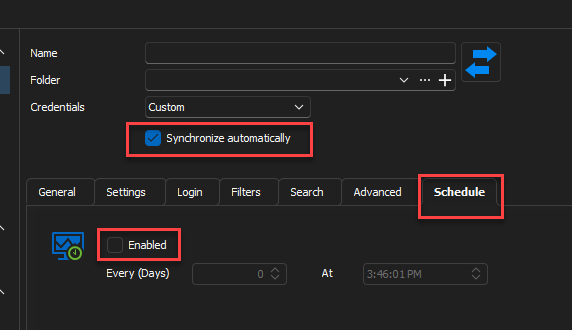
The former will only run if RDM is open and you are connected to the data source. You can also go to File > Background Services and validate the "Execute automatic synchronize every x minutes" is enabled.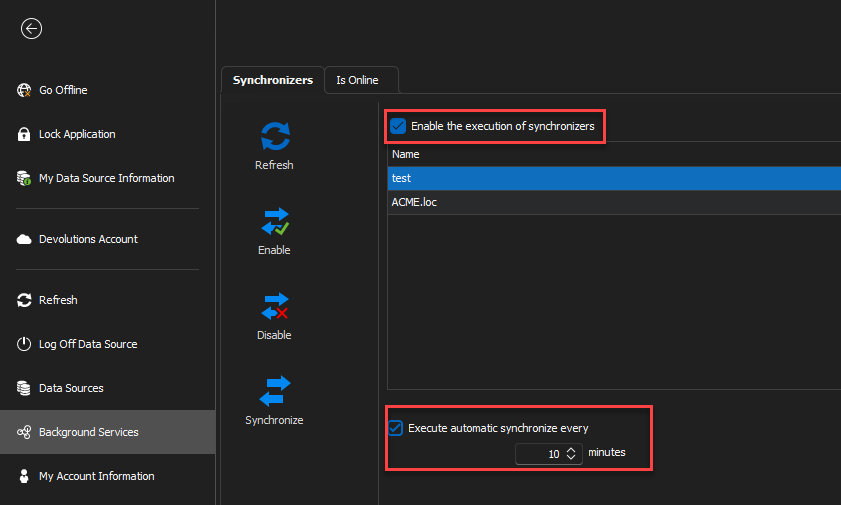
For the Schedule, the Devolutions Scheduler service must be running - https://docs.devolutions.net/kb/devolutions-server/how-to-articles/enable-server-side-synchronizer/
Best regards,
Richard Boisvert
39cb0767-8c61-46e3-a548-9723c2636e56.png
2239e543-7abd-42ed-af11-3f761cb61551.png