Multi-threaded connecting?

Hello, is there a way to connect to RDP's in a way that's multi-threaded? Or perhaps multiple servers at once?
Sometimes I need to quickly connect to several hundred servers via RDP to execute a script, and it's pretty slow, going 1 by 1. Another tool I used I was able to connect 10 at a time, in batches, by setting the thread count.
Maybe it already exists but I haven't found a way to do so. Anyone know?
Another thing is how can I mass disconnect from the servers? It also goes 1 by 1, making the entire process seemingly slow.
All Comments (6)
Anyone know?
Hello,
It's not currently possible, and it's not simple to change because of the way RDM is designed. We constantly make improvements to the architecture of the product and it might be possible to allow this eventually. We will keep your request in mind.
Regards,
Hubert Mireault
Hello,
It's not currently possible, and it's not simple to change because of the way RDM is designed. We constantly make improvements to the architecture of the product and it might be possible to allow this eventually. We will keep your request in mind.
Regards,
Very inconvenient to use this tool for managing 200+ servers, if there's a necessity to login to every server in a short amount of time for whatever reason, I must wait until all connections are done 1 by 1.
Please consider it, in the meantime I will use another tool for that specific purpose and RDM for everything else, thank you.
PS I was able to mass disconnect, in a way that mass disconnects multiple servers at once, instead of 1 by 1. Window > Thumbnails > Select servers > Log off
However, no feature for connecting.
931dd6a0-7e97-4607-ad29-e92e6d8aa0dd.png
Hello,
Could you let us know what the other app you're using is, the one that allows opening RDP entries in batches of 10? This would allow us to test on our end what the behavior is with a similar app, it could give us ideas on how to implement it on our end.
For the mass log off, if the solution you found doesn't work well enough for you, you could always do a combination of two things:
- In File > Options > Types, change the "default close all action" to "log off"
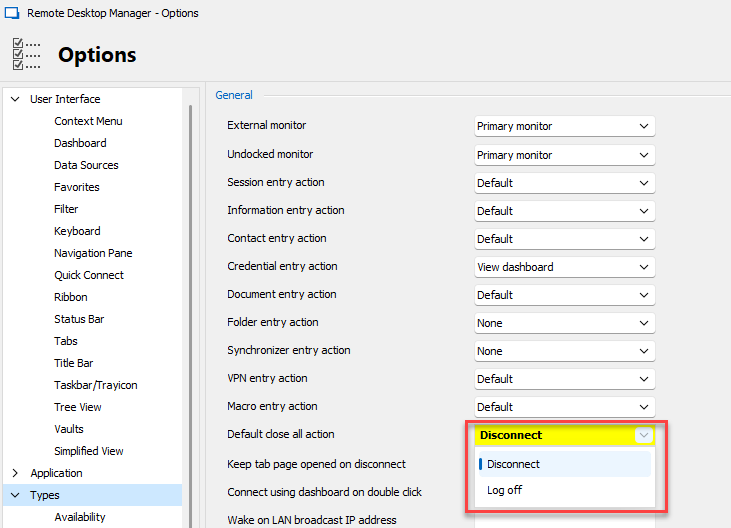
- Right click on one of your opened tabs, and choose "close all"
This should perform a log off on all of your opened entries. It's not as flexible as the other solution you mentioned, but if your goal is always to close every opened entry by performing a logoff, that should work.
Regards,
Hubert Mireault
9e8fa6a4-989c-46b7-9438-24b11ecacd4c.png
Thanks for answering sir, I want to close every opened entry by logoff and now I know my answer. I wasn’t a big fan of writing services before I worked with this https://stateofwriting.com/ online writing services on my UK assignments, but it’s not the quality of the writing that sets them apart. It’s the personal touch. I felt like we were working together instead of just providing a service. Every detail was taken care of from my custom writing to my final proofread. A real game changer for UK students!
Hello Richard,
Thank you for your reply,
Perfect, I'm glad to hear this helps in your case,
Best regards,
Samuel Dery