RDM: Move Entries Deletes Passwords

RDM: 2023.3.28.0
DVLS: 2023.3.8.0
Moving Entries in RDM causes a complete removal of the Password:
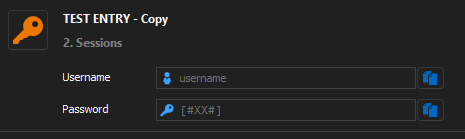
Password History is also empty after this happens.
Moving in DVLS works.
Please fix this Bug urgently.
Thanks,
Andreas
Edit: Just noticed that RDM 2023.3.28.0 released today and updated it. Still the same Problem.
All Comments (13)
Hello Andreas,
This issue was fixed internally, but it was only merged in the 2024.1 branch. It has been added to the 2023.3 branch and should be available in the next version.
Best regards,
Richard Boisvert
Thanks Richard
Hello Andreas,
As a workaround, you can do a Ctrl+F5 to refresh the cache; the password will be available after.
Best regards,
Richard Boisvert
Hi Richard
Just wondering how this should be possible when the Password is also missing in DVLS after moving.
Best Regards,
Andreas
Hello Andreas,
My apologies; the moving issue is another issue that was also fixed internally. The fix will be in RDM 2023.3.29. In the meantime, you can use the entry history to restore the entry - https://docs.devolutions.net/server/web-interface/vault/entries/entry-section/entry-history/
Best regards,
Richard Boisvert
Thanks Richards, looks good!
Ive disabled the moving Option Global until its fixed.
In the meantime i can find and restore all Entries, but first i need to check which entries are affected by this Bug.
Best Regards,
Andreas
Hello Andreas,
Great, you should be safe until the new version is available. Once it is, I would recommend setting the version management to set the minimum version to 2023.3.29 - https://docs.devolutions.net/server/web-interface/administration/configuration/system-settings/version-management/
Best regards,
Richard Boisvert