RDM: Move Entries Deletes Passwords

RDM: 2023.3.28.0
DVLS: 2023.3.8.0
Moving Entries in RDM causes a complete removal of the Password: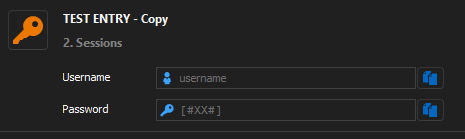
Password History is also empty after this happens.
Moving in DVLS works.
Please fix this Bug urgently.
Thanks,
Andreas
Edit: Just noticed that RDM 2023.3.28.0 released today and updated it. Still the same Problem.
e43f1c5c-07d3-470f-99b1-b389159a94ef.png
All Comments (13)
Hello Andreas,
This issue was fixed internally, but it was only merged in the 2024.1 branch. It has been added to the 2023.3 branch and should be available in the next version.
Best regards,
Richard Boisvert
Thanks Richard
Hello Andreas,
As a workaround, you can do a Ctrl+F5 to refresh the cache; the password will be available after.
Best regards,
Richard Boisvert
Hi Richard
Just wondering how this should be possible when the Password is also missing in DVLS after moving.
Best Regards,
Andreas
Hello Andreas,
My apologies; the moving issue is another issue that was also fixed internally. The fix will be in RDM 2023.3.29. In the meantime, you can use the entry history to restore the entry - https://docs.devolutions.net/server/web-interface/vault/entries/entry-section/entry-history/
Best regards,
Richard Boisvert
Thanks Richards, looks good!
Ive disabled the moving Option Global until its fixed.
In the meantime i can find and restore all Entries, but first i need to check which entries are affected by this Bug.
Best Regards,
Andreas
Hello Andreas,
Great, you should be safe until the new version is available. Once it is, I would recommend setting the version management to set the minimum version to 2023.3.29 - https://docs.devolutions.net/server/web-interface/administration/configuration/system-settings/version-management/
Best regards,
Richard Boisvert
Hey Richard
At least on one Entry im not able to revert the Password.
Entry Compare: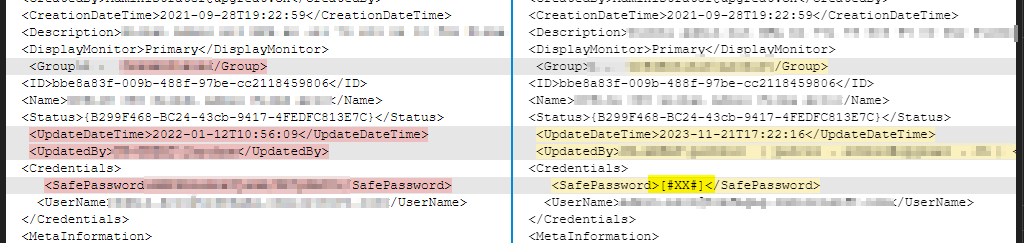
After Restore:
Tried it more than 10 Times.
I've now restored an old Backup and got a list from all affected Entries.
But it looks like that this Bug needs a bit Care from the RDM Developer Team.
I hope that everyone has a Backup which is using the same Version of RDM.
Best Regards,
Andreas
9a7896d0-ea7a-4b5b-ae54-1fa237f94934.png
b9c3eca6-3219-41b9-9c88-66c6e3ff9a40.png
Hello Andreas,
I have sent the information to the developer working on the issue; we will keep you posted.
The next version of RDM, which contains the fix, had other issues discovered by the QA team. It it still being worked on.
Best regards,
Richard Boisvert
Thanks Richard
Just noticed, that when using "Copy API Key" in RDM on API Credentials, RDM only returns [#XX#] but the API Key is set correctly.
Best Regards,
Andreas
Hello Andreas,
RDM 2023.3.31 is now available with the fix for [#XX#] - https://devolutions.net/remote-desktop-manager/release-notes/
Best regards,
Richard Boisvert
Hello Richard.
We have:
RDM: 2023.3.31.0
DVLS: 2023.3.10.0
we can "View Password" from action list - this is OK.
but when we go to "Password List" tab and click little "eye" on the right there is still [#XX#]
see on screenshot
see on screenshot
dps_pass_error.png
Hello Martin,
I have notified the developers of the issues and created an internal ticket. That said, there will be a new RDM release next week that will temporarily remove the feature so it will indirectly fix the issue you are experiencing.
Best regards,
Richard Boisvert