Start Hyper-V VM before RDP

Hello.
Can somebody help me with starting hyper-v VM before connecting RDP ?
In mRemoteNG i have use script on powershell
"Start-VM $vm_name"
With migrate to RDM - searching howto.
Hope - there is something like VPN, that give start command and wait for IP, then start RDP session.
All Comments (2)
ok.
Create TOOL on powershell
if (Test-Connection -CN $HOST$ -Count 1 -Quiet)
{}
else
{
	Start-VM "$CUSTOM_FIELD1$"
	Wait-VM "$CUSTOM_FIELD1$"
}
Do
{}
Until (Test-NetConnection -cn $HOST$ -Port $PORT$)
and set it for connection at EVENTS section.
Maybe there is a beter solution ?
Hello,
There is an option in RDM to open a session when it is available, but since you also want to start the VM if it is not available, you would need to use a script in the Event > Before Open, as you mentioned in your second post.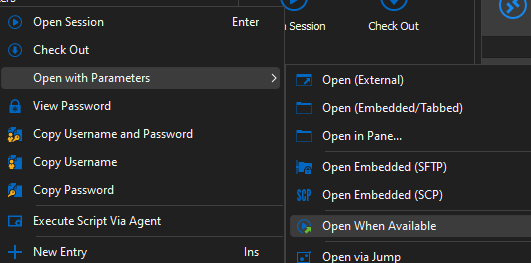
Alternatively, you could use a Macro/Script/Tool to launch the VM, and then use the above, but it would involve more clicks. For a sample - https://docs.devolutions.net/kb/remote-desktop-manager/how-to-articles/automating-remote-mmc/, you would just adjust it to start the VM instead.
Best regards,
Richard Boisvert
f8d0ad74-ac63-43b7-bdcd-b118706c65a9.png