Invoke-RDMParentSession --> Access denied

Hello,
I want to move a session as a child of another session. In any case, I receive an "Access denied".
For the purpose of a demo, I've created following Powershell script. It first creates a parent and a child session and then tries to move the child session under the parent session.
$timestamp = Get-Date -Format yyyy-MM-dd_HH-mm-ss

$parent = New-RDMSession -Name "parent $timestamp" -ConnectionType "SSHShell" -Host "parent"
Set-RDMSession $parent -Refresh
Write-Host "Parent:"
$parent | ft -Property Name,Group,ConnectionType
Write-Host ""

$child = New-RDMSession -Name "child $timestamp" -ConnectionType "WebBrowser" -Host "child"
Set-RDMSession $child -Refresh
Write-Host "Child:"
$child | ft -Property Name,Group,ConnectionType
Write-Host ""

Write-Host "Move child session under parent session:"
Invoke-RDMParentSession -ParentSession $parent -Session $child -Refresh
Output:
Parent:

Name                       Group ConnectionType
----                       ----- --------------
parent 2023-11-22_08-48-58             SSHShell


Child:
Name                      Group ConnectionType
----                      ----- --------------
child 2023-11-22_08-48-58           WebBrowser


Move child session under parent session:
Invoke-RDMParentSession: C:\Users\tom\Powershell\cmdb_scripts\ad_hoc_scripts\rdm_move_session.ps1:16
Line |
  16 |  Invoke-RDMParentSession -ParentSession $parent -Session $child -Refre …
     |  ~~~~~~~~~~~~~~~~~~~~~~~~~~~~~~~~~~~~~~~~~~~~~~~~~~~~~~~~~~~~~~~~~~~~~
     | Access denied
In RDM this results to: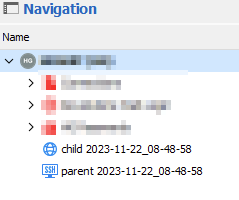
I really doubt this is a permission problem, since I'm able to create the sessions. And even move the child under the parrent (by drag and drop) within RDM: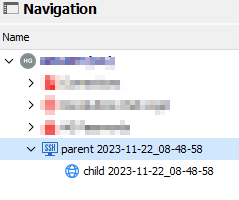
I'm using Powershell module Devolutions.PowerShell version 2023.3.1
41d57f62-d855-46ab-90df-912fa4249728.png
4ed5bdb1-bf8b-476b-91c9-5340f483648f.png
All Comments (3)
Hello,
Could you please confirm the account used in the PowerShell module has admin rights in the data source? It is required to use that cmdlet.
Best regards,
Richard Boisvert
Hello,
I can indeed confirm it works by giving the user administrator rights.
However, as this is managed automated, I should be able to run this as an application account:
There doesn't seem a way to make a application user administrator.
Also, I would like to prefer "Principle of least privilege".
Is there another commandlet that enables one to directly create a sub session (instead of creating another session and moving it as a sub session)?
91a18dc4-fe9a-49e4-b46d-e365efa2ef4a.png
Hello,
To make an application administrator, you need to create a custom user group with administrator rights, and you can then add the application to that group.
Unfortunately, it is not possible to directly create a child session; both entries need to exist first.
As for the least privileged, it would need to be a feature request for the right to be granted to non-administrators: https://forum.devolutions.net/forums/17/remote-desktop-manager--feature-request
Best regards,
Richard Boisvert