use custom variables in installation path

Hi
Is possible use custom variables in installation path? So far seems doens't work.
c7fcc628-8a52-40a7-811b-008d94631371.png
All Comments (7)
Hello,
It's possible that we don't resolve the custom variable for that path. I will create a ticket for that.
Regards
David Hervieux
Thank you. Please let me know once it avaiable. I happy to try on this.
Hi,
Do you have any update on this?
Hello,
The ticket is currently assigned to a developer. We are hoping to work on this soon.
Regards,
Hubert Mireault
Hello,
Could you please confirm your RDM version? We did some testing on our end and it seems to work properly, so we want to make sure you're up to date before investigating further.
Regards,
David Godin
Hi
I am currently use 2023.3.35.0 64-bit free portable version
I tried this again, my crrent path variable use another variable like following: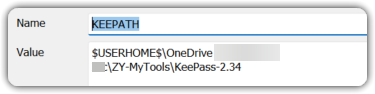

I can success install plugin, but the plugin actually installed to the folder name like below: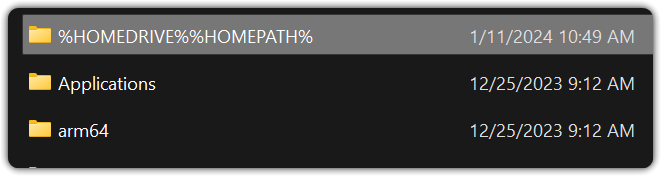
I assume this is not something expected.
I trid add a new credentical as below instruction, seems it doesn't work. I am not sure this is something version related or plugin install related problem. Thanks advice.
https://docs.devolutions.net/kb/remote-desktop-manager/how-to-articles/configure-keepass-rdm/
4f851330-9751-42a1-a400-665c19994c14.png
1075dfbb-9e65-49ff-bcb3-200007c2a92e.png
e706bfc9-3e26-45cd-9cf0-5146dbcac0c0.png
Hello,
We've successfully recreated and resolved the issue you reported. The fix will be included in version 2023.3.37. Thank you for bringing this to our attention.
Regards,
David Godin