Version Mismatch when checking for updates

Hi,
I checked for updates just now and at the top of the screen it said version 2023.3.24.0 was available. But in the Release Notes it showed version 2023.3.25.0 was current.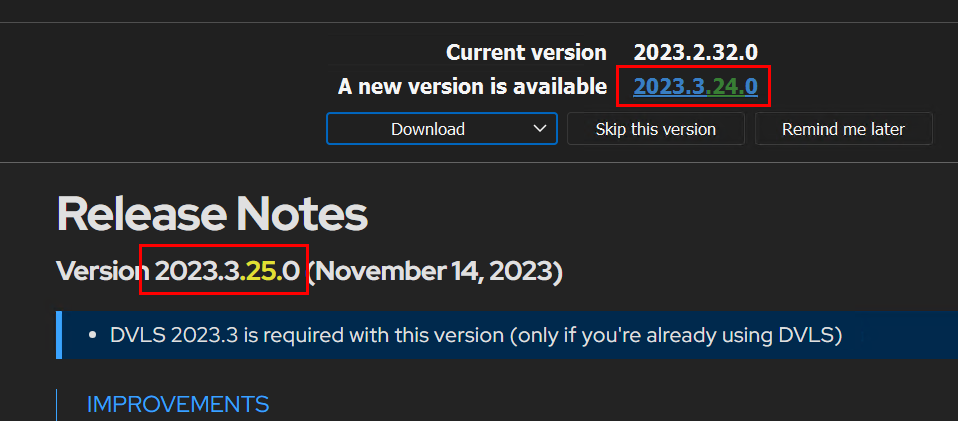
I clicked to install the latest version and ended up with 2023.3.24.0.
I checked for updates again and it again shwoed me that a new version was available, but now showed .25.0 at the top of the window.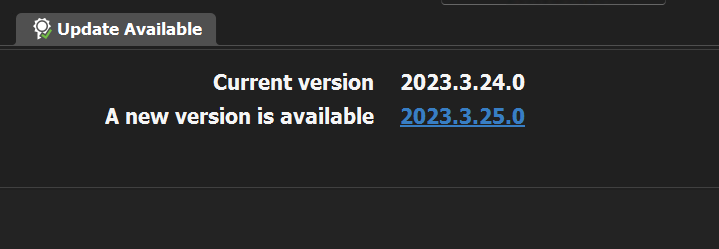
I again told it to install the latest version and this time it took me up to .25.0.
Is there maybe a requirement that you have to go to .24 before you can go to .25? It just seemed strange the way this all worked.
Also, I have 2023.3.24.0 installed on a different machine. When I click to Check for Updates on that one, it tells me that my version is up to date. Not sure why that one doesn't show me that a new version is available. Maybe I clicked Skip on this one at some point but I don't recall doing so.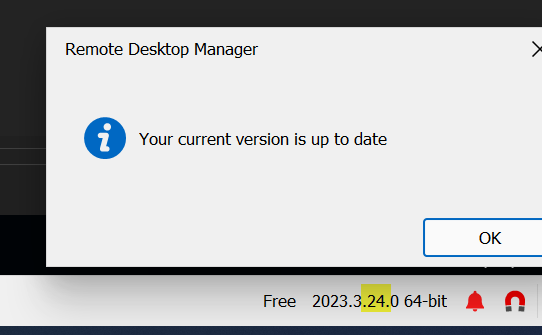
0202c2f6-6009-4e12-9435-8f876f1a57cd.png
4cd27dc2-2d47-473a-8153-ff7b9c12e0f0.png
9ec96905-5952-46c0-99e3-92a38c361294.png
All Comments (2)
Hello,
I think we should change our wording. We don't enable the auto update for each minor update to not annoyed our users and I think this is creating more confusion. I will try to improve this.
Regards
David Hervieux
HI,
Just to clarify, I wasn't doing an Auto-Update. I manually clicked Check For Updates under the Help menu. The issue is that it said 24 was available but the released notes showed 25. When I clicked to get the updates, it only installed 24. Then I had to check for updates again to get to 25.
Yet on the 2nd machine, It's at 24 and when I click Check For Updates, it doesn't find 25 at all.
It's just all kind of confusing.