Don´t use the Database connection name as account name for Database MFA
Don´t use the Database connection name as account name for Database MFA

Hello,
We use a Default.cfg to configure our RDM installations. Because you take the name of the SQL database connection as account name, it is not possible to add more than one account to an authenticator. Adding a second connection (e.g. one for my user and one for my admin) is not possible without renaming the database connection first. Otherwise the authenticator app overwrites the first account with the second...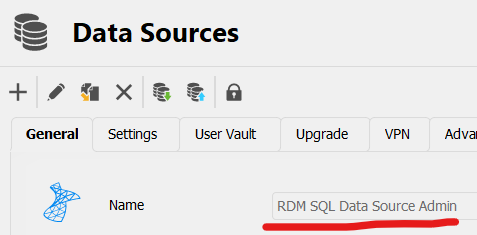
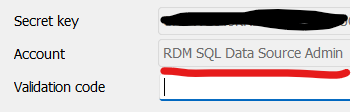
As the MFA is for the user and not the database connection, please choose the username as the account name and not the given name of the SQL connection. The email would also be a bad idea as my user and the admin have the same address configured...
Brgds Andreas
6606cc43-8281-49b8-8dc7-908146c731a7.png
3987eb29-e54f-4cff-925b-9a2e465ba380.png
All Comments (6)
Hello Andreas,
This is a good point. I feel it's possible that our users would not always want to use strictly the user as the MFA account name, though. For example, if they have two different databases that both use "admin" as the user, in this case they would need something else to distinguish between both.
Do you think having it under the format (Datasource name) - (user) would be a good way to solve this issue?
Regards,
Hubert Mireault
Hello,
also a good point from you - a combination of datasource name and user would solve such issues.
same datasource, different users => OK
different datasource, same user => OK
Brgds Andreas
Perfect, thanks Andreas, I've opened a ticket so we can change the behavior.
Regards,
Hubert Mireault
Hello Andreas,
Just letting you know, this will be implemented in our 2024.1 release early next year.
Regards,
Hubert Mireault
Hello Hubert,
Thanks for the info!
Brgds Andreas
Hello,
We will update you as soon as this is released.
Thanks !
Best regards,