Undocked RDP sessions crash RDM?

Hello,
a colleague was updated to 2023.3.25 today and after that RDM constantly crashed, when he opened a RDP session. All other users currently available did not experience this issue.
When we investigated the problem, we noticed that it only happens with undocked RDP sessions to domain joined machines.
I tried to reproduce this on my client, but I had no luck. Re-configuring my sessions to undocked did not make RDM to crash. And also creating a new entry with undocked RDP worked for me.
He went now back to 2023.2.33 where he was before and there it is working. We use a central MS SQL Database so the config is the same.
Is this something you already know...?
Another question related to that - is it somehow possible to modify only all RDP entries with batch edit and change the display? When I select session type settings this option is not available. General settings has an override for this, but I think this will change ALL entries and not just RDP sessions.
Thanks a lot for your help!
Brgds Andreas
All Comments (15)
Hello
Can I ask what setting you are using for "Remote Desktop size" on the affected connections?
Thanks and kind regards,
Richard Markievicz
Screenshot 2023-11-20 at 09.28.35.png
Hello,
same as on your screenshot - current work area size.
When the problem occurs, we see a new tab on the task bar, but are unable to switch to this new window. When we hover with the mouse over the tab, we see a preview of the windows with is white with something written in the middle we cant read. After a few seconds RDM just closes without any error message.
Brgds Andreas
Hello
Thanks for confirmation.
I believe this issue has already been reported here; the problem is related to thread timings and due to the nature of the issue, it might occur all the time for some users, occasionally; or in most cases never.
I believe the problem is fixed internally although it's hard to reproduce reliably without using a special tool. That fix will be in the next RDM release.
For the batch edit question, I'm not sure but I will ask someone more familiar with that feature.
I apologize for the inconvenience, please let me know if you have any further questions or comments.
Kind regards
Richard Markievicz
Hello again
is it somehow possible to modify only all RDP entries with batch edit and change the display? When I select session type settings this option is not available. General settings has an override for this, but I think this will change ALL entries and not just RDP sessions.
This is possible but you have to only select the RDP sessions before choosing batch edit. You could use the advanced search to filter by connection type to make sure you only select RDP sessions: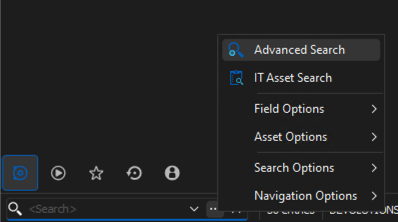
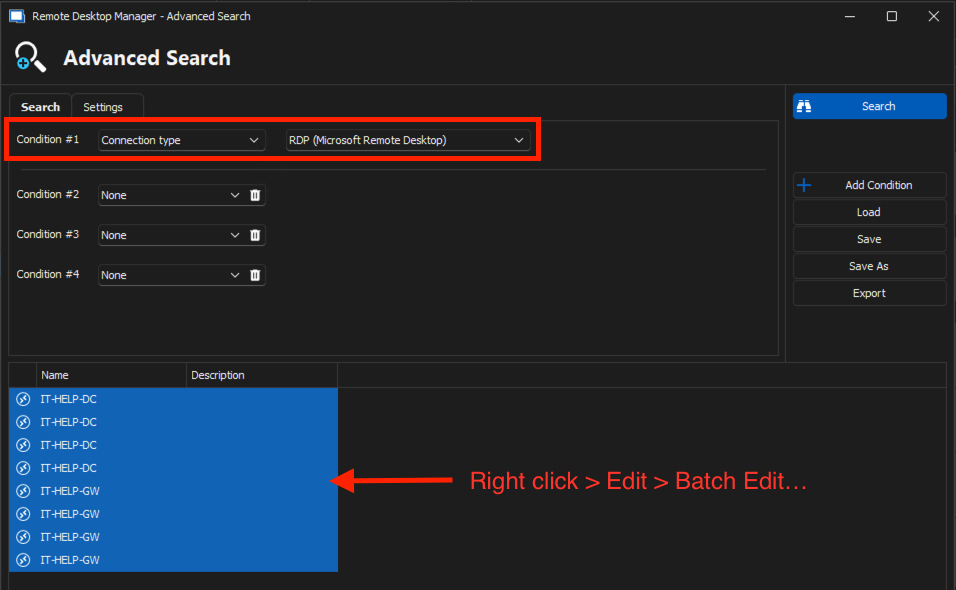
Please let me know if something isn't clear or you have further questions.
Thanks and kind regards,
Richard Markievicz
Screenshot 2023-11-20 at 10.18.48.png
Screenshot 2023-11-20 at 10.18.01.png
Hello,
thanks for the info and also about the batch edit! :) Do you have an ETA for the next release?
Brgds Andreas
Hello Andreas
If everything goes well with QA, it should be by the end of this week. We'll post back once that fix is available.
Thanks and kind regards,
Richard Markievicz
Hello Richard,
thanks for the info!
Brgds Andreas
Hello
RDM 2023.3.28 is released and contains a fix for this issue. Please, let me know if you still experience a problem after updating.
Thanks and kind regards,
Richard Markievicz
Hello,
sorry - no, still the same issue...
Brgds Andreas
Hi Andreas
My apologies, this was an oversight on my part. I committed the fix for the 2024 branch but not the 2023 maintenance branch, so the changes weren't in this version.
I've corrected that and the fix will be in the next 2023.3.x release.
Once again, I apologize for the inconvenience and appreciate your patience
Kind regards,
Richard Markievicz
Hello,
Ok - thanks for the info. When is the next release planned?
Brgds Andreas
Hello
The next version is already in QA as I understand it, so I expect to see that sometime this week.
Thanks again for your patience.
Kind regards,
Richard Markievicz
Hi Andreas
Please update to the current (2023.3.31) release and please let me know if the issue persists.
Thanks and kind regards,
Richard Markievicz
Hello Richard,
With the latest version the problem is fixed! :)
Thanks a lot for your help!
Brgds Andreas
Hello Andreas
Thanks for your patience and confirmation of the fix. I appreciate the feedback and please don't hesitate to post with further questions or comments.
Kind regards,
Richard Markievicz