Application Security

So we have a user that is unable to remove the Application Security dropdown and unable to revert back to "No application Password" it is stuck on either application password or use this computer's credentials as application password, or windows hello.. no option to remove it entirely..
They do have 2fa setup and working.
I am on the same version of RDM, and I can turn this off as needed. Is there a corresponding reg key we can check on this machine
All Comments (3)
Hello,
This does sound like it's forced via registry, and the corresponding key would be ForceLogin (location : "%Root%\SOFTWARE\Policies\Devolutions\RemoteDesktopManager").
Please let us know if that solves your issue.
Regards
Jonathan Del Signore
Hello,
This does sound like it's forced via registry, and the corresponding key would be ForceLogin (location : "%Root%\SOFTWARE\Policies\Devolutions\RemoteDesktopManager").
Please let us know if that solves your issue.
Regards
So far it looks like turning off 2fa, closing RDM and back in, lets you set that back to no password, then able to turn 2fa back on.
Interesting, I don't believe this should be the case (and I can't seem to reproduce for now). Unless you're using an older version of RDM?
Otherwise, could you please go in Help -> Diagnostic -> Policy, and confirm that nothing relating to application password / login / 2fa is activated? Mainly these ones : 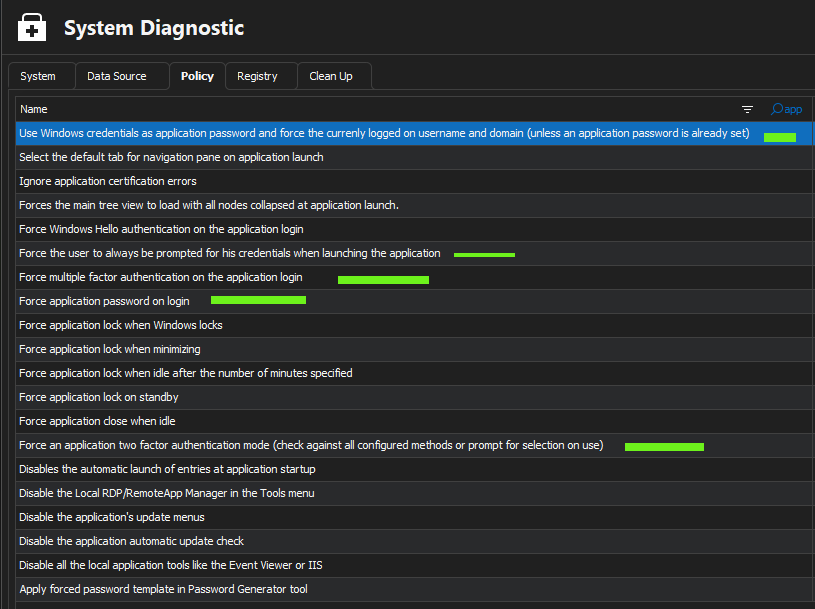
Thanks
Jonathan Del Signore
f60c9a67-c568-4830-8847-9c868982dd89.png