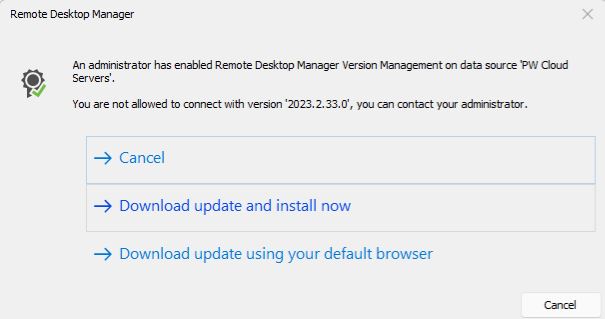
RDM Prompt for upgrade even you are on the latest version.

We are having issue were update prompt keeps populating every time we launch RDM, the result it will not allow us to use RDM, it will not connect to database.
Even if we update with the latest version, when RDM launch this will again prompt. all users are affected, the workaround is to uninstall and reinstall older version then that will fix the issue and allow us to connect, however after some time when you close RDM, this prompt will again appear. very annoying and frustrating, how can we fix this issue?
All Comments (3)
We had this before it appeared to be due to setting the minimum and maximum version.
We removed this and allowed users to update and then reapplied the min and max version.
Thanks
Iain
Version 2026.2.13.0 64-bit
Data Source SQL
Hello,
As @iaing80 mentioned, with an administrator account, you need to update the minimum and maximum versions in the Version Management section of Administration - System Settings.
Let us know if that helps.
Best regards,
Érica Poirier
Thanks for sharing @iaing80 and @Erica Poirier will ask our admin to check these settings.