User Vault Missing after RDM/DVLS Update

Hi All
We have updated DVLS to 2023.3.6.0 and RDM to 2023.3.24.0.
Currently 2 Users has reported, that theyre Personal Vaults are empty in RDM after Update.
In DVLS Web all Entries are available. When Checking those Entries in DB, i dont see any special, why the Entries arent available.
Restarting RDM did not work.
On one User we had the phenomen that when the User switched to personal vault, all entries are there for about 1 second and then dissapeared immediatly.
Currently Workaround (Fun Fact?):
When changing in Datasource Settings the "On start up" option to "Last used data source", then the users needs to re-authenticate. After that, the User Vault is back available again - also after RDM Restart, all Entries are back visible and working normaly.
When changing the option back to "Use default data source", all entries are still available.
Best Regards,
Andreas
Edit: 4 Users so far
All Comments (10)
Hello Andreas,
It seems like the migration of their user vault is causing an issue or that the offline cache in their RDM does not have the correct information.
If they do a Ctrl+F5 in their user vault, it will bypass the cache and retrieve the information directly from Devolutions Server. Does it display their entries afterward?
Best regards,
Richard Boisvert
Hi Richard
A Refresh (F5 also not Ctrl+F5) did not help on all 4 Users.
Is there another Way to clear the local Cache? Am i right, that the RDM Cache is file based and located in %localappdata%\Devolutions\RemoteDesktopManager\{Random-GUID} ?
Best Regards,
Andreas
Hello Andreas,
That is the correct location. The GUID is the ID of the data source in RDM, but it will be different for every user: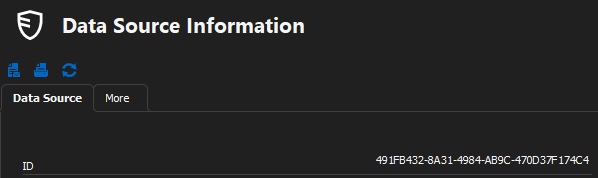
Under File > Data Sources - (select data source and click Edit) - Advanced, there is normally a "Manage cache" button, but there is a display bug, and it is not currently showing. This will be fixed in the next release. For now, you can ctrl+click on the ID, it will open the file explorer to the above location. The offline.mcdf2 file will be already selected, you can delete it, but RDM needs to be closed first.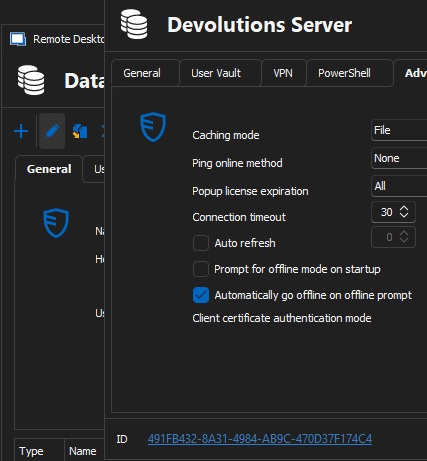
Best regards,
Richard Boisvert
df34c54e-0d82-4f2b-ad7c-e41a59456855.png
ad21239e-ad6e-4692-b338-4c5ba2b3c6f2.png
After cleaning up the whole Folder, on some Users it works and the Entries are back, on some Users not.
Then on some Days the Entries are back and on other Days the Entries are gone.
It seems that the bug exists arbitrarily.
Best Regards,
Andreas
Edit: Same so far in most current Versions:
RDM: 2023.3.28.0
DVLS: 2023.3.8.0
Hello,
As a test, would it be possible for you to create a portable installation of the latest version of RDM and see if this issue still occurs? To do so, you will need to do the following:
1- Download the .zip file below:
https://remotedesktopmanager.com/home/thankyou/rdmbin
2- Create a new folder on your Desktop
3- Extract the content of the .zip file into the folder created at #2
4- Go to this folder once the .zip file has been extracted and run remotedesktopmanager.exe
5- Connect to your data source
This test will allow us to rule out your local installation of RDM as a possible cause for this issue.
Best regards,
Richard Boisvert
Thanks Richard, we will try when the Problem next time happens.
Dear Richard
One User just wrote me this Morning that his User Vault is again empty and we tried it with the RDM above.
In this Portable Version, the User Vault was back there.
After closing RDM and reopening the local installed RDM, the User Vault was also back there.
We just disabled the In-Memory Cache Function for now and he will notice me, when the User Vault is empty again.
Best Regards,
Andreas
Hello Andreas,
Once the new version is available, the user should be all set. We will keep you posted once it is released.
Best regards,
Richard Boisvert
Hey Richard
Bug is in 2023.3.32.0 still available.
It also doesnt helps when removing the whole Devolutions Folder located in localappdata.
The only working workaround i found is to disable the Cache Function in Datasource: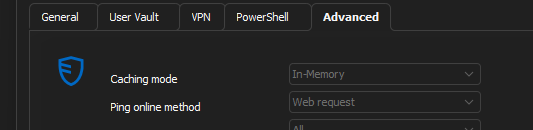
Best Regards,
Andreas
3f9b576f-c70e-4dcf-ac24-559954b75c7c.png
Hello {{{Recipient.FirstName}}},
The "Manage Cache" button is now back for Devolutions Server data sources, but since deleting the folder does not help, it will not help either.
The .33 release did fix some caching issues related to licensing, so it could help with your issue. I have not heard of any similar issues with other clients. It is also peculiar that it only happens intermittently with some users.
Best regards,
Richard Boisvert
39e7205e-7dc1-4c73-a7be-f79183329cd7.png