Keepass not working after update

Upgraded to latest version 2023.3.24.0 64-bit and now keepass isnt working
All Comments (22)
Hello,
Thank you for reaching out to us regarding this,
Could you give us some additional details on the issue you're encountering? Are you receiving an error message? If so, could you provide me with a screenshot of this error?
Let me know,
Best regards,
Samuel Dery
Hi, i dont receive any error, it just tries to load keepass and then nothing happens.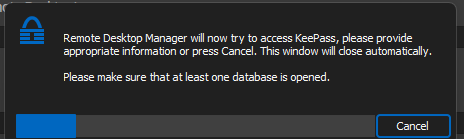
This was working before the upgrade
IM using keepass version 2.55
4d49db76-10f8-4df2-9df7-9ce062e4ed6c.png
Hi.
Same here. RDM version 2023.3.24.0 64bit and KeePass 2.55 64bit.No error messages, just window with "trying to access Keepass" like above. Then Keepass main window is opened (or moved to front). And nothing happens. Works ok earlier with this version of Keepass.
Marcin
any news on this?
Hello,
Have you tried this troubleshooting topic?
https://docs.devolutions.net/kb/remote-desktop-manager/troubleshooting-articles/keepass/
Regards
David Hervieux
Hi, none of the suggstions works.
Same behaviour as before.
This was working before i updated
/Glenn
Hello,
Have you tried this troubleshooting topic?
https://docs.devolutions.net/kb/remote-desktop-manager/troubleshooting-articles/keepass/
Regards
Hello Glenn,
Thank you for your reply,
From performing some tests on my end, I believe I've been able to reproduce the behavior, I will open a case with our development team so they can investigate.
For now, as a workaround, you can use the "Direct" mode in your KeePass entry "Properties" from testing on my end this seems to work as expected.
Let me know,
Best regards,
Samuel Dery
Hello Glenn,
Thank you for your patience,
After doing some additional testing with the help of our development team, we've found a workaround that will hopefully also work for you,
Could you go into your KeePass installation folder under the "Plugin" folder and move all the files from this folder to another folder on your desktop,
Once done, restart RDM, when RDM is restarted, go back in your entry "Properties" and use the 'Install Plugin" button, with this completed try the "View Password" button from the navigation pane.
Let me know if the issue persists for you,
Best regards,
Samuel Dery
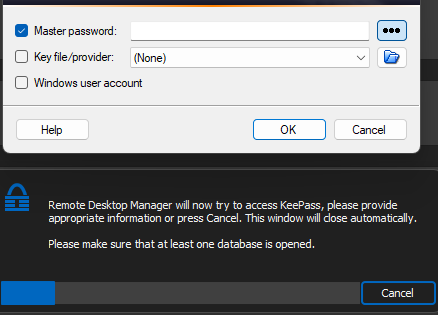
Hi, i did as you requested and when i try to view password it launch keepass even though keepass is started
Hello Glenn,
Thank you for your patience,
After doing some additional testing with the help of our development team, we've found a workaround that will hopefully also work for you,
Could you go into your KeePass installation folder under the "Plugin" folder and move all the files from this folder to another folder on your desktop,
Once done, restart RDM, when RDM is restarted, go back in your entry "Properties" and use the 'Install Plugin" button, with this completed try the "View Password" button from the navigation pane.
Let me know if the issue persists for you,
Best regards,
f1848a44-e13e-4882-9836-38cc7caaa0d8.png
Hi,
Just information, update to version 2023.3.25.0 didn't change anything. Still the same problem.
- Cleared Keepass folder with plugins and install once again - not helped :(
- "Direct" mode and provide path to database file .kdbx - not helped, looks like RDM cannot access database file, "view password" shows empty fields :(
Marcin
Hello Marcin, Glenn,
Thank you for your replies,
I want to open cases for both of you so that we can perform a remote session and I can have a look at the issue with you, If you can confirm that the email used for your Account would be the correct email to use, I can open the cases myself.
Alternatively, you can open one by sending an email to service@devolutions.net. Mention this thread so that it can be easily identified.
Let me know,
Best regards,
Samuel Dery
Hi, my email is correct in my profile but im not available today or tomorrow. Going to attend MS ignite
/Glenn
Hello Marcin, Glenn,
Thank you for your replies,
I want to open cases for both of you so that we can perform a remote session and I can have a look at the issue with you, If you can confirm that the email used for your Account would be the correct email to use, I can open the cases myself.
Alternatively, you can open one by sending an email to service@devolutions.net. Mention this thread so that it can be easily identified.
Let me know,
Best regards,
Yes. My profile email is correct.
There is one thing. Mybe it will help. When I use "direct" mode and select database and enter password to this database file (or check always ask password and give password in prompt) and then try to select UUID from "Entry" bookmark there is message box "There was en error connecting to the database. Please make sure your credentials are correct.". Yes, I'm sure, credentials are correct ;)
Hi again.
I make some more testing.. and I'm confused. I created clean, new Keepass database. Put one entry copied from main database. And then change in RDM credential to this one. Aaaand... it works. Without any problems. Direct and plugin mode. Everything is ok. Glenn02 could you please check if this works for you too? I definitely don't know why new database works ok. Maybe number of entries in keepass database matters?
And yes. Next I change to old database and that database not work :(
Marcin
Hello Marcin,
Thank you for your reply,
That is indeed odd,
With Direct Mode, the Encryption of the Database would be important, we have the following knowledge base article regarding this:
https://docs.devolutions.net/kb/remote-desktop-manager/troubleshooting-articles/keepass/#solution-2
How many entries do you have in your KeePass? I'm unsure if this could be related as on my end I initially reproduced the behavior with only a few entries.
Let me know,
Best regards,
Samuel Dery
Hi, i also did a new keepass database and put in one entry.
And doesnt seems to work for me
I got 114 entry in my original keepass database
Hi again.
I make some more testing.. and I'm confused. I created clean, new Keepass database. Put one entry copied from main database. And then change in RDM credential to this one. Aaaand... it works. Without any problems. Direct and plugin mode. Everything is ok. Glenn02 could you please check if this works for you too? I definitely don't know why new database works ok. Maybe number of entries in keepass database matters?
And yes. Next I change to old database and that database not work :(
Marcin
Hello Marcin,
Thank you for your reply
I've created a case for you regarding this and will reach out to you shortly via email.
Best regards,
Samuel Dery
Hello, I'm having the same issue after updating. I've tried the suggestions mentioned above and no change. Any updates on a potential fix/workaround?
Or is there a way to rollback the update?
Hello KC,
Thank you for your reply,
For now, the workaround would be to use "Direct Mode" for your KeePass entry, I've had a session with Glenn where we confirmed that this works for also.
You will need to make sure your database uses the correct Encryption as mentioned here: https://docs.devolutions.net/kb/remote-desktop-manager/troubleshooting-articles/keepass/#solution-2
Let me know if this works for you,
Best regards,
Samuel Dery
Hello KC,
Thank you for your reply,
For now, the workaround would be to use "Direct Mode" for your KeePass entry, I've had a session with Glenn where we confirmed that this works for also.
You will need to make sure your database uses the correct Encryption as mentioned here: https://docs.devolutions.net/kb/remote-desktop-manager/troubleshooting-articles/keepass/#solution-2
Let me know if this works for you,
Best regards,
Hi Samuel,
I tried enabling "Direct Mode" per the instructions on that guide. It doesn't seem to change anything. KeePass pops up but when I login with my password RDM never recognizes it. Eventually it'll timeout.
What is the most current guide to incorporate KeePass with RDM? I've been using RDM for many years now so I'm wondering if my configuration is out of date which my explain why the workaround isn't working for me.
Disregard my last post. It looks like my license was no longer applied and my app was in a weird state. I reapplied the license and built out a KeePass "credential" using Direct and it's working now. Thanks.
Hello KC,
Thank you for your reply,
No problem, I'm glad to hear that he "Direct" mode is working for you now,
Let me know if you have further questions regarding this,
Best regards,
Samuel Dery