2023.3.20 - RDM Crash when RDP session Screensize is "Work size area"
2023.3.20 - RDM Crash when RDP session Screensize is "Work size area"

Hi
Windows 11 x64 23H2 (Build 22631.2506)
RDM 2023.3.20
DVLS .2023.3.5
When opening RDP connections set to screen size "Work Area Screen" or changing a tabbed connection to "work size screen" win RDM freezes for 10 seconds and the close.
If I change settings or right-click and "Connect with Parameters" and select Tabbed og External the connection starts just fine.
Regards Lars
Remote Desktop Manager connected with Devolutions Server running newest versions.
------------------------Signature------------------------
Sorry if any of above sounds harsh or provoking, it is NOT meant as such, but I have Asperger's and don't always know.
My intentions is always to be friendly.
-------------------------------------------------------------
All Comments (26)
Hello,
we reproduced your issue and a ticket has been sent to the Engineering Team.
Best Regards,
Antoine Mauger
Hi
Sounds good!
I can confirm that it is also present in .22 if you haven't tested yourself :)
Regards
Remote Desktop Manager connected with Devolutions Server running newest versions.
------------------------Signature------------------------
Sorry if any of above sounds harsh or provoking, it is NOT meant as such, but I have Asperger's and don't always know.
My intentions is always to be friendly.
-------------------------------------------------------------
Just curios, is this fix expected in next release .23+ ?
And are you gunning for a release of .23+ before the weekend starts?
Regards Lars
Remote Desktop Manager connected with Devolutions Server running newest versions.
------------------------Signature------------------------
Sorry if any of above sounds harsh or provoking, it is NOT meant as such, but I have Asperger's and don't always know.
My intentions is always to be friendly.
-------------------------------------------------------------
Unfortunately, this hasn't been fixed in .24 either :(
Remote Desktop Manager connected with Devolutions Server running newest versions.
------------------------Signature------------------------
Sorry if any of above sounds harsh or provoking, it is NOT meant as such, but I have Asperger's and don't always know.
My intentions is always to be friendly.
-------------------------------------------------------------
Hello,
we are still investigating the crash, there's no ETA yet on the fix.
Best Regards,
Antoine Mauger
Hello
I've been able to reproduce the issue somewhat intermittently; given the symptoms that makes sense as it appears to be timing related.
Does the problem occur for you consistently, or only sometimes?
I'd like to ask a little more information:
- In the "Display" tab, what do you have configured for "Screen sizing mode"?
- In Options > Types > Sessions > Remote Desktop (RDP), in the "Advanced" section; is "Force reconnect when monitor is changed while using "work area" display mode" checked?
Thanks and kind regards,
Richard Markievicz
It is every time.
My settings: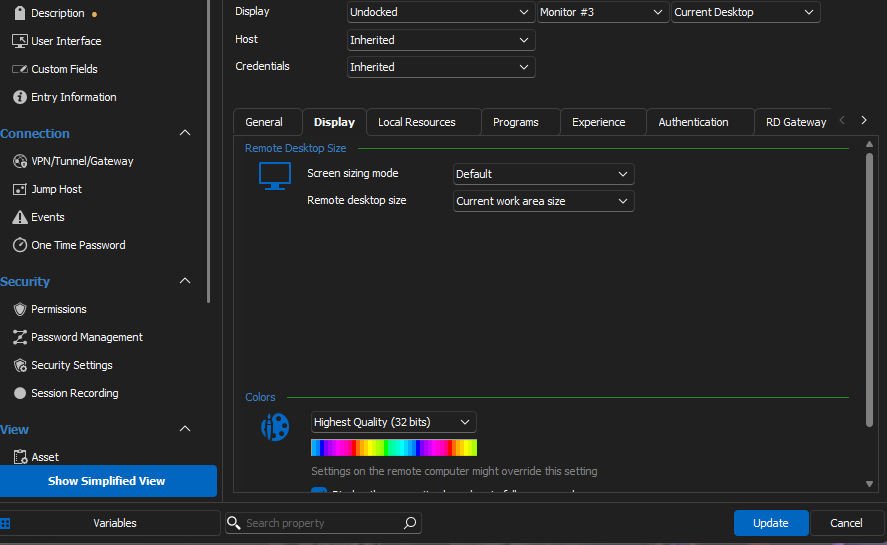
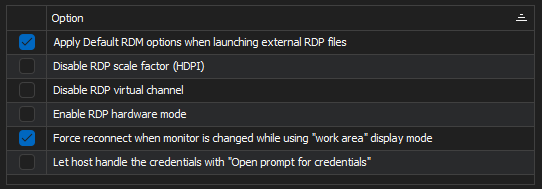
I just tried disabling Force reconnect.... but still happens.
Remote Desktop Manager connected with Devolutions Server running newest versions.
------------------------Signature------------------------
Sorry if any of above sounds harsh or provoking, it is NOT meant as such, but I have Asperger's and don't always know.
My intentions is always to be friendly.
-------------------------------------------------------------
a35c23a1-f584-49c4-bb16-377678829217.png
05d3e4ab-7a4f-4473-8f84-d36ed69f0e2a.png
Hello
Thanks for the information. As a follow up question; last week I managed to reproduce once or twice connecting to a Windows Server 2k16 system. Today I've been trying with a Windows Server 2k22 server but haven't seen the issue once.
What server version(s) of Windows are you connecting to?
Thanks and kind regards,
Richard Markievicz
Yes, it seams that only Windows 11 and Server 2022 seams to have the issue.
and I mainly connect to 2022 :D
Remote Desktop Manager connected with Devolutions Server running newest versions.
------------------------Signature------------------------
Sorry if any of above sounds harsh or provoking, it is NOT meant as such, but I have Asperger's and don't always know.
My intentions is always to be friendly.
-------------------------------------------------------------
Just a random thought, could it be something with newer RDP uses both TCP and UDP? or is that part entirely mstsc.exe?
Remote Desktop Manager connected with Devolutions Server running newest versions.
------------------------Signature------------------------
Sorry if any of above sounds harsh or provoking, it is NOT meant as such, but I have Asperger's and don't always know.
My intentions is always to be friendly.
-------------------------------------------------------------
Hello
I do believe I found the issue here: it's very timing dependent so by that nature, some users would see this problem every time, some would see it intermittently and most would never see it all. I was only able to reliably recreate the issue by running a concurrent fuzzing tool to randomize thread scheduling.
I'm afraid the fix did not make it in time for today's 2023.3.25 release but should be in the next update. After you upgrade to the next version, please do post back if you still experience issues. I will try to update this post once the next version is available.
I apologize for the inconvenience.
Kind regards,
Richard Markievicz
Hi
I'm just happy there hopefully will be a fixeven if that means waiting a few more days.
I will for sure report back when I have tested .25
Regards Lars
Remote Desktop Manager connected with Devolutions Server running newest versions.
------------------------Signature------------------------
Sorry if any of above sounds harsh or provoking, it is NOT meant as such, but I have Asperger's and don't always know.
My intentions is always to be friendly.
-------------------------------------------------------------
Think I might have misunderstood you, but I have just upgraded to .25, and as you said, the issue still persists.
But I will report back again when next release is out :)
Remote Desktop Manager connected with Devolutions Server running newest versions.
------------------------Signature------------------------
Sorry if any of above sounds harsh or provoking, it is NOT meant as such, but I have Asperger's and don't always know.
My intentions is always to be friendly.
-------------------------------------------------------------
Hello
Yes, apologies for any confusion - my fix didn't make it in time for the .25 release but will be in the next version.
Thanks for your patience.
Kind regards,
Richard Markievicz
Have a similar but different issue, it might have been around before 2023.3.
But for now I use external instead of undocked, and it seams that External dosn't forward "Defualt" values to mstsc.
So in RDM -> Types -> Sessions -> RDP I have the following settings set: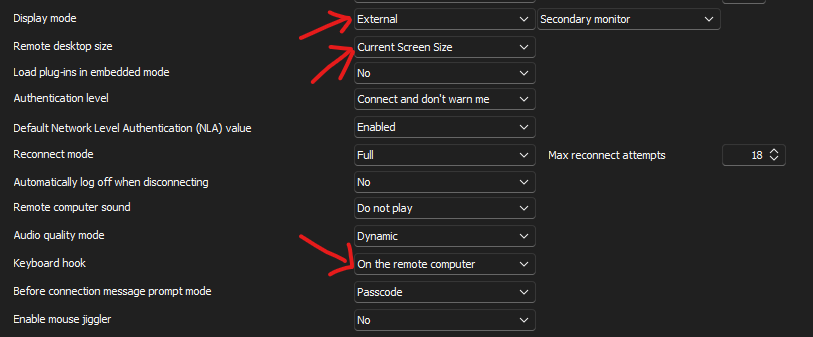
But the RDP Entry is configured with: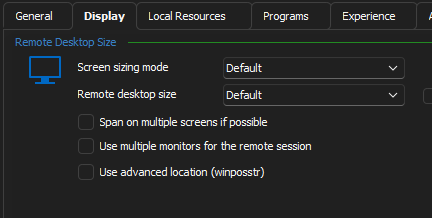
and: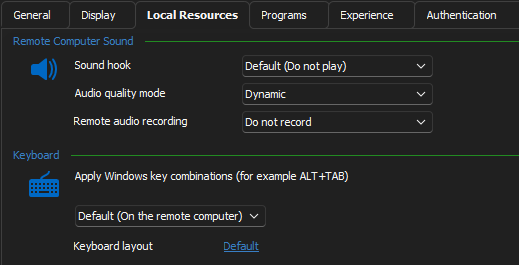
The opened mstsc-RDP session is opened as Full screen and keyboard hook "On remote computer" - As MS defaults are.
If I then change Remote desktop size to: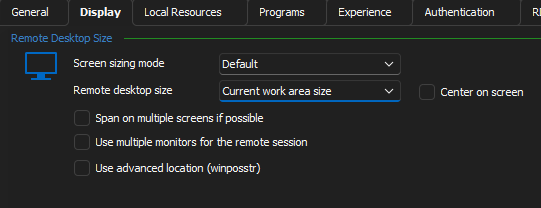
And keeps the Keybord hook as Default (As above).
The opened mstsc-RDP session is opened as maximized window, as expected, but the keyboard hook is now "On Local computer" again as MS default.
If I again, on the entry, directly set the hook to "On remote computer", it works as expected, but then i will have to change all Entries.
Shouldn't "Default" be the default's from RDM's settings, as set in the first image?
Regards Lars
Remote Desktop Manager connected with Devolutions Server running newest versions.
------------------------Signature------------------------
Sorry if any of above sounds harsh or provoking, it is NOT meant as such, but I have Asperger's and don't always know.
My intentions is always to be friendly.
-------------------------------------------------------------
a7c625ce-fc00-41c8-879d-4d320974ea85.png
f7444723-d6c8-429b-8069-e86a476457fb.png
e88934f7-b36a-488a-ad60-095f660b65f5.png
73484ab9-537b-43c3-89cf-d86368d3c7d8.png
Hello
Thanks for the issue report. I confirm the problem - this looks like a simple oversight. I've already submitted a fix to the RDM team for that.
Kind regards,
Richard Markievicz
Hi
Any estimate on an update? :)
And can you also fix variables not been translated in dashboard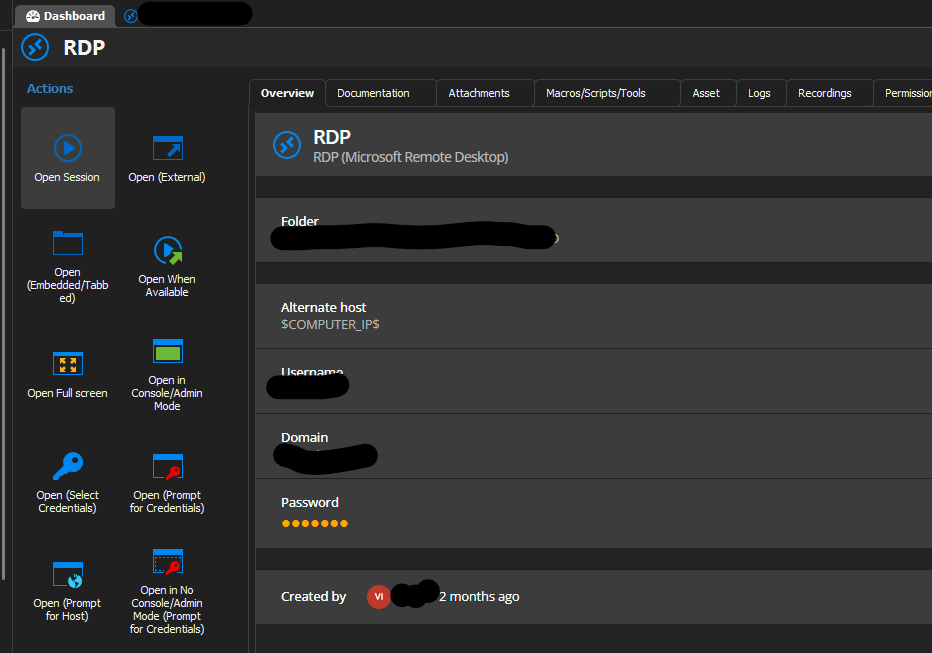
Remote Desktop Manager connected with Devolutions Server running newest versions.
------------------------Signature------------------------
Sorry if any of above sounds harsh or provoking, it is NOT meant as such, but I have Asperger's and don't always know.
My intentions is always to be friendly.
-------------------------------------------------------------
b45fec5d-a498-4ae0-919d-733df1c1d805.png
Hello
The update is still passing through QA; I should expect it by the end of the week depending on how that goes.
I've asked the QA department if the variable resolution in the dashboard is a known issue.
Thanks for your patience,
Kind regards
Richard Markievicz
Hi
Sorry for the long reply time, but on my laptop it didn't seam to work directly after install, but after a restart it worked.
So yes, it works now!
Thanks.
Remote Desktop Manager connected with Devolutions Server running newest versions.
------------------------Signature------------------------
Sorry if any of above sounds harsh or provoking, it is NOT meant as such, but I have Asperger's and don't always know.
My intentions is always to be friendly.
-------------------------------------------------------------
Hi
No, it dosn't work. Apparently I didn't set the setting back completely to "failed state".
Undocked and Current screen are size together still dosn't work.
Sorry for the first happy message :)
/Lars
Remote Desktop Manager connected with Devolutions Server running newest versions.
------------------------Signature------------------------
Sorry if any of above sounds harsh or provoking, it is NOT meant as such, but I have Asperger's and don't always know.
My intentions is always to be friendly.
-------------------------------------------------------------
Hi Lars
My apologies, I actually deleted my message earlier because I had neglected to move the fix into the 2023.3 maintenance branch. So it's not released yet, but it will be in the next version.
Sorry for the oversight and thank you for your patience.
Kind regards,
Richard Markievicz
Hi
Any estimate on an update? :)
And can you also fix variables not been translated in dashboard
Hello again
Regarding this issue, I checked with the RDM team. COMPUTER_IP is specifically disabled in several circumstances because to can cause performance issues (and it's noted in the variables window).
The recommendation is to use INFORMATION_IP, and add the IP to the Asset section (in the IP field)..png)
I hope this helps. If you have further questions or comments, please don't hesitate to post back.
Thanks and kind regards,
Richard Markievicz
image (5).png
Hi Lars
With regard to the original forum topic, I'd encourage you to update to the current (2023.3.31) release and please let me know if that issue persists.
Thanks and kind regards,
Richard Markievicz
Hi, I didn't report it myself but faced the issue. I followed this topic, and can confirm the update is fixing the issue for me!
Thanks
Hi
I 2 can confirm that this is working!
Thank you ! And don't worry about the fix got delayed it happens, the cool part is that you have solid support and rapid releases so it can be fixed fast!
And thank you for the update regarding $COMPUTER_IP$
Regards Lars.
Remote Desktop Manager connected with Devolutions Server running newest versions.
------------------------Signature------------------------
Sorry if any of above sounds harsh or provoking, it is NOT meant as such, but I have Asperger's and don't always know.
My intentions is always to be friendly.
-------------------------------------------------------------
Hello
Thanks for confirmation of the fix. We appreciate the feedback and please don't hesitate to post with further questions or comments.
Kind regards,
Richard Markievicz