Chinese garbled characters after the font is configured on the local terminal
Chinese garbled characters after the font is configured on the local terminal

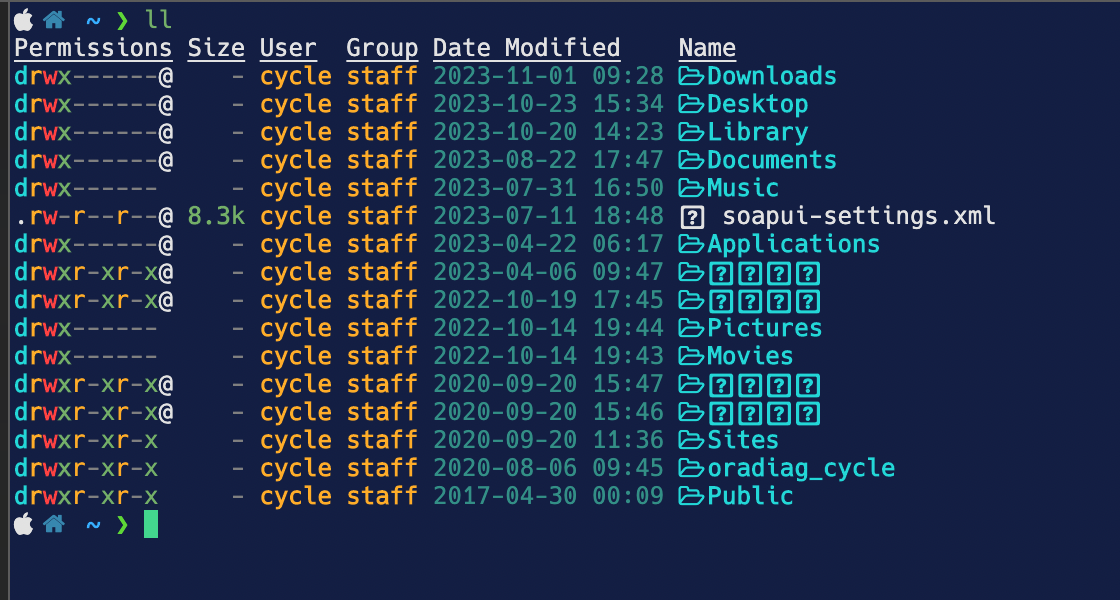
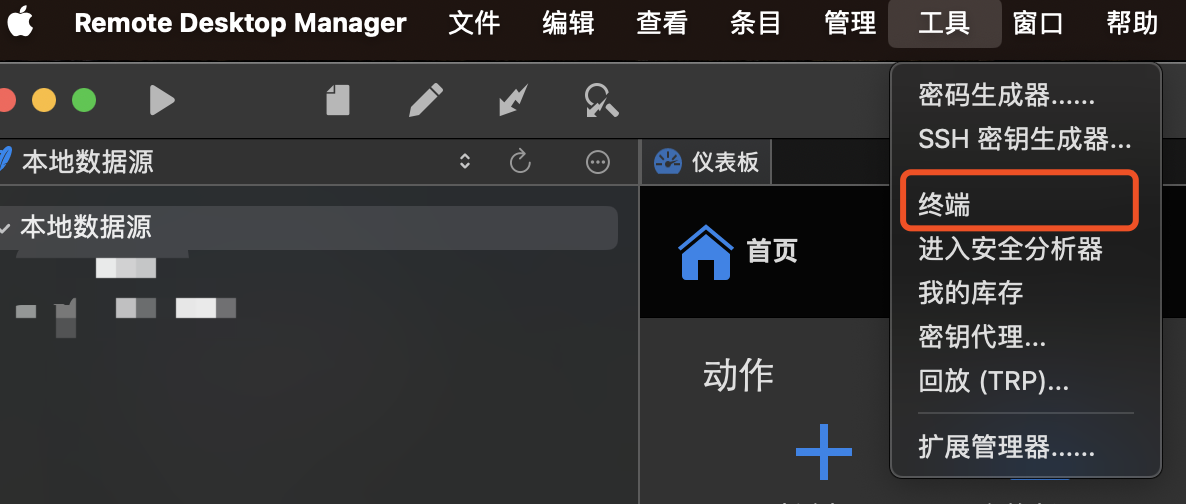
If you log in to the local ssh through the tool-terminal, Chinese characters will be garbled. The font used is hack nerd font. If you switch to the Chinese font, Chinese characters can be displayed normally, but the icon is garbled
e1943d1f-67a4-47ea-aefb-9053190135f2.png
459d0b98-105e-45a0-8226-d77ce0fd8119.png
All Comments (14)
Hi,
I have opened a ticket regarding this matter. We will get back to you when we have an update.
Best regards,
Jesse Galarneau
Hi,
I tested the hack nerd font and it works correctly on my side with Chinese characters.
Could you please provide us your environment variables in the local terminal.
Best regards,
Jesse Galarneau
Hi,
I tested the hack nerd font and it works correctly on my side with Chinese characters.
Could you please provide us your environment variables in the local terminal.
Best regards,
fig-details:
  - 2.17.0
hardware-info:
  - model:
  - model-id:
  - chip-id: Apple M1 Max
  - cores: 10
  - mem: 32.00 GB
os-info:
  - macOS 14.1.1 (23B81)
environment:
  - shell: /bin/zsh
  - terminal: iterm
  - cwd: /Users/cycle
  - exe-path: /opt/homebrew/bin/fig
  - install-method: brew
  - env-vars:
    - DISPLAY: /private/tmp/com.apple.launchd.uSItqVj26S/org.xquartz:0
    - FIGTERM_SESSION_ID: 49e2dbdd-b82b-4cb9-b232-c9bc1b2b55e1
    - FIG_SET_PARENT_CHECK: 1
    - FIG_TERM: 2.17.0
    - PATH: /opt/homebrew/bin:/usr/local/bin:/System/Cryptexes/App/usr/bin:/usr/bin:/bin:/usr/sbin:/sbin:/var/run/com.apple.security.cryptexd/codex.system/bootstrap/usr/local/bin:/var/run/com.apple.security.cryptexd/codex.system/bootstrap/usr/bin:/var/run/com.apple.security.cryptexd/codex.system/bootstrap/usr/appleinternal/bin:/opt/X11/bin:/Applications/Little Snitch.app/Contents/Components:/Users/cycle/.fig/bin:/Users/cycle/.local/bin
    - SHELL: /bin/zsh
    - TERM: xterm-256color
    - __CFBundleIdentifier: com.googlecode.iterm2
    - FIG_PID: 37403
- FIG_SET_PARENT: 49e2dbdd-b82b-4cb9-b232-c9bc1b2b55e1fig-details: - 2.17.0 hardware-info: - model: - model-id: - chip-id: Apple M1 Max - cores: 10 - mem: 32.00 GB os-info: - macOS 14.1.1 (23B81) environment: - shell: /bin/zsh - terminal: <unknown> - cwd: /Users/cycle - exe-path: /opt/homebrew/bin/fig - install-method: brew - env-vars: - DISPLAY: /private/tmp/com.apple.launchd.uSItqVj26S/org.xquartz:0 - FIGTERM_SESSION_ID: e332019c-4444-4c36-a2c8-080afcf7cf27 - FIG_SET_PARENT_CHECK: 1 - FIG_TERM: 2.17.0 - PATH: /opt/homebrew/bin:/usr/bin:/bin:/usr/sbin:/sbin:/Users/cycle/.fig/bin:/Users/cycle/.local/bin - SHELL: /bin/zsh - TERM: xterm-256color - __CFBundleIdentifier: com.devolutions.remotedesktopmanager - FIG_PID: 37259 - FIG_SET_PARENT: e332019c-4444-4c36-a2c8-080afcf7cf27
This is the information obtained in the remote desktop manager, and it feels like the environment path is missing
Hi,
Is there a - LANG in the environment variable?
It doesn't seem to be on any of your lists, we would need it to speed up the investigation of this issue.
Best regards,
Jesse Galarneau
Hi,
Is there a - LANG in the environment variable?
It doesn't seem to be on any of your lists, we would need it to speed up the investigation of this issue.
Best regards,

- Can output
f8d69712-1921-4df4-80b9-5e3761ffa887.png
Hi,
Thank you for the response, we will get back to you as soon as we find the issue.
best regards,
Jesse Galarneau
Hi,
Sorry for the delay, we found a fix for the issue.
Follow these steps:
- Open RDM
- Go to File -> Settings
- In the settings go to: Types -> Local section
- Add a new Environment Variable:
- In the left field, enter: LANG
- In the right field, enter: zh_CN.UTF-8 (refer to the attached screenshot for guidance).

Once you complete these steps, you should be able to see the characters correctly.
Best regards,
Jesse Galarneau
Screenshot 2023-12-06 at 11.00.03 AM.png
Hi,
Sorry for the delay, we found a fix for the issue.
Follow these steps:
- Open RDM
- Go to File -> Settings
- In the settings go to: Types -> Local section
- Add a new Environment Variable:
- In the left field, enter: LANG
- In the right field, enter: zh_CN.UTF-8 (refer to the attached screenshot for guidance).
Once you complete these steps, you should be able to see the characters correctly.
Best regards,
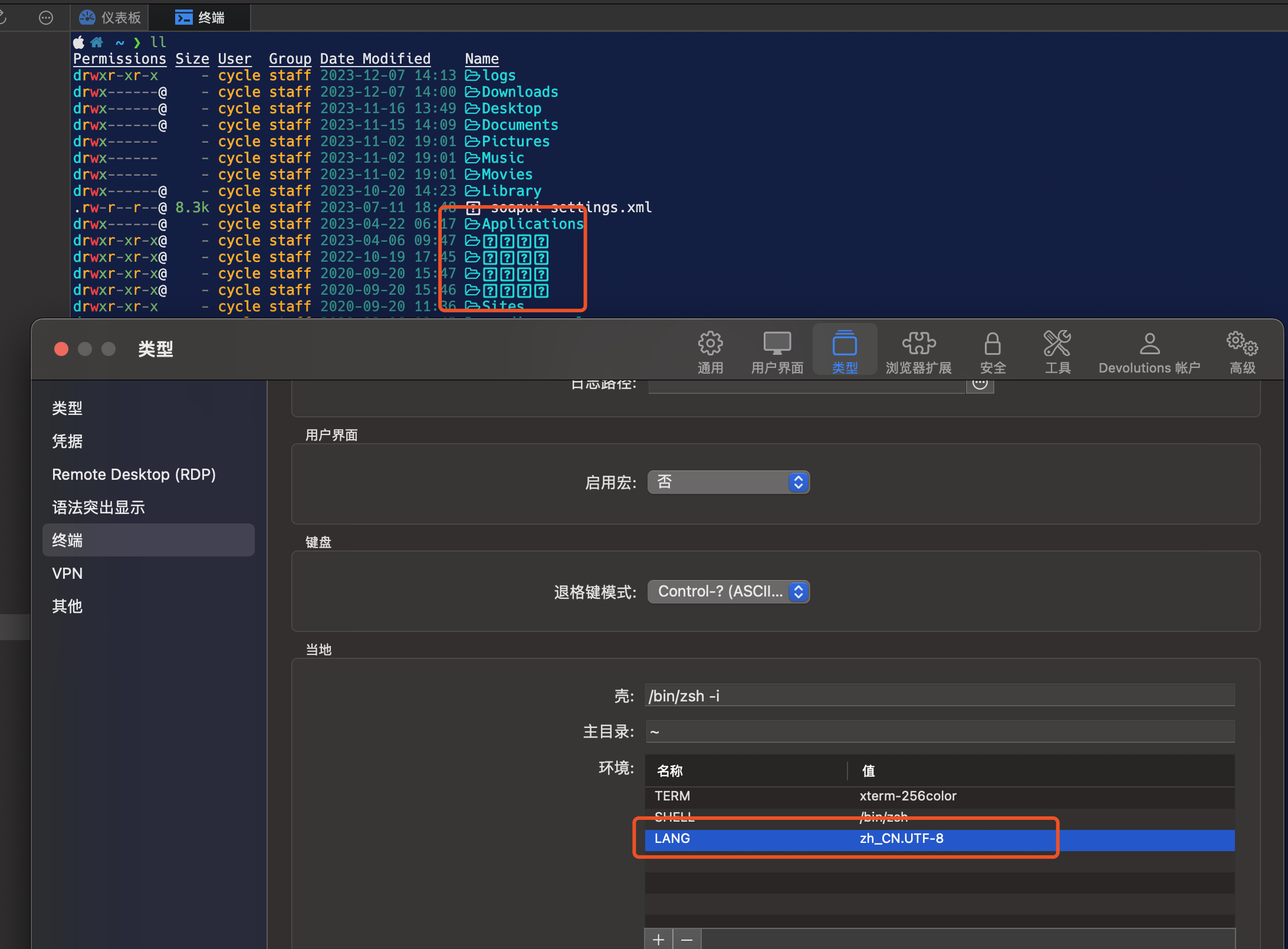
I have tested according to the method you gave, but it doesn't seem to work. Thank you for your answer
ccca7cf9-1731-4248-83ae-c3a183ad094a.png
Hi,
Have you tried restarting the terminal after adding Environment Variable in the preferences?
Have you tried reinstalling the nerd hack font?
It might be a LSDeluxe issue could you try typing Chinese characters in the terminal?
Best regards,
Jesse Galarneau
Hi,
Have you tried restarting the terminal after adding Environment Variable in the preferences?
Have you tried reinstalling the nerd hack font?
It might be a LSDeluxe issue could you try typing Chinese characters in the terminal?
Best regards,
Hi,
Following your steps, rdm restarts after setting LANG, no effect; I also reinstalled the font and tried again to no avail; It can be used normally after switching to another font that supports Chinese, but nerd hack fonts are normal in other terminals (iterm2, terminal, vscoe, idea), and only rdm has garbled characters
Hi,
Unfortunately, nobody in the team is able reproduce the issue. As shown in the following screenshots, there is no gargled characters with the Hack Nerd Font on our end.

I advise to use another font for the terminal in RDM.
We are deeply sorry for the inconvenience.
Best regards,
Jesse Galarneau
Screenshot 2023-12-19 at 7.59.15 AM.png
Screenshot 2023-12-19 at 7.57.24 AM.png
Hi,
Unfortunately, nobody in the team is able reproduce the issue. As shown in the following screenshots, there is no gargled characters with the Hack Nerd Font on our end.
I advise to use another font for the terminal in RDM.
We are deeply sorry for the inconvenience.
Best regards,
Hi
Found the problem, not the rdm problem; Is a plugin exa caused by garbled code, thank you
Hi,
Glad to hear that you found the solution.
If you have any more issues do not hesitate to reach out!
Best regards,
Jesse Galarneau
