No hide username
0 vote

Hi
Where setting for no hide username in quick connect?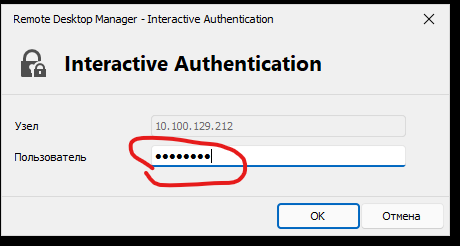
cabba974-217d-4d7f-9bcf-0dff089df3a9.png
All Comments (5)
Hello,
After looking through the options, it appears to me that this option is unavailable in RDM.
I will move this thread to our Feature Request forum for better visibiltiy, if you have further questions or concerns regarding this do not hesitate to contact us about them.
Best regards,
Hello,
Would adding the eye to reveal the text in the box be good enough for you? The reason why this is always a password-protected field is because the terminal doesn't know whether the prompt is asking for sensitive information or not, so we opted to always consider it a password-protected field.
Regards,
Hubert Mireault
Hello,
The eye is a great idea.
But for me it would be convenient to set up a setting that allows you to see the username always open and the password always closed.
You can also add an eye to the password for convenience.
Thank you for the confirmation. I have opened a ticket and we will see what we can do.
Regards,
Hubert Mireault
Hello,
The behavior should be improved starting with RDM 2023.3.21.0. Fields that shouldn't be hidden like a username will be revealed, and fields that should be hidden like a password will be hidden by default, with a button to reveal the field.
Regards,
Hubert Mireault