Need some sort of progress bar when doing an Import
0 vote

Hi,
When I go through the Import Computer Wizard, after filling out the page with the Domain, OU, etc stuff on it, when I click Next, it goes out to retrieve a list of all the machines to import. I WFH and we probably have 7,000+ items in our AD. This means it can sit on the screen for 10-20 minutes waiting to show me the list of servers it found. There's no real indication that it's doing anything, or how far along it is, so I just have to wait and hope it's working.
Then, after selecting the items to import and clicking Finish, it again sits on that screen for a while doing the actual import. I don't have any indication what it's doing, or how far along it is, until it finally finishes.
For the first one, if RDM could maybe get a total count of entries in AD, and then show how far along it as is it parses each one for the attributes it needs to match, then I could tell how much longer it was going to take.
For the second one, since RDM knows how many entries were checked off to import, it also could show a progress bar as it goes through the list.
Thanks.
All Comments (9)
Hello,
Thank you for the request. I have opened a ticket. I'm not sure yet about the first point but we will see what we can do.
Regards,
Hubert Mireault
Thanks for taking a look.
Hello,
We've improved the feedback provided by the Import Computer Wizard window.
For your first point, we can't quite have access to the total count of computers while we are loading them, but we can still provide feedback showing that there is work being done. To do so we added some text to the message window showcasing how many computers have been scanned so far. As long as the number keeps increasing, it means that RDM is still acquiring the information for available computers. This will at least show you that nothing has frozen and that the progress is ongoing.
For your second point, we've added a prompt showcasing the import status in percentage, which will provide accurate feedback on the entries being imported.
This should be available for the 2024 version.
Regards,
Jafran Majeau
Sounds great. Thanks for the update.
Hello,
Small update, we've managed to add this to the 2023.3.30 version.
Regards,
Jafran Majeau
Thanks for the update. I will watch for it.
Also, now that you guys added the Synchronizer to the Free version, I think that is more powerful since it's more automated and can be scheduled. Could similar information be added to that? Currently a blue bar shows on the bottom but I get no other indication that it's doing anything or how far along it is. A counter of what it's found so far would be great since I know approximately how machine machines it should find.
Thanks for the feedback. I will open a ticket for this. We might be limited depending on the synchronizer type and how their respective APIs/methods of fetching the assets work, but there are definitely ways we can improve the progress.
Regards,
Hubert Mireault
Hi,
Just attempted to use the Import Wizard for the first time after these changes went in. I'm currently on 2023.3.31.
I like how it shows the number of items it has scanned. I also like that it has a progress bar as it does the import.
However, I then ran into a problem. After it did the initial scan, it showed me all my servers. All of their checkboxes were checked as I was importing them into a new folder for testing. I clicked Next and then went to my Shared Templates and picked my RDP template. It went through the Settings Up and Importing progress bars. After that I went to look at the sessions, and there weren't any. It had imported all the OUs that the servers should be in, but there were no servers.
I decided to try again so I deleted everything from my Import folder and walked through the same steps. This time, when I got to the Template section, I now have dozens of duplicates of my RDP Template. They weren't there the first time through, so doing the import somehow created tons of duplicates.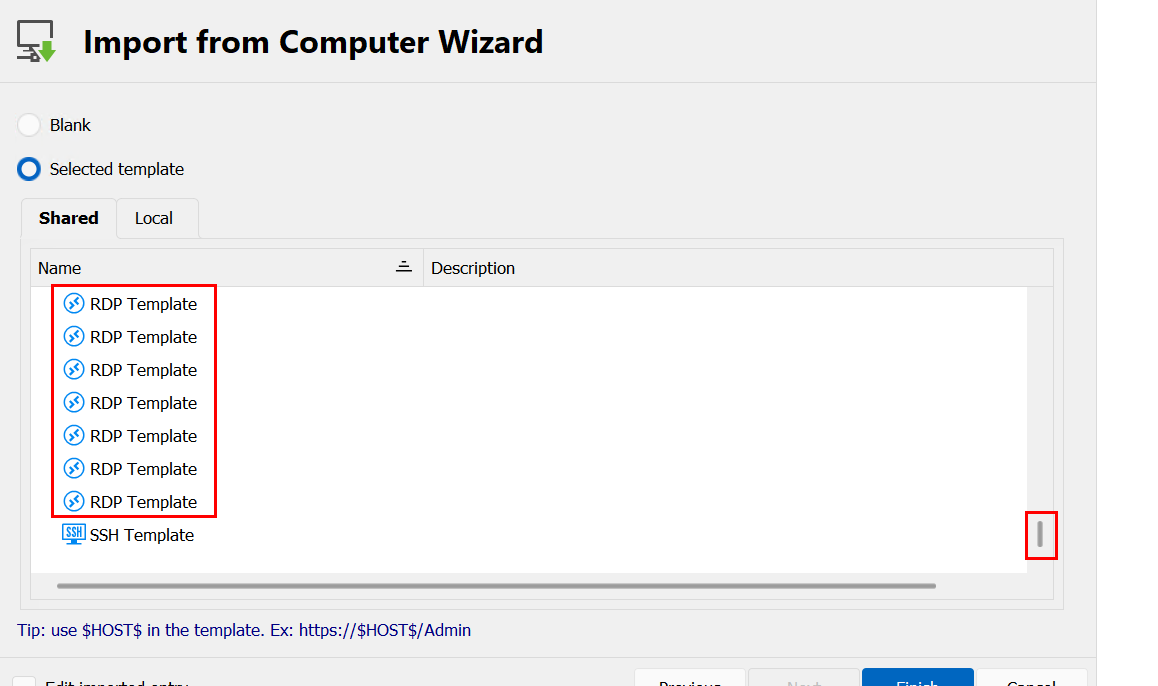
I picked one at random and tried again. I got the same results of OUs with no servers.
I manually went to File | Templates, expecting to see dozens of them, but I only see the actual two templates I created. One for RDP and one for SSH. I don't know where all those other ones came from.
Thanks.
86cc7507-fc04-48e6-93fa-0dff28f72ce5.png
Hello,
Thank you for reporting this. We were able to reproduce this issue, we have opened a ticket.
Regards,
Hubert Mireault