Hide Extra menu bar

While on the mac version of the remote desktop software, and maximized I have 2 "File" menu bars, I was wondering if one of these can be hidden.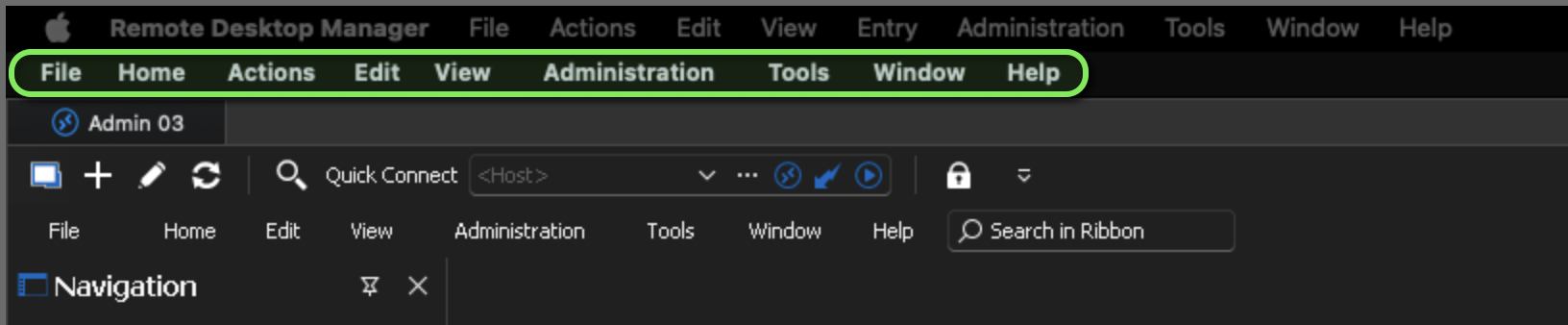
e1553f58-7213-43f2-9636-fe03565400c6.png
All Comments (7)
As you can see, the same menu options are listed in the line directly above it.
Hello,
You can achieve this by switching to the classic user interface:
- Click on the "Remote Desktop Manager" tab.
- Select "Preferences.
- Change the user interface to "Classic."
If you have any additional questions, concerns, or require further support, please let me know, and I'll be more than happy to help.
Best regards,
Carl Marien
I don't have "Preferences" I have been looking through settings though, I don't see a way to change the UI to "Classic" though.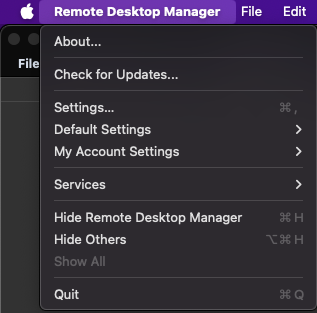
b7e489df-6d29-4310-b277-f65026735649.png
I was able to find it here: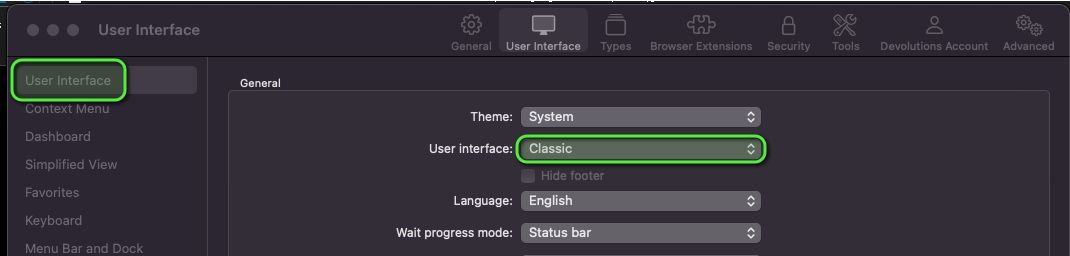
Thank you!
00e0876a-d3c8-4325-b7cf-f24e247850db.png
Hello,
Did switching to the classic-style user interface resolve your issue?
Best regards,
Carl Marien
Hello Carl,
Yes that did resolve the issue.
thank you,
Hello,
Thank you for your feedback. I am now closing this forum.
Best regards,
Carl Marien