VNC - UltraVNC zoom greyed out
0 vote

If you use UltraVNC as application for a VNC application, the zoom option (General - Settings - Zoom) is greyed out. This is only available when using the FreeVNC application.
If you use UltraVNC as a standalone application, it is possible to connect with an initial zoom setting.
After connecting with UltraVNC inside RDM, you can modify the Viewer Scale via Connection Options. Is it possible to make this configurable during initial connection?
As an alternative auto scale on vertical level only is also an option for us. This is useful when connecting to devices with multiple screens.
We are using different version of RDM on Windows, but they all have the same issue: 2021.2.28.0. - 2023.2.28.0.
All Comments (11)
Hello,
Thank you for the request. We have opened a ticket.
Regards,
Hubert Mireault
Hello
I just wanted to follow up with a question - is there a specific function or feature in UltraVNC that you need, that isn't available with the `FreeVNC` application?
The UltraVNC integration is difficult to maintain. If there's something you need that isn't available in FreeVNC, I'd like to know so we can try to implement that on our side.
Thanks in advance for any feedback
Kind regards,
Richard Markievicz
Thanks for the feedback!
We have a lot of delay/lag when using FreeVNC instead of UltraVNC, up to 2 seconds. If this is fixed somehow, this is also fine for us.
The remote devices are Thin Clients (ThinOS 2308 and other versions)
Hello
Thank you for the information.
When you talk about delay, do you mean the initial connection speed, or that the session is laggy or has high latency when in use?
Overall I'm surprised and I'd like to understand why it's the case.
Do you use encryption (DSM plugin)?
Can you share the configuration options you use for the Ultra session? Is it a custom config file, or you set everything directly in the session properties?
Thanks and kind regards,
Richard Markievicz
The session is laggy when in use. The initial connection speed is also slower, but this is not a big issue.
We didn't activate the encryption plugin ourselves.
We did set all UltraVNC settings via the session properties. All default, except hostname and password.
Hello again
Thanks for the information.
I'll look at the original request (as my colleague wrote, we have a ticket open for that). At that same time I'll try to do some investigation on my side. It's quite possible that FreeVNC is just selecting an encoding that doesn't perform well on the ThinClient.
I will update this post once I have some more information.
Thanks again and kind regards,
Richard Markievicz
Hello again
I'm still looking at how to set the zoom level for the embedded UltraVNC application.
In the meantime, I wonder if you could make a short test for me: if you switch temporarily to using FreeVNC, and select either "Tight" or "ZRLE" for the "Preferred encoding"; is performance any better?
That's in the "Advanced" section of the VNC session settings: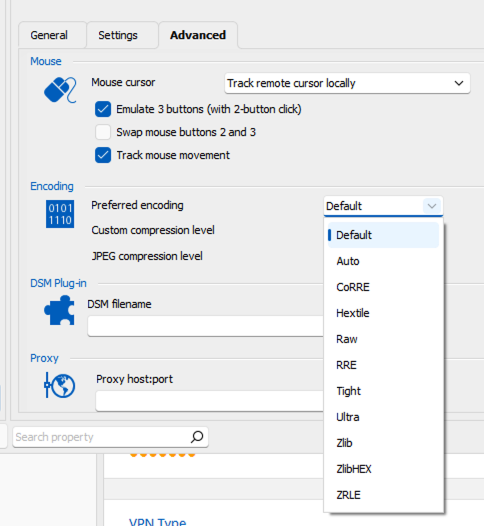
I noticed that the Ultra vncviewer prefers to use their own "Ultra" or "Ultra2" encoding when left to default settings. From reading the code, it seems fairly straightforward however we don't currently have an implementation on our side. I think that Tight or ZRLE should, however, have similar performance characteristics.
If let to "Default", FreeVNC will prioritize hextile encoding which is processor efficient but uses quite a lot of bandwidth. What kind of network connection do your thin clients have?
I'd appreciate your feedback on this; one thing I would like to do when their is time is clarify the encoding options in RDM and what they mean (in terms of bandwidth and CPU needed versus image quality).
Please let me know if you have some questions.
Thanks and kind regards,
Richard Markievicz
Screenshot 2023-10-17 at 12.43.42.png
I'm sorry for the delay. I've checked with our users.
The issue is apparently only the mouse movement delay. When using FreeVNC, the mouse movement is lagging behind (>0.5sec). When using UltraVNC, this is not an issue.
Change the encoding session doesn't help.
Any help/suggestion is appreciated.
Hello
Thank you for the update. I'm going to look into this.
For your information, I've enabled the zoom option for embedded UltraVNC connections and that will be available in RDM 2023.3 (it should be released at the end of the month).
Please let me know if you have any other questions or feedback
Kind regards,
Richard Markievicz
Hello again
In the UltraVNC viewer, do you use any custom options under "Mouse and keyboard"? For example, is it set to the default "Track remote cursor locally", or something else?
One optimization I see UltraVNC has that FreeVNC does not is that it throttles mouse move events and only sends them around every 150ms.
Can I ask what kind of network link you have to your thin clients? Does it have good bandwidth, latency?
Thanks and kind regards,
Richard Markievicz
Hello
RDM 2023.3 is available and should allow you to set the initial zoom level on UltraVNC embedded sessions. Please let us know if you still have a problem after updating, or if you have further questions or comments.
Thanks and kind regards,
Richard Markievicz