Slow scroll speed when connecting to Apple RDP

Great product! Is there a way to adjust the scroll speed?
Thank you!
All Comments (12)
Hello,
Currently, it's not possible to adjust the scroll speed in RDM. However, you can change the scroll speed on the remote Mac.
Best regards.
Carl Marien
That's the strange part, scroll speed is already at the fastest speed. There's no lag, everything works full speed, except scrolling.
Hello,
I was able to replicate the issue you've described. I have created a video to share with our development team. At this moment, we are still uncertain if the problem originates from RDM.
I will keep you updated as we learn more.
Best regards,
Carl Marien
Excellent, I will watch this thread. Thank you!
Hello,
I apologize for the inconvenience. Our developers are still working on the issue you reported. I'll keep you updated on our progress.
Best regards,
Carl Marien
Thanks for the update. For now I found an app named MOS that lets me adjust, but I'd rather not have to use another utility and look forward to retiring it.
Hello
I want to share an update and some information.
First, to give some background, Apple Remote Desktop (Screen Sharing) is built on top of the open RFB (VNC) protocol. Apple extends the protocol in various ways to add improved security, higher performance and tighter integration with their own clients. Apples protocol extensions are not open (neither the protocol or the code) so the only way we can emulate their client is by studying it's behaviours and the traffic it sends (this is a laborious and difficult process).
The regular RFB (VNC) protocol doesn't define an ability to control the scroll speed, only a fixed value for "scroll up" or "scroll down" can be sent. Our ARD client was using this event previously so scrolling would only ever be at a fixed speed.
ARD defines two additional input events for scrolling (one which is based on gestures - presumably from a trackpad - and one that is based on mouse wheels). I've implemented the mouse wheel event and as of RDM 2023.3, that is what we use.
However, the event is designed to match the input from the macOS eventing system - it takes multiple high-resolution delta parameters as well as other flags and options for things like "inertial" scrolls (generated by a touch pad or Magic Mouse, for example). It's non straightforward to align this to a Windows scroll event, which may or may not be high resolution (and in any case, uses a different range of deltas to represent scroll speed).
All that to say: I hope this version represents an improvement, but I welcome your feedback on if things feel better. There's a lot of room for refinement in how we translate Windows scroll events to macOS ones.
Please let me know if something isn't clear or you have further questions
Kind regards,
Richard Markievicz
Thanks Richard! That's really interesting. It sounds like you may have done all you can do unless Apple further documents the protocol. I'm very impressed with what Devolutions has been able to accomplish with ARD. Keep it up!
I would say mouse scrolling IS faster, but not nearly as fast as native. That's my primary use input device. But I did try the magic trackpad and scrolling is full speed. Is that any help?
I was able to remove MOS at least.
Hello
Thank you for the positive feedback!
Can I ask what kind of mouse (brand / model) you normally use on Windows?
Thanks and kind regards,
Richard Markievicz
Microsoft ergonomic mouse. Not using the Microsoft Mouse Center software, standard generic driver: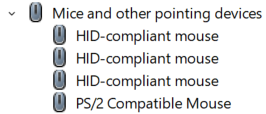
4d339989-2c5c-4562-abfc-a87c1b067c77.png
Hello
Your observations with the mouse and Magic Trackpad match mine, and it makes sense based on the algorithm we're using to convert Windows mouse wheel deltas (which can be low or high precision, depending on the input device) to macOS ones. It's a fairly naive algorithm.
My colleagues working on our next generation VNC integration have a ticket open to add support for this event, and I'm going to mention this and see if we can come up with something better.
Thanks and kind regards,
Richard Markievicz
Excellent, thanks for running this to ground. Great support!