Green play indicator does not light up to reflect an active server connection when using the CyberArk Module
Green play indicator does not light up to reflect an active server connection when using the CyberArk Module
0 vote

Need to fix the CyberArk module so that the green play indicator reflects the connected server in the Navigation Bar. Currently, the functionality only works in RDM when not using CyberArk.
When using CyberArk, only the data source reflects the green play indicator noting a connection. Given that we are heavily using CyberArk, this is critical so the we know which servers have active sessions when working on multiple servers at a time.
- The green play indicator should turn green in the Navigation Name bar when connected to a server when using the CyberArk connection module
All Comments (7)
Hello,
Thank you for the request. I have opened a ticket and we will see what we can do.
Regards,
Hubert Mireault
Good morning,
Is there a status update for this request?
Hi Larry,
I've just recently taken over the CyberArk integration and I was looking at this ticket at the very moment.
I just have one question, are you referring to entries launched using the CyberArk Dashboard entry (with the Connect Using menu item)? I'm asking because I do reproduce with the dashboard. I, on the other hand, do not reproduce with the CyberArk PSM Connection, so I just wanted to make sure we are talking about the same thing.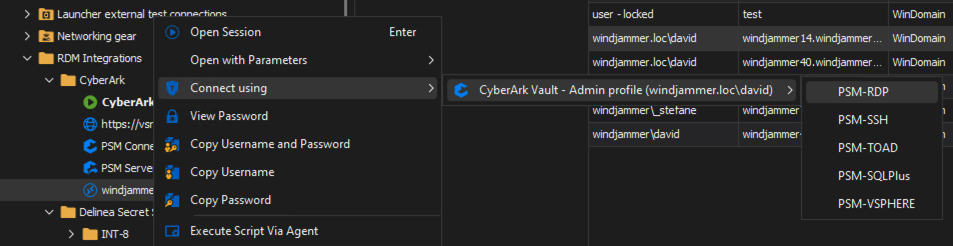
Best regards,
Xavier Fortin
CyberArkDashboardConnectUsing.png
Hey Xavier!
See example below.
Pretty much, if i don't use the CyberArk module, the green play indicator works with server connections.
When I use the CyberArk module, the indicator works for the CyberArk module. However, any servers that I connect to through the CyberArk module do not reflect the green indicator status noting being connected to a server.
Perfect, this is pretty much what I thought, we'll look into it.
For now I can't provide an ETA, since we have a good backlog, but the fix itself should not be to complicated.
Best regards,
Xavier Fortin
Thanks Xavier!
Hi larryransom,
The fix for this has been made internally. You can expect a fix for this in an upcoming release of RDM Windows.
Best regards,
Xavier Fortin