How to maintain the folder %localappdata%\Devolutions\RemoteDesktopManager?
How to maintain the folder %localappdata%\Devolutions\RemoteDesktopManager?

How to maintain the folder %localappdata%\Devolutions\RemoteDesktopManager?
It seams that when this folder becomes over 5GB it can case issues in RDM.
Is there a way to maintain the content of this folder without deleting the folder, which
results in you having to set up the local settings again?
All Comments (4)
Hello,
The solution to free some space in the data source's folder may help you.
- Click on File – My Data Source Information.
- Hover over the file size. It will give you the full file path, something like %LocalAppData%\Devolutions\RemoteDesktopManager\GUID-DatasourceID
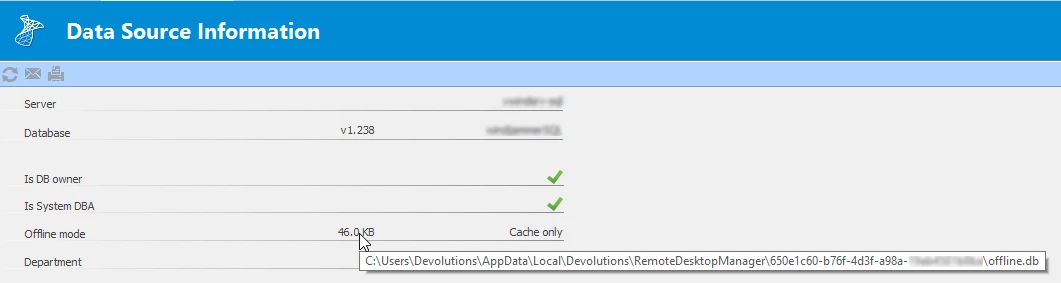
Let us know if that helps.
Best regards,
Érica Poirier
KB2030.png
Hello,
It could also be related to website entries' cache.
You can clear the cache in File - Options - Types - Website.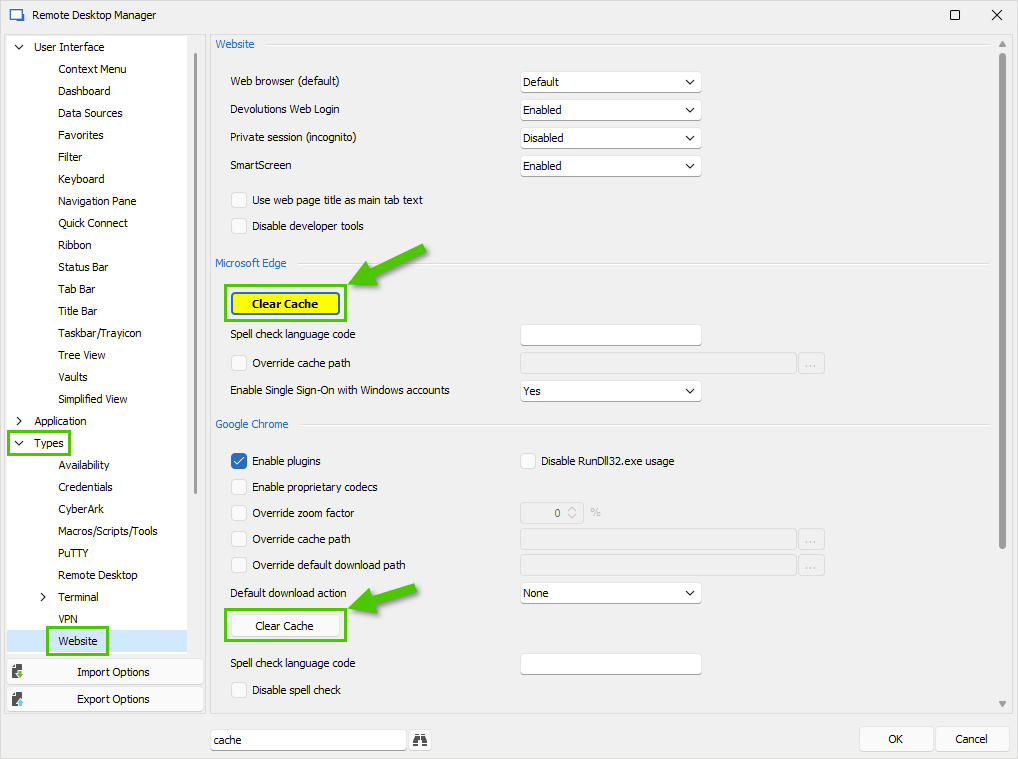
Best regards,
Érica Poirier
35df9b89-74c4-4ddf-aa40-0029c1fa694d.png
Thanks, the clearing of the Edge and Chrome cache did reduce the folder size.
Hello,
Thank you for your feedback. That's good news clearing the cache has reduced the folder's size.
Best regards,
Érica Poirier