Convert Bug from old Web Entries (Legacy) to Credential Object
Convert Bug from old Web Entries (Legacy) to Credential Object

DVLS: 2023.2.9.0
RDM: 2023.2.32.0
Hi All
It looks like there is a convert Bug when converting old Entries from "Web Legacy" to "Credential".
Log Entries in RDM when accessing such an Entry via API: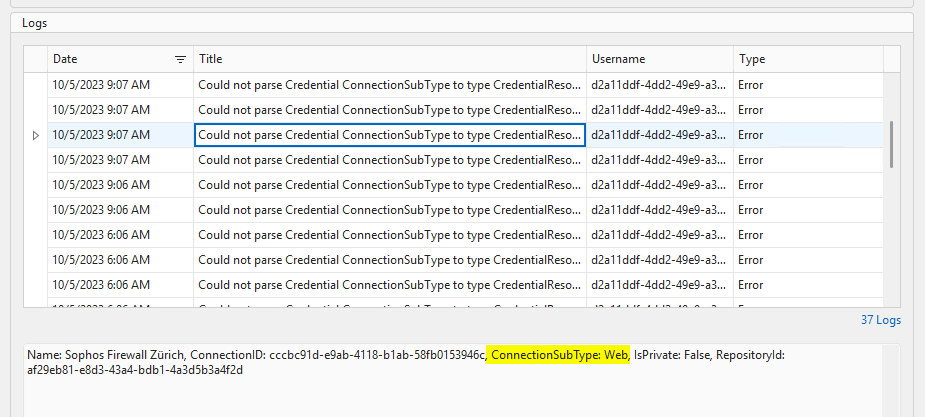
Entry Data via API:(Get-DSEntry -EntryId "cccbc91d-e9ab-4118-b1ab-58fb0153946c" -AsRDMConnection).Body.data.connectionInfo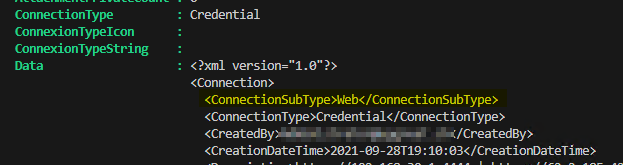
ConnectionSubType should be "Default" in my opinion.
Before the Conversion: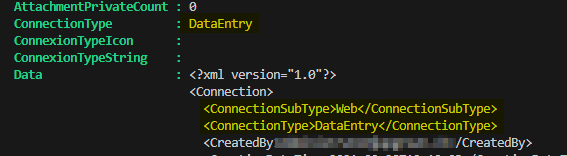
Convert is be done via:
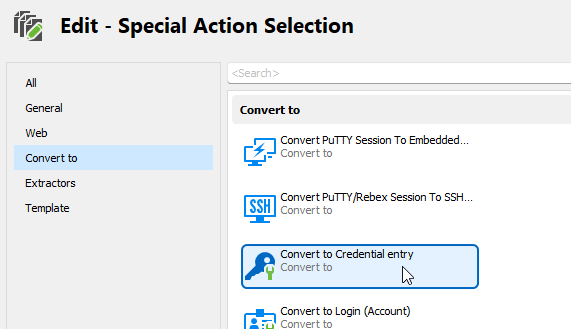
After Converting: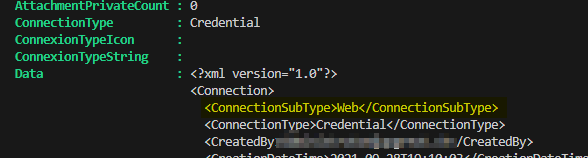
Is there a best practice how to automaticaly fix those Entries instead of looping trough ALL Vault Entries with AsRDMConnection Switch?
Best Regards,
Andreas
83627cb3-d6bf-4470-b1bf-f3eb0bca51bb.png
fa575e94-a3f5-40c3-b838-93fae376050b.png
089f062f-d456-4257-9b94-f4fb3fa3bf24.png
9b09d474-bfd2-4bbe-b681-adaeb6c6780d.png
ecbdf455-bd31-428f-adfe-6648d2b4460a.png
4663d599-7e75-41c4-89f7-a3e9f71ee402.png
All Comments (11)
Hello Andreas,
I just created a legacy web browser entry in the same versions of RDM and Devolutions Server as yours; I then used the "Convert to Credential entry" conversion, and the resulting entry is a credential entry: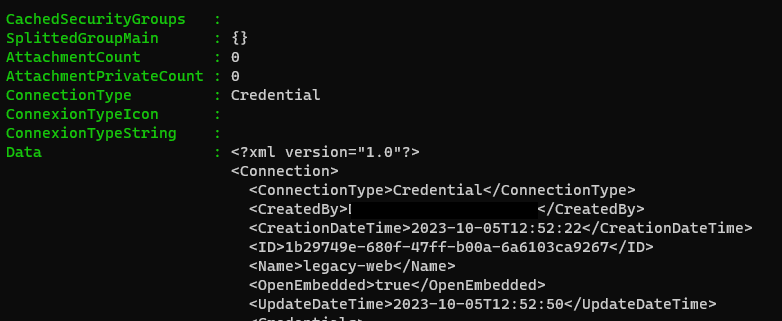
Could you try to create a new legacy web browser entry and see if you have the same behavior? The issue may be only present with older legacy website entries.
Best regards,
Richard Boisvert
e969cdfc-6e08-49aa-862e-03939ba09765.png
Hi Richard
Yes, only old Web Entries are affected.
Best Regards,
Andreas
Edit:
I've just wrote a small Script which loops through all Vaults and checking for every Entry which has connectionType equals 26 and connectionSubType not null and connectionSubType not equal Default to get all faulty Entries.
After that i remove on every entry the connectionSubType Field from Root and Data.
Updating it via /api/connection/save (PUT) and voila, looks good so far (Update-DSEntryBase doesnt work for me).
So for me the Problem is temporarely solved, until another old Web Entry will be converted. I think i might update them too.
Best Regards,
Andreas
82d44379-42a1-4c69-a8e5-82ab7384a518.png
Hello Andreas,
The fastest method to solve the issue would be first to convert them to the new website format, and then extract the credentials: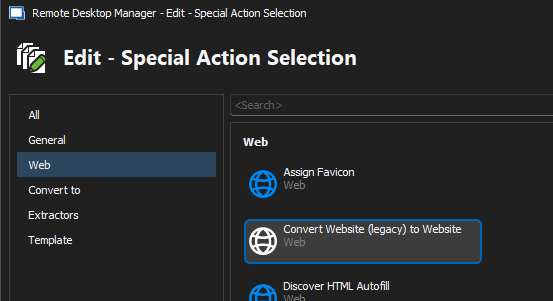
You can use the batch edit with the advanced search, with the connection type set to Website legacy, to quickly find them: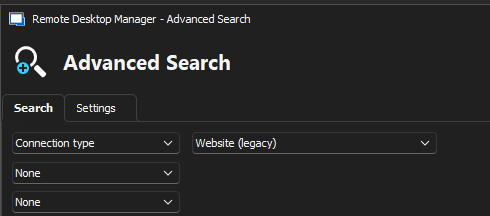
Best regards,
Richard Boisvert
bc8bd2e7-e3eb-42b1-ba07-0b8d56007e3f.png
ae09402e-3108-4a3d-8a53-8323d200402c.png
Hi Richard
You mean converting the Web Entries to "Website" and then back to "Legacy Website"?
We dont want get rid of the Copy Buttons.
I Will try if this will fix the Issue for old existing Entries.
Best Regards,
Andreas
Edit: It seems that legacy Web Entries arent supported anymore?
Mmmh thats bad...
Hello Andreas,
You can add the copy buttons for all entries, including the "new" website entries, under File > Options > UI > Dashboard - "Show copy actions in session dashboard"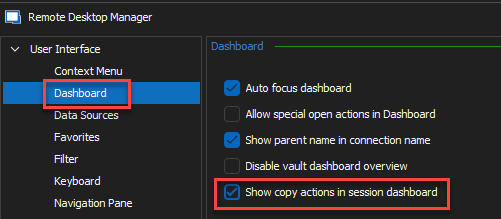
Best regards,
Richard Boisvert
b0a87cfe-a601-4fc8-93db-885b472c189d.png
Hi Richard
Excellent, thank you very much!
Best Regards,
Andreas
You can use the batch edit with the advanced search, with the connection type set to Website legacy, to quickly find them:
Is there also a Way to mass Update all Entries over all Vaults?
It would be a little painful with 265 Vaults.
Hello Andreas,
You can use the Muli Vault Search feature in this case.
Regards,
Min
Hello Andreas,
You can use the Muli Vault Search feature in this case.
Regards,
Min
Hi Min
No, because it seems that Multi Vault Search doesnt allow to search for "Website (Legacy)" Entries and it doesnt allow to Update Entries when the Vault is not loaded.
Best Regards,
Andreas
Hello Andreas,
Since you have many vaults, you would need to use PowerShell. At that point, however, you could use your initial fix.
Best regards,
Richard Boisvert
Hi Richard
Thanks for your Answer.
My Script just does fix all Entries, which are converted from Legacy Web to Credential Object, but it doesnt convert Legacy Web Entries into Website Entries.
Ive written a second Script for converting. But when i try to convert an Entry, this works, but the Password is missing on the Converted Entry.
So i need an Option to reset the Password after converting. Is there a buildt in function to set an Entry Password via Devolutions.Powershell Module?
This doesnt work in this Case:
$Entry = (Get-DSEntry -EntryId $EntryId).Body.data
$Entry.data.passwordItem = @{
    hasSensitiveData = $false
    sensitiveData = $YourNewPassword
}
Update-DSEntryBase (ConvertTo-Json $Entry -Depth 10)
Btw: ive also tried to add directly $entry.data.passwordItem while converting the Entry, but this didnt worked either.
Thanks,
Andreas