Enhance Keeper Security Search Capabilities
0 vote

Hello,
Currently when using integration w/ Keeper Password Manager, if we search for an entry it only shows results directly in the folder selected, or we can use the "show all entries in root" option and search in the root which lets us search all entries (which does help a lot). However it seems when searching, it only searches a few fields - perhaps title, maybe username but that seems to be about it. It does not produce matches similar to when doing a search within Keeper itself where it can match on website URL, or some sort of custom field value, etc.
A couple enhancements I would love to see if possible:
- Have the default search be able to search on all field values in a record, including URL and any custom fields.
- Add the option to search recursively below the selected folder - maybe another option on the ellipsis menu where we could enable "recursive search" and it would then search all subfolders below the folder selected on the left (this would provide a search scope in between the two currently available i.e. searching through all records at the root or only searching directly within the selected folder).
- If this option was added then the "display all records in root" option may no longer be needed (or at least would not be required to search recursively at the root) because the new "recursive search" option could be used for that.
- Possibly add an advanced search where the scope could be limited to one field (although this is less important if item #1 could be realized).
Thanks in advance for your consideration of this request!
David Willis
All Comments (12)
Hello,
These are very good suggestions and would indeed make the feature more usable, so we'll open an improvement ticket.
We'll notify you of any updates.
Regards
Jonathan Del Signore
Sounds good, thank you!
David Willis
Hello,
We've improved the Keeper search to include the URL and Custom fields values. We've also modified the already existing option in root to work through all child folders of the current selection. These changes will take effect for the upcoming 2024.3 version.
Regards,
Jafran Majeau
That's awesome, thank you! Will look out for that in the new version! Always appreciate how responsive you all are - and you have an amazing product - so thanks again!
David Willis
Hello! Got a chance to check out the new version, and the improved search is great - thank you!
Can I suggest one very minor improvement for a future version perhaps? Since we can now easily search records through all child folders in the right pane, it would be very helpful if, when the results came up, it did one of two things:
- Show a column with the parent folder name, or
- Even better would be to auto-navigate/"jump" to the containing folder in the left pane when a result in the right pane is selected. This would be very helpful.
As always, thanks in advance for your consideration, and Happy New Year!
Best regards.
David Willis
Hello,
Since the folder selection on the left affects the accounts that are displayed on the right, an "auto navigate" wouldn't really work in this case.
We'll definitely add a column to display the folder though. We'll notify you when it's done.
Regards
Jonathan Del Signore
Hello,
The enhancement to display the folder path in the search results has been implemented. This improvement will be available in version 2025.1.18.0.
Regards,
David Godin
Thank you!
Haven't used this for a while, but I just did, and a couple things I noticed. One is the "title" column seems like it can only be expanded so far (to a certain extent but not further - in my case it wasn't far enough to see the full title of many records). I could mouse-over them to see the full name in the tooltip, but that is tedious if you have a lot of search results.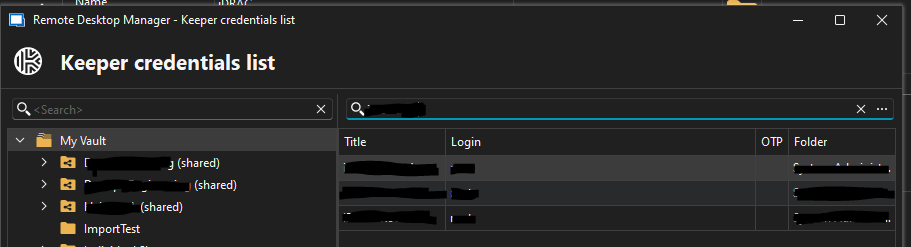
If the title column (or any column) could be resized to any size, that would be helpful... to take it a step further, if it was possible to add a "column picker" like many of the other screens in RDM have here, that would add a lot of flexibility!
Another idea, if there was a way to bring up a sort of "properties window" for the selected Keeper record to see its details (full title, username/login info, full values of custom fields, etc.), that could be very helpful as well.
Not sure how much of a lift these things would be to add, but I figured I'd ask. As always, thank you for continuing to make this product better and better!
Best regards,
David Willis
c82c9a4e-6a33-4973-85d9-38bc770e2688.png
Hello,
I've opened a ticket for investigation on supporting the Column chooser as well as handling the size of the currently existing columns. We will update you on that as soon as we have more information.
For the property window, I suggest opening a separate forum thread explaining as thoroughly as possible what you would expect from it.
Regards,
Jafran Majeau
Thanks Jafran. I will post a separate request for the property window.
David Willis
Hello,
We've added the column chooser to let you decide which columns is displayed, the same one that is present in several other locations. This should take effect with the upcoming 2025.2.17
To be able to re-size any column beyond what seems to be their maximum width, there is a functional workaround. You need to reduce the size of the window until a scrollbar appears, after what you can simply expand your column size to any desired length (in fact, if you have already tried to do so, those settings should be saved and load as soon as the scroll bar appears).
This is a workaround we implemented to circumvent some limitations that the 3rd party we use for those controls presents.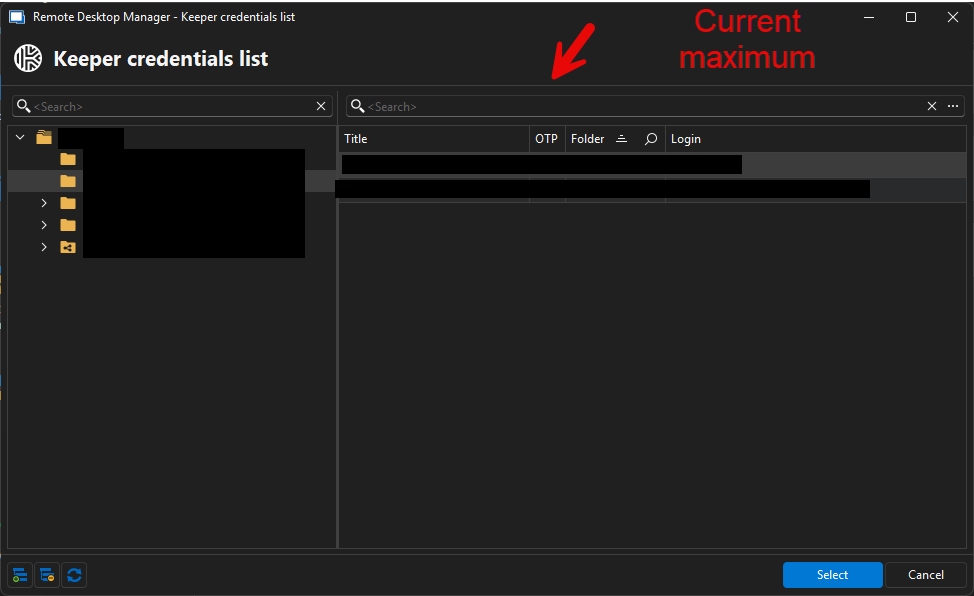
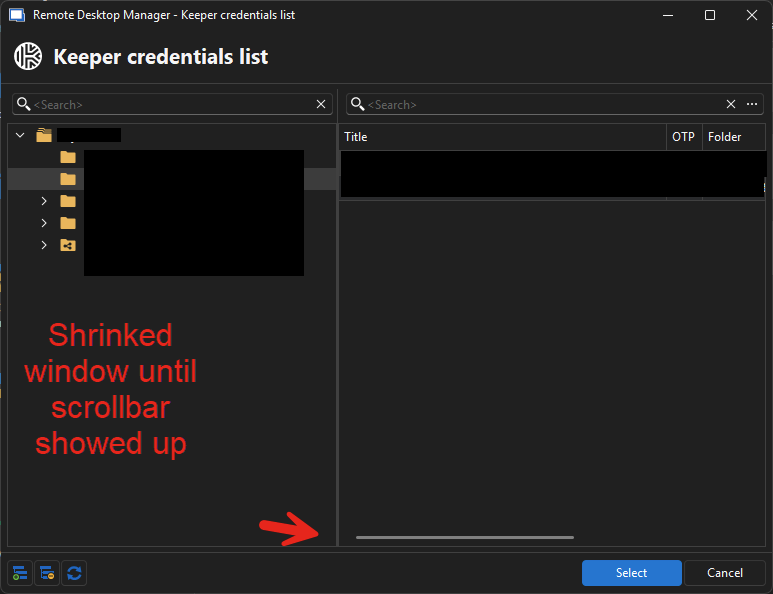
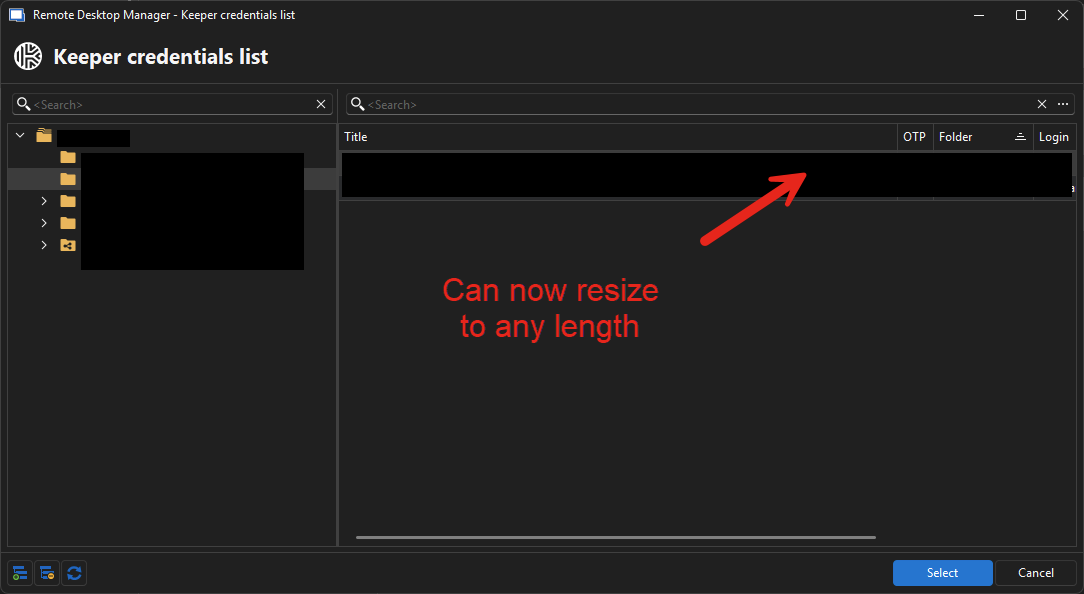
Regards,
Jafran Majeau
36e4b96f-37cf-4f65-a31a-8916a6c8f546.png
127e0cca-eea0-4bb8-bbab-b8771f91733b.png
8833bcd0-8dd7-4b6e-ba8d-2af52ab0e4b9.png
Hi Jafran,
That's awesome, thank you!! Will definitely check it out as soon as I get a chance!
Best regards,
David Willis