Azure Bastion (native client) with IP support
0 vote

I'm trying to connect to a Azure VM via a Bastion (native client) on an IP address.
I'm able to connect to the VM via az:
$subscription = "xxxxxxxx-xxx-xxxx-xxxx-xxxxxxxxxxxx"
$bastion = "xxxxxxxxxxx-bas-01"
$resourceGroup = "xxxxxxxxx-rg"
az login
az network bastion rdp --name "$bastion" --subscription "$subscription" --resource-group "$resourceGroup" --target-ip-address "10.1.1.11"
I configured the following values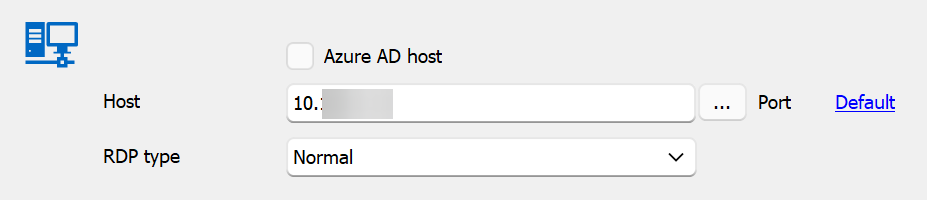
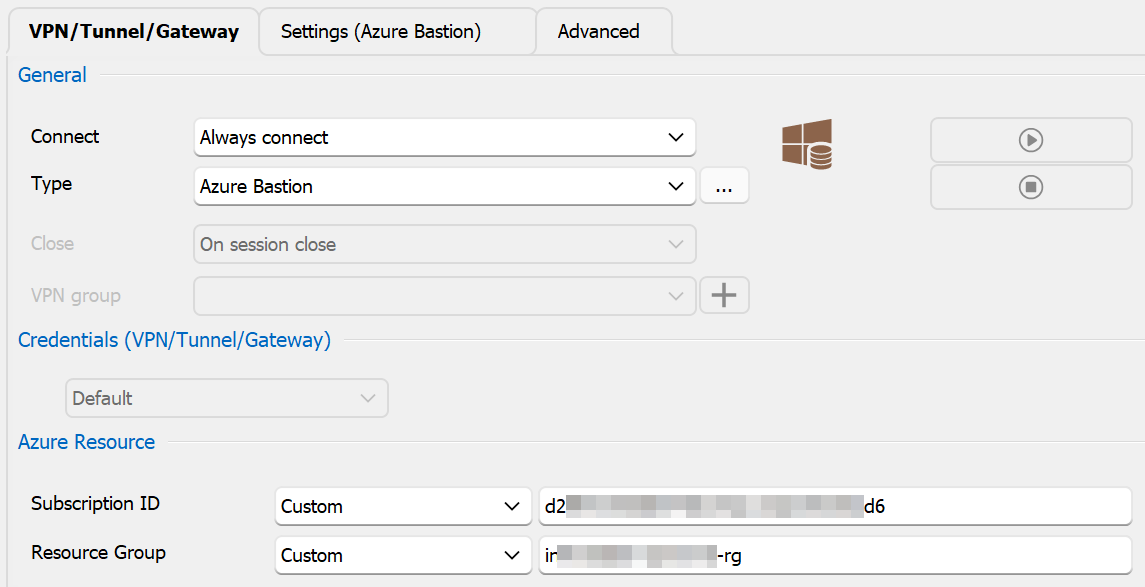
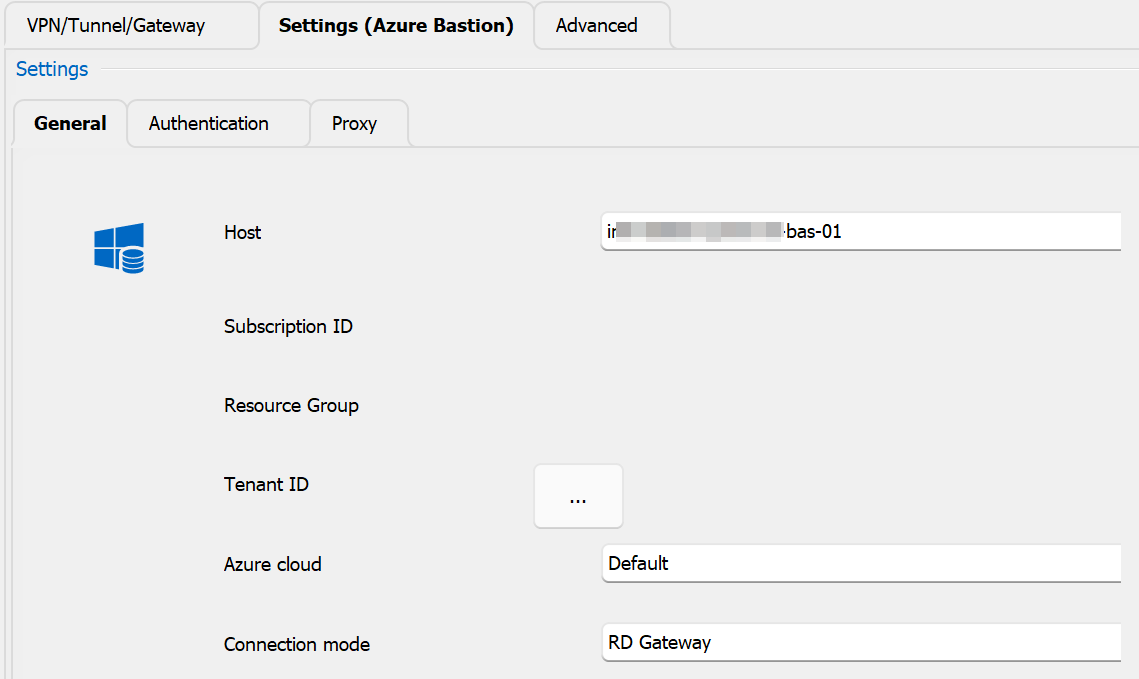
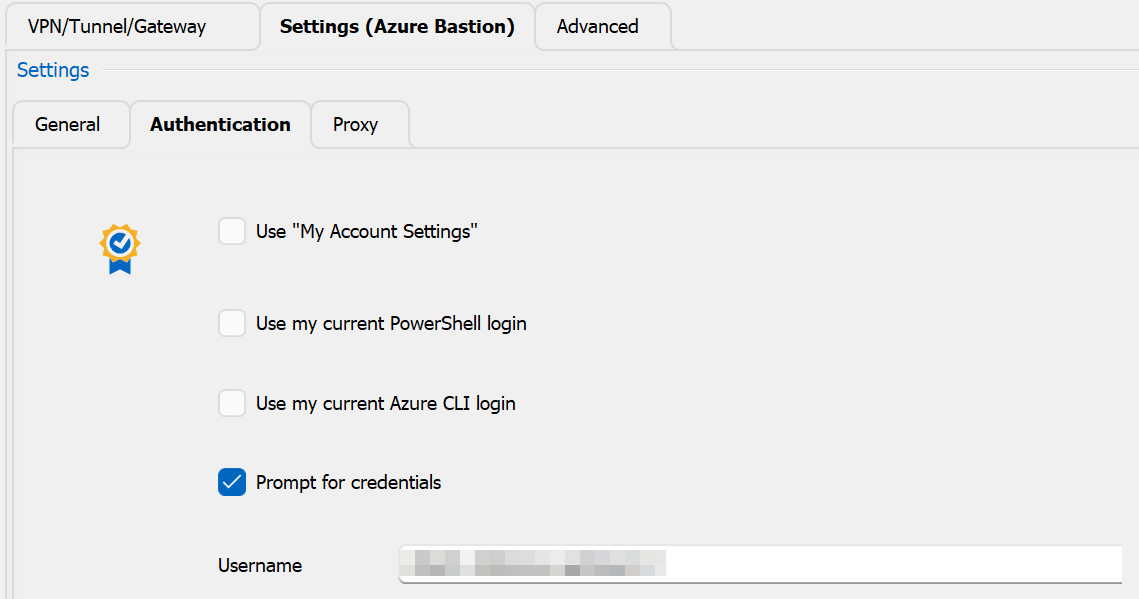
When I try to connect I get the following error.
What do I need to change to be able to connect to the vm?
61246b1f-912f-4a96-85dc-209a3286503c.png
789cc2a2-1900-4581-ae4d-8841056ca573.png
df274e05-6e10-4f63-bec6-cfc1b0341e69.png
a6567705-9772-4201-9863-5eb3e1593647.png
553b8e98-2bea-4761-9efc-ed5215a3d587.png
All Comments (12)
Hello,
I will speak with our developers to see what exactly the issue could be.
Is the error message appear to be accurate to what you're trying to do ?
By this I mean, are you using an IP-based client connection ?
Best regards,
Hi Zachary,
Yes, i'm trying to connect via an IP address
Connect to a VM - specified private IP address: Azure portal - Azure Bastion | Microsoft Learn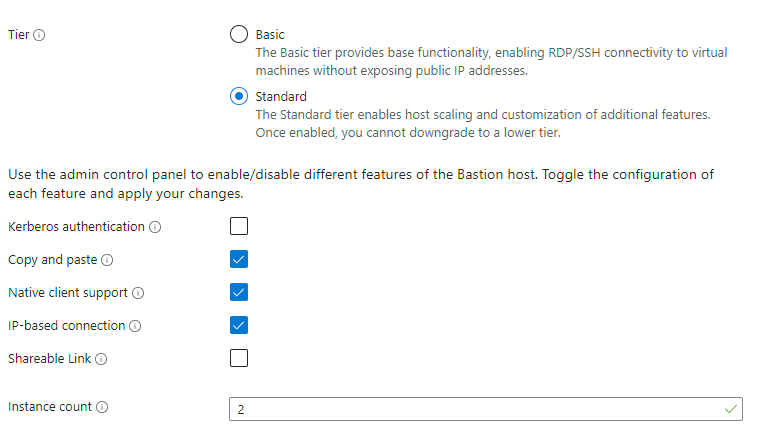
173e4733-0fb7-49e3-be59-6159d51b53d9.png
Hello,
In that case, as the error message states, this doesn't appear to be supported by the Azure Bastion integration in RDM.
This may be a limitation of the implementation in RDM.
I will move this thread to the feature request forum so that our developers can look into this with you and see whether or not this is something we can improve.
Best regards,
I didn't see this as a turned in to a feature request, but would also like to up-vote this if possible. We would really like to be able to use RDM for connecting through Azure Bastion to private VMs using their IP address. Currently we have to traverse the Azure portal and enter the IP address in to the webpage for each machine we connect to, which is so "old school" and would love to be able to use RDM's interface instead.
Hello
I also couldn't find a feature request for this, but I'm not sure if it didn't happen or if my search is failing me.
I'm pretty certain that we already support this, I remember implementing that and there are paths in the code that handle IP-based connections. However I will be completely honest and say that I don't 100% remember how this works in either Azure Bastion or RDM.
I'll take a second look and try to refresh my memory. In the meantime - did you already try this in RDM and fail? Or did you assume that it wasn't implemented or supported, probably based on this post?
Thanks and kind regards,
Richard Markievicz
Hello again
A quick follow up: we did implement this, based on a user request in another thread. I'm not sure why I didn't see this thread when the issue came up again.
What I can tell you is, that we implemented the feature "blind" - at the time, IP-based connect worked via the web interface but not in az cli (this was the issue). We supposed the Microsoft released the feature prematurely (as has happened a few times over the Bastion rollout), but I'm not sure we ever revisited it after that was fixed or if the user that requested it previously ever came back to us.
So, I'd encourage you to try it and see if it works; if not, please let me know and I'll take a second pass at that. I recall that the implementation was not very complicated so I don't think this would be hard to unblock for you.
Thanks and kind regards,
Richard Markievicz
Richard,
Thanks for getting back to me so quickly. I have attempted this but I was not successful. I have several Azure based machines that I can get to through RDM and if I duplicate one of those connections and change the host to an IP address of one of my internal machines (which I can connect to via the Azure bastion portal connection page) I get the "The Azure Bastion or current connection mode does not support IP-based connections"
Perhaps there there is something else I need to change related to the connection from a typical bastion connection? There is the resource group and subscription that are fed in, but those are obviously irrelevant for a private IP based resource, I am assuming those are ignored. Happy to share a session or provide logs or anything that might be helpful in working through this.
Thanks,
Craig
Hello
Thanks for the info. I'm going to try this on my side, it might take a day or two before I get chance to spin up a Bastion instance and etc.
In the meantime, can you let me know the connection mode you're using for the Bastion? Is it RD Gateway or TCP Tunnel? If it's RD Gateway, can you try the tunnel option? I remember at the time this was introduced, IP connect was only available with a Bastion tunnel and that's where we added support; but after looking at the latest docs I see Microsoft support this with the RD Gateway as well now.
Please, let me know if something isn't clear
Kind regards,
Richard Markievicz
OK wow, that gave me the clue I needed. So if I change the bastion to use TCP Tunnel it works, if I use RD gateway it does not work for IP based connections. Both settings seem to work for resource connections. So this solves the problem for me. Thank you so much!
Hello again
Ok great, good news!
To close the loop on this: like I wrote before, at implementation time Microsoft only supported this for tunnel-type connections. I've revisited the `az cli` sources to look at the current state of things, and it looks like they no longer even offer the mechanism to connect through an RD Gateway anymore - they only implement tunnel type connections.
Since the RD Gateway option still works, we'll leave it as-is for now, but going forward my recommendation will be to use the tunnel mode.
Please, let us know if you have any other questions or feedback.
Kind regards,
Richard Markievicz
It worked for me
I created a folder with some default settings, because we use different (ad) credentials to login to the vm, I specified them at folder level.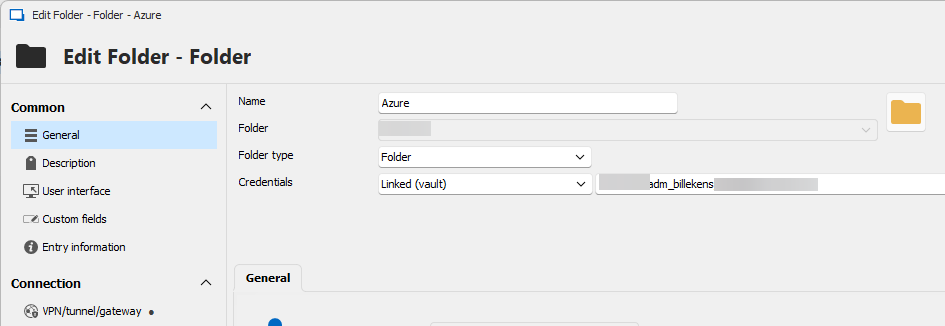
Configured subscription and resource group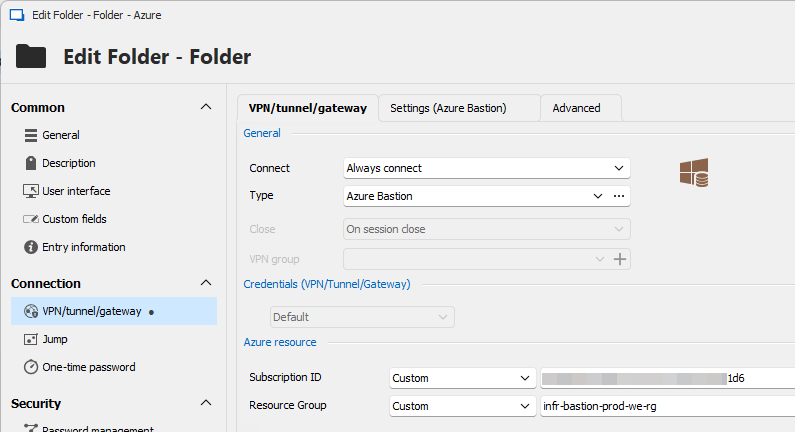
Bastion settings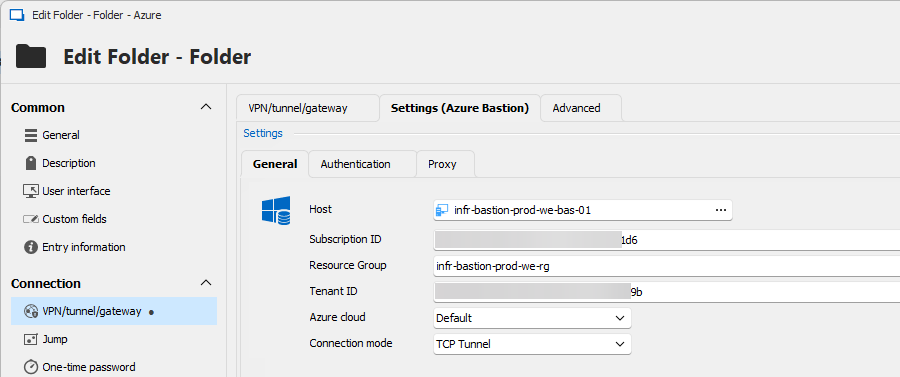
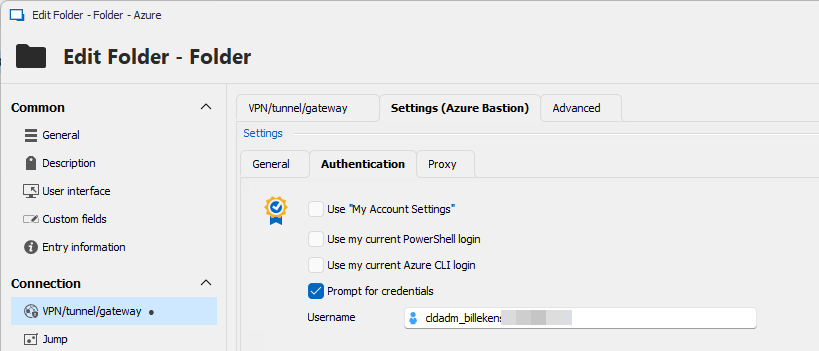
Next I created a session entry with inherited credentials, not marked as Azure AD / Entra ID host as I have to login with domain credentials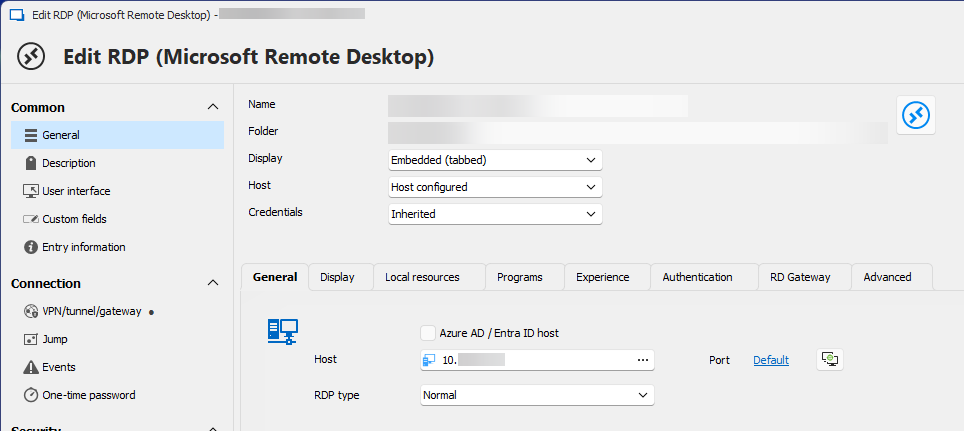
And the last important setting, unter VPN/tunnel/gateway, make sure you inherit the settings (from the folder)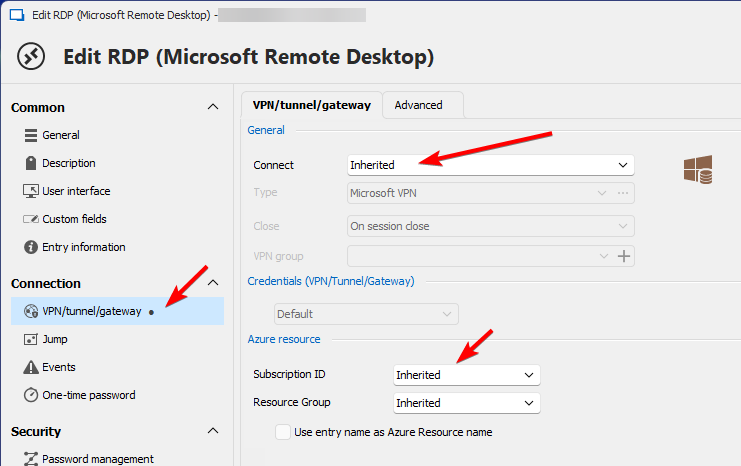
64c4678e-e3b0-411a-96a7-b46719c38bb5.png
9db92302-6d62-4e8d-af59-71ef8ead2c62.png
cc61fd71-bd8a-46a0-b704-e89733fa2afb.png
b0f725cc-f86e-4a0a-8373-177b7629f28d.png
5a9fa652-08f8-46d2-8c49-fdf7043724cf.png
668e43b1-c00e-46c3-bc0e-f5d8f0e4a204.png
Thank you John for the feedback! I'm glad this is working well for you.
Please don't hesitate to post back with additional questions or comments.
Best regards,
Richard Markievicz