Bypass SSL Invalid Certification

Hello!
I am running into issues using RDM to connect to some outdated devices with invalid or nonexistent SSL certifications.
Recieving the error NET::ERR_CERT_AUTHORITY_INVALID when trying to connect to a Synology server for example.
Now, I can bypass this by "Continuing anyway" but I would much rather save my option to bypass this extra window.
Is there a way to "Accept" the Invalis SSL-certification on by entry practice?
Or a way to disable it software wide?
I have found the forum posts
Allow embed Firefox to access SSL w/invalid certs (devolutions.net)
But I am using Edge
All Comments (3)
Hello,
What RDM version are you using?
The Ignore certificate errors option in the More Settings tab should prevent getting this prompt.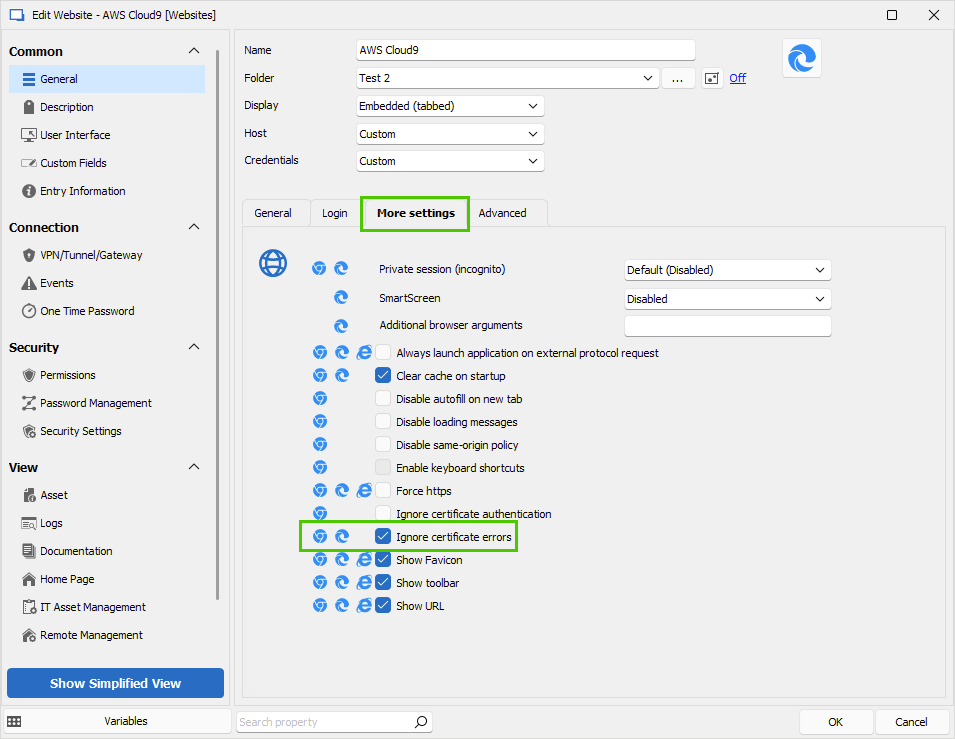
Let us know if that helps.
Best regards,
Érica Poirier
2df1e525-f29b-412f-a09a-05ef10821786.png
Hello!
I am on the latest version: 2023.2.32.0 64-bit
This seems to have done the trick.
Thank you for the quick response!
Hello,
Thank you for your feedback. I'm glad that the provided solution answered your question.
Best regards,
Érica Poirier