Microsoft RD Client Fails to Receive Password after Upgrade to Sonoma
Microsoft RD Client Fails to Receive Password after Upgrade to Sonoma

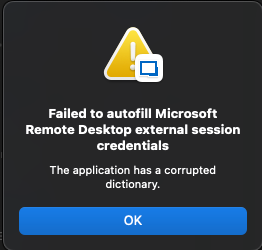
After upgrading to Sonoma on my M1 MacBook Air, I am no longer able to pass through the password of my saved vault credentials for the connection. See attached screenshot.
I have tried disabling and re-enabling RDM in the Security / Privacy Settings, updating and clearing preferences for Microsoft RD Client, and using the embedded rdp client, which just times out and fails.
All Comments (4)
Hi,
We are aware of this issue and a ticket is already opened for this. Unfortunately, we do not have a solution so far. We uses the NSAppleScript from the macOS framework to autofill most external apps and it simply throws this error for any AppleScript ran from the application. I've already confirmed that the content of the script itself does not matter (as the same script are working perfectly fine in Script Editor).
We'll keep investigating, but I alas cannot provide any workaround so far.
Best regards,
Xavier Fortin
any update?
Unfortunately, no. It's quite a tricky issue, so there really is no ETA we can provide.
Best regards,
Xavier Fortin
Hello,
A new version (2023.2.10.5) is available with a fix for this issue.
If there's anything don't hesitate to contact us again.
Best regards,
Michel Lambert