All Vault clear cash

Is there a way to clear the cash that the search uses when the All Vault is checked?
The reason is that when this is on, I don’t get alle the entry’s that I get if I use the Multi Vault Search.
Client: Windows 11 Verison 22H2 (OS Bulid 22621.2283) 64-bit
RDM 2023.2.30.0
Datasource: Azure SQL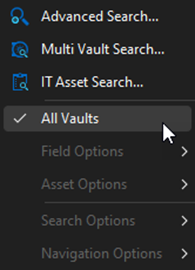
5a3065e0-91f0-46bd-8902-180d476c7a3e.png
All Comments (4)
Dear Acetico,
Thank you for reaching out to us regarding this matter.
I would like to clarify that the All Vault Search option allows you to search for information in all of your vaults but with limited search options. Please note that all of your search options will appear greyed out at the bottom.
On the other hand, the Multi Vault Search option is an advanced search that allows you to specify the type of entry you are looking for across all of your vaults.
I hope this explanation helps. Please let me know if you have any further questions or concerns.
Best regards,
Patrick Ouimet
If I am in the vault the servers are located and I search for “Server” I get:
Server1
Server2
Server3
Server4
If I click on the All vaults I get:
Server2
This has worked before and it is working on other installations, I just hope I do not have to delete the hole %localappdata%\Devolutions folder.
Hello,
In that case, would it be possible for you to create a portable installation of the latest version of RDM and see if this issue still occurs? To do so, you will need to do the following:
( Close RDM )
1- Download the .zip file below:
https://remotedesktopmanager.com/home/thankyou/rdmbin
2- Create a new folder on your Desktop
3- Extract the content of the .zip file into the folder created at #2
4- Go to this folder once the .zip file has been extracted and run remotedesktopmanager.exe
5- Connect to your data source
This test will allow us to rule out your local installation of RDM as a possible cause for this issue.
Please note that if you are using an Advanced Data Source, I would recommend skipping step #5 and using the default data source created by the portable installation of RDM instead.
Best regards,
Patrick Ouimet
I deleted the folder %localappdata%\Devolutions\RemoteDesktopManager, It solved the problem.