RDM: VPN/Tunnel/Gateway Website Response Check
0 vote

RDM 2023.2.32.0
Hi All
Currently it seems only possible, to check if destination is reachable via Ping before VPN Connection is opened on Sessions.
In our environment for some Websites we have special Publishings via Proxy/Loadbalancer which routes based on Source IP and Server Name Indication (SNI) which means, the specific Destination is always Pingable, but depending on your Source and SNI is the Proxy returns you specific HTTP Codes.
In this case, VPN will never be opened, because im only able to check if destination is reachable by IP and specific Port, which always is true: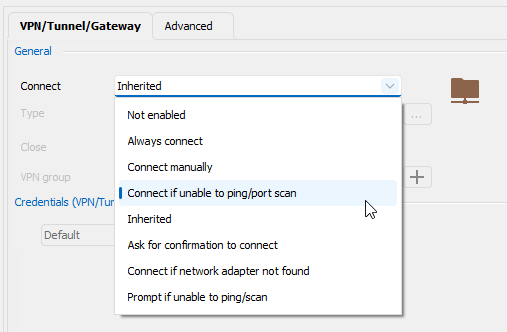
Is there an Option to check if Destination is reachable and HTTP Code is 200 for Web Sessions?
Best Regards,
Andreas
f988e0cc-0c8f-4d95-83c6-8e206a336965.png
All Comments (8)
Hello Andreas,
Thank you for contacting us regarding this,
I see, I do not believe there is currently an option for this, however, I will confirm with our development team.
Best regards,
Samuel Dery
Hello Andreas,
Thank you for your patience,
After discussing your case with our development team they have confirmed that this would not be currently possible, I've moved your thread to the Feature request section.
Best regards,
Samuel Dery
Hello Andreas,
Do you think adding a way to specify a powershell script could work for you? I'm thinking you could verify by powershell if your machine is up, and then return a true or false value to let RDM know whether to proceed or not. This would make it very versatile, too.
Regards,
Hubert Mireault
Hi Hubert
Can you please provide me a simple boolean Example to get RDM know?
In other Words, how to implement such a Script?
Thanks,
Andreas
Hello Andreas,
I imagined something like this, where you can replace "https://URL" by your own URL. Maybe you could try it outside of RDM and see if it works for you. If it does, then I think adding this powershell option as a method of checking if RDM should start the VPN would be perfect for your scenario.
try{
   if ((Invoke-WebRequest -uri "https://URL").statuscode -eq 200){$true}else{$false}
} catch{
   $false
}
Hubert Mireault
Hi Hubert
Thank you very much, but i think i missspelled 😅
I would like to know how to implement a Powershell Script in RDM, so RDM first checks for the Boolean before a VPN is triggered or not.
Or do you mean the Powershell Script is local and will trigger Sessions by RemoteDesktopManager.exe with Parameters Datasource, Repository and Session?
Best Regards,
Andreas
Sorry for the confusion, this feature isn't currently available. I was asking if such a solution could work (using powershell to detect if your machine is reachable or not). If this works, then I can open a ticket and we will add a new option to provide a script that will run and expect a true/false value and start the VPN or cancel the opening of the entry depending on the result. I hope this is clearer!
The second point you mention could work, but it's more complicated for a user. I think adding a new option in RDM to support this kind of scenario is better and makes sense for the product.
Regards,
Hubert Mireault
Hello,
With our 2025.1 release, we implemented a new "Check HTTP code" option which is now available. You can download it here: https://devolutions.net/remote-desktop-manager/download/
Let us know if you have any additional feedback regarding this feature.
Regards,
Hubert Mireault