Shortcuts: Different icons/colors
0 vote

Hello,
we are using a bunch of shortcuts.
E.g. when our sales department needs credentials, our IT department uses.
It's quiet hard, to make out the difference between the original and the shortcut.
The icon looks the same
In the "Overview" panel, there's also no info, regardingf the state of the object (source oder shortcut?)
What would be nice:
Different color
Maybe different Symbol, e.g. so that the little shortcut arrow points downwards on the shortcut itself
A small overview, where the source is linked
If there's already that option, please let me know.
Best regards,
Daniel
All Comments (1)
Hello,
Due to the way shortcuts are currently implemented, there is no real distinction between the "original entry" and the "shortcut". In the backend, this is all the same object. If you notice for a shortcut, the folder's value is simply the list of all the folders to which the entry belongs, thus RDM identifying these as shortcuts to one another.
Here's a simple example with a credential entry belonging to both a "Marketing" and a "Sales" folder.
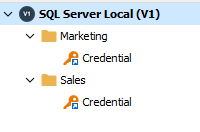
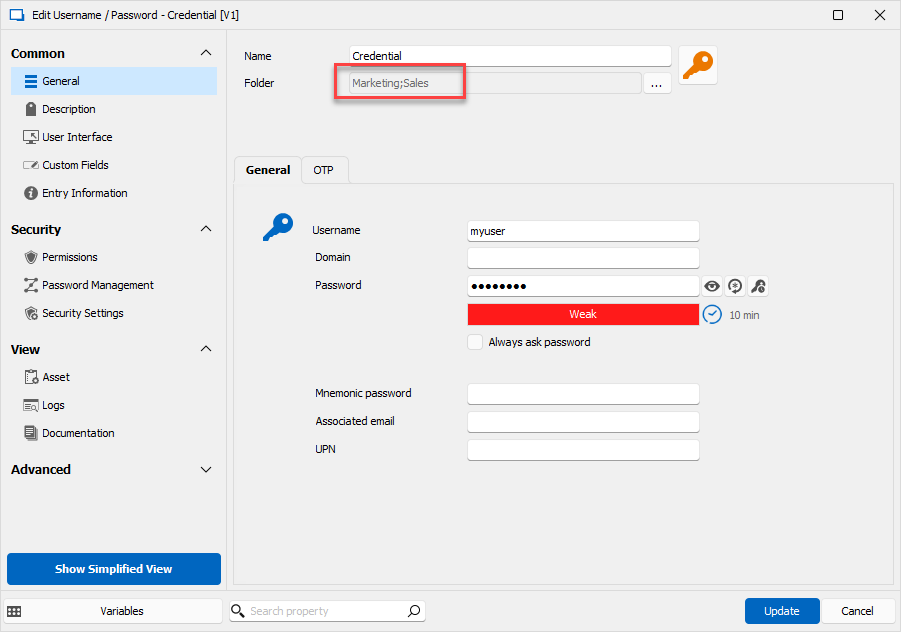
As you can see, the Folder section has the path to both folders it belongs to, separated by a semi-colon.
This is just to give you some context as to why this isn't a simple change at the moment. Nevertheless, we will keep this suggestion in mind and see if we can come up with a solution to allow these changes in the future.
Regards,
Hubert Mireault