BeyondTrust Password Safe - Extend Functionality for SSH and RDP session options
BeyondTrust Password Safe - Extend Functionality for SSH and RDP session options
0 vote

Hey there,
As I'm working on my Devolutions + BeyondTrust deployment I'm observing some differences between typical RDP/SSH sessions and those offered by the PasswordSafe entries.
For RDP, I don't have the ability to turn of 'connect local drives', nor does the clipboard passthrough seem to work (haven't confirmed if that's a BeyondTrust issue or not).
For SSH, I don't have the ability to send commands after login; my ecosystem is such that my users SSH in and then use sudo to execute admin commands, and our usage of BeyondTrust is focused around my users not needing to know their privileged account password. Having the ability to execute a sudo macro at login would be highly beneficial to my use case.
To work around these, I have a powershell macro/credential to call the Password Safe API to retrieve account passwords, but that seems slightly cumbersome and isn't cross platform (at least doesn't work on Mac, which makes sense because it's powershell (perhaps support for the cross-platform versions of powershell can be added?).
Thanks,
Sam N.
All Comments (3)
Hello Sam,
Under the advanced tab of the BeyondTrust entry, you can apply a template- https://docs.devolutions.net/rdm/windows/commands/file/templates/creating-templates/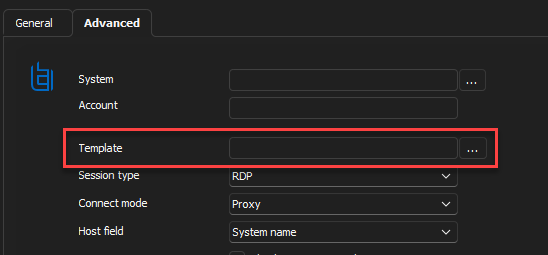
With it, you should be able to configure all the settings you requested without issue for both RDP and SSH, and it will work for both the Windows and macOS versions.
Best regards,
Richard Boisvert
0c16f561-5331-4b94-9c6c-55c675c5bc11.png
@Richard Thank you, this is exactly what I need!
Is there some documentation I would've found this under for the BeyondTrust plugin?
Hello,
Great! The only documentation we have for BeyondTrust is this page: https://docs.devolutions.net/kb/remote-desktop-manager/how-to-articles/beyondtrust-configuration/
While the template is not mentioned, I just made a change request to add the information; it should be available shortly.
Best regards,
Richard Boisvert