Enhancement/Bug Request for RDP Connections: Alt+Tab Functionality and Window Animation Toggle Options
Enhancement/Bug Request for RDP Connections: Alt+Tab Functionality and Window Animation Toggle Options

I am utilizing the Remote Desktop Manager Android app on my Samsung Galaxy Tab S9 Ultra running Android 13 for RDP connections to a Windows 11 system. In my experience, there are two pivotal areas where enhancements could significantly improve the user experience:
1. Alt+Tab Functionality Enhancement for RDP Sessions(I think this one is actually bug):
- Current Behavior:
- The Alt+Tab shortcut currently only toggles between the current and the last used application, without showing previews of all open applications.
- Comparison:
- In contrast, the Microsoft Remote Desktop Android app handles this functionality perfectly, offering previews of all open applications and allowing for quick switching between the current and last used application. Tested in Samsung Dex mode.
- Expected Behavior:
- I recommend revising the Alt+Tab functionality in the Remote Desktop Manager app to mirror the seamless experience provided in the Microsoft Remote Desktop Android app, with a preview window that displays all open applications and facilitates smooth transitions between any open apps.
- Impact:
- Adopting a similar functionality would cultivate a more intuitive and desktop-like user experience during RDP sessions, aligning with the superior standard demonstrated by other apps in the market.
2. Introduction of Window Animation Toggle Option for RDP Sessions:
- Current Behavior:
- The app has window animations enabled by default, making actions tied to window animations, such as minimizing/maximizing apps and utilizing the "Windows+Tab" shortcut to preview workspaces, feel slow, laggy, and sluggish. It is clear that the app struggles to keep up with these animations, which impairs the user experience. To provide context:
- The Microsoft Remote Desktop app has window animations disabled by default, with no option to enable them, ensuring a faster user experience.
- Remotix offers users the choice to enable or disable window animations, catering to individual preferences.
- The app has window animations enabled by default, making actions tied to window animations, such as minimizing/maximizing apps and utilizing the "Windows+Tab" shortcut to preview workspaces, feel slow, laggy, and sluggish. It is clear that the app struggles to keep up with these animations, which impairs the user experience. To provide context:
- Expected Behavior:
- Introduce a feature in the Remote Desktop Manager app that allows users to disable window animations during RDP sessions, to foster a quicker, more responsive UI experience.
- Impact:
- Incorporating this feature would harmonize the app's performance with industry standards, allowing for a smoother, more responsive RDP session, aligning with the features available in other leading apps.
I am confident that these enhancements would significantly elevate the user experience of this already great app. Thank you for considering these suggestions.
All Comments (14)
Hi,
Thank you for investing your time in providing us with invaluable feedback. We will add your suggestions to our to-do list and explore how we can address them.
Best Regards,
Nicolas Dufour
Hi,
Both features are available.
1. ALT + TAB
To use Alt+Tab, simply hold down the Ctrl + Alt keys and press Tab to achieve the expected behavior. If you wish to hold down the Ctrl key or the Alt key using the soft keyboard, just double-tap the respective key.
2. Windows Animations
Regarding animations, follow these steps: Edit your RDP Connection and display all properties. Look for the "Experience" section, where you'll find the "Menu and windows animation" option. Toggle this option based on your preference.
Best Regards,
Nicolas Dufour
Hey, thanks for the reply!
I see that I can disable animations, and it works very well thanks!
But alt + tab to preview doesn't work at all in remote manager, it only switches between apps. I'm using samsung book cover keyboard slim, which is directly connected to the tablet. In Microsoft RD client it works perfectly here is the comparison video: https://drive.google.com/file/d/13aKO47cXYdMrFy5-tpGtN1GnHBQ598FN/view?usp=drivesdk
Also, another thing I have noticed is that touch control in the app is very weird/different than others. In microsoft RD client, as soon as touch the desktop I can start dragging, multiseleccting by dragging mouse etc, also I can long touch to see context menu. But in Remote Desktop Manager it just works like a mouse not a touch control, I have to long touch/press the screen to do everything related with clicking mouse long in real mouse like dragging, multiselecting etc everything has to be long touch, but in Microsoft RD I can just touch and select everything, immedietly drag etc. So I think Remote desktop is trying to emulate mouse by touch control, but Microsoft is actually emulating touch screen. Can we achieve the same in Remote Desktop Manager? It can be a toggle or option.
Lastly, touch control itself is really unresponsive for example if i drag something or try to multiselect by dragging my finger and actual selection is veery far away and feels like only moving 1/4 of the space than what I'm actually moving my finger, but after releasing the finger it actually does move to the released point.
Here is the video about that lagginess of touch control + Remote Desktop's wrong touch emulation: https://drive.google.com/file/d/13gv5VyoMp4p1UTwVjBQ_hzJFiWCcEKZ3/view?usp=drivesdk
Should I create another post on those issues? Also attached the videos as attachments(Couldn't attach it looks like files are too big please take a look at google drive files).
Thanks in advance.
Hi,
many thanks you for your feedback.
There is no need to create another post.
Can you tell us what is your application version number? The version number is displayed in the about screen.
For the ALT + TAB, we've tried it holding CTRL+ALT and then pressing TAB multiple times and it seems to work fine. Have you tried CTRL-ALT TAB with your keyboard? Can you also try it using the soft keyboard to see if it works?
Your are right. We currently have to long press to move or select items. To select or move an item, the other option is to quickly double tap and drag.
We will investigate and see what can be done (if we can add an option, etc...)
Many thanks.
Best Regards,
Nicolas Dufour
I have just tried ctrl + alt then tab, it works perfectly thanks. Also quick tapping twice to multiselect is really responsive compared to long pressing, long press on the other hand very laggy and buggy(doesn't move same distance as I have moved my finger etc), thanks for the tip.
Is there anyway to achieve window's default alt +tab behavior without ctrl, just clicking alt + tab? It works in the Microsoft RD client.
Also any future plan to support pen input(spen)? :D
Hi,
We should be able to do something with CTRL + ALT. We will investigate and keep you posted.
Regarding long-press behavior, you can adjust the delay setting located in the User Interface Settings (Settings - User Interface). Reducing this delay should give you the desired behavior.
Best Regards,
Nicolas Dufour
Hello,
We've identified the issue with the ALT + TAB functionality and we are currently testing a fix. We'll update you once it's ready for release.
Best Regards,
Frederick Simard
Hey running xrdp on ubuntu 22.04. Haven't connected in a while. Now if i alt tab or win tab or ctrl alt tab i don't get the change window overlay and alt tab only switches between last two windows (as described in this thread). Strangely mappin right super key with tab cycles through windows the way it should. The ctrl alt tab doesn't fix the issue for me. Also using shift alt tab doesn't bring up the windows thumbnails overlay but it cycles backwards through all windows, not just the last 2.
For info i used the neutrino labs xrdp installer. Tried my keyboard in bluetooth mode and also wired mode, and tried the tablet (galaxy s7 fe) in regular mode and dex mode and always getting the bug. Also tried with older apks of remote desktop manager (2023.2.2.8 and 2023.2.3.8) and also getting the bug there. In my rdp config i tried the keyboard as unicode and unicode disabled and it didn't do the trick either. Also with and without the optimize for xrdp.
Basically i tried everything and i wonder if the bug crept in with a system update. As i recall i didn't used to have this problem.
I installed the microsoft remote desktop app but alt tab would switch windows on android, not on the remote desktop.
Finally I want to say the performance of the Devolutions app is amazing compared with other clients. Really hope it gets sorted out!
Also in case it helps, running xev shows when i do alt tab without releasing the alt key there is a keyrelease event after i have only released the tab key: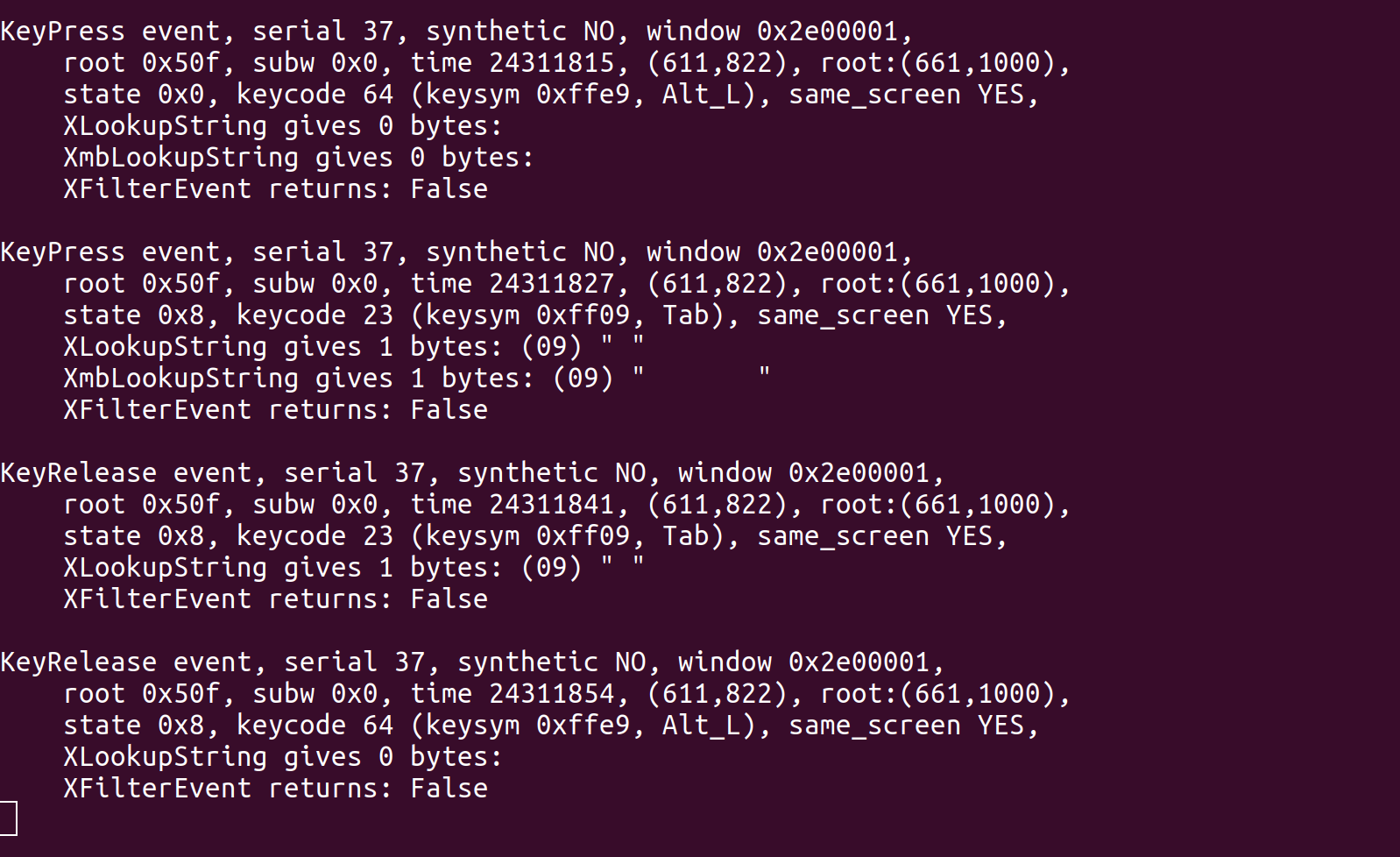
screencap-1.png
Hello,
Yes, that is indeed what we found was wrong with the Alt+Tab.
We are currently testing a fix that should address that issue.
Best regards,
Frederick Simard
Hello,
We have identified an issue with touch accuracy where selections move only 1/4 of the screen's width. This is caused by the inadvertent application of our mouse acceleration feature during selections, reducing the speed of selection compared to finger movement. To address this temporarily, navigate to Settings > User Interface and turn off Mouse Acceleration. We are working on a fix and it should be ready to go by our upcoming release later this month.
Additionally, we are testing a feature that enables rendering at higher refresh rates for smoother mouse movements and zoom functionality, benefiting screens with refresh rates above 60Hz.
We've created a ticket to enhance the TouchMode experience, aiming to minimize the necessity for double taps and long presses during selections.
Best Regards,
Frederick Simard
Yo, you guys are the best! I will be eagerly waiting for the new release!
Hello,
We've released a new version aimed at resolving:
- Touchpad mode mouse accuracy no longer slows down when dragging.
- ALT + TAB functionality is now corrected.
We're exploring ways to improve the TouchPad experience without disrupting users familiar with the current setup. Meanwhile, you can alter the long press detection speed in Settings > User Interface > Delay to make it more responsive.
Best regards,
Frederick Simard
Thanks for the fix, it works wonderfully now! Really looking forward to more responsive and more true to actual touch screen implementation!
Thanks!