Cyberark session timeout issue

We recently set up Cyberark Privilege Cloud. One issue we are running in to is that once the Cyberark session times out, RDM pops up with warning messages and forces the user to select 'sign out' on the Cyberark dashboard. Our sessions are 12 hours, so this usually means when a user resumes work in the morning, they have to dismiss warning boxes and know to select 'sign out' and then sign back in to the dashboard. See below for the errors. 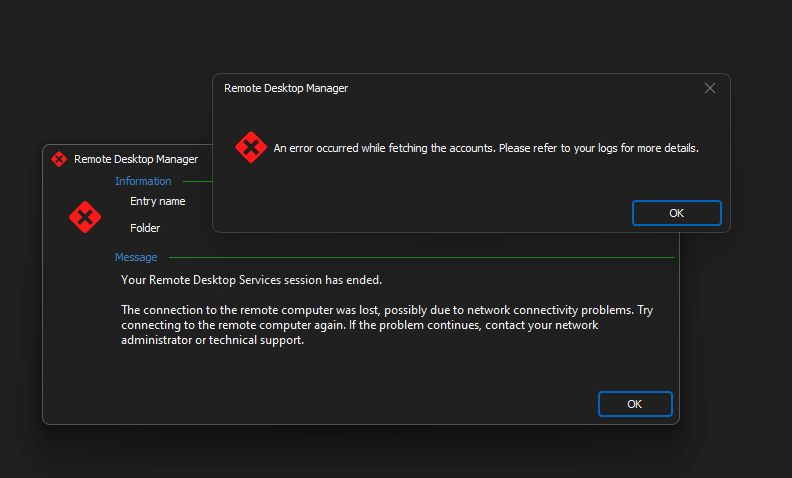
I attempted to see if there was a solution/setting to this and found this option in the advanced settings of the Cyberark dashboard, but it is grayed out. I am not sure what is preventing this option from displaying. It sounds like this would be the solution, we would set this option to be slightly before 12 hours so it cleanly closes out the RDM session. 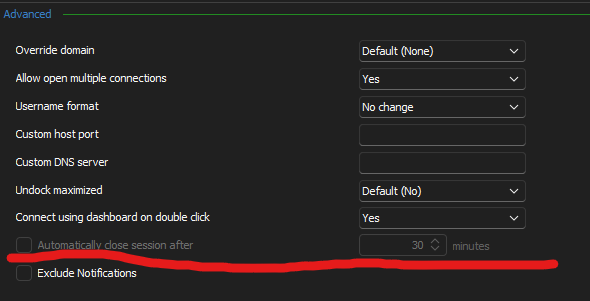
Any help or guidance would be appreciated!
rdm-ca-session-option.png
rdm-ca-session.png
All Comments (2)
Hello,
I can confirm that the "Automatically close session after" setting is always disabled on CyberArk Dashboard entries, but it's a bug.
We'll open a ticket to take a look into it and update this thread once we have a solution.
Regards
Jonathan Del Signore
Hello,
We've fixed the issue where CyberkArk Dashboard entries were not able to use this particular setting. This should be available for the next 2023.3 version.
Regards,
Jafran Majeau