Asset field version no longer supported
0 vote

Hello,
It appears that the asset field 'Version' has been removed in the newest RDM release 2023.2
This introduces a problem for existing customers who use this field.
For details, related ticket: 00036187. Hopefully the field can be fixed / added again into the RDM.
Thanks in advance.
All Comments (6)
Hello,
I suspect that the filed was moved or renamed. Could you try to verify the content of one of your entry here;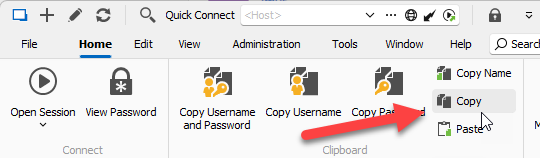
And here: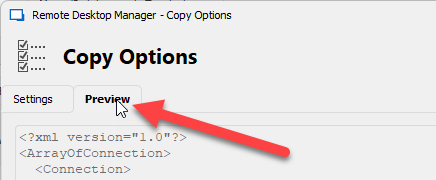
Let me know the name of the property containing the missing version.
Regards
David Hervieux
2c4127c8-4b40-4a4c-9031-7ad8fe632d2c.png
21e915b8-3f63-4eb1-9d98-e7b59a95cb62.png
Hello, the field isn't visible unless previously used.
This is the name of the property:
<?xml version="1.0"?>
<ArrayOfConnection>
  <Connection>
    <MetaInformation>
      <Version>1.2</Version>
    </MetaInformation>
  </Connection>
</ArrayOfConnection>Hello,
I have verified and this field only appears if it's not empty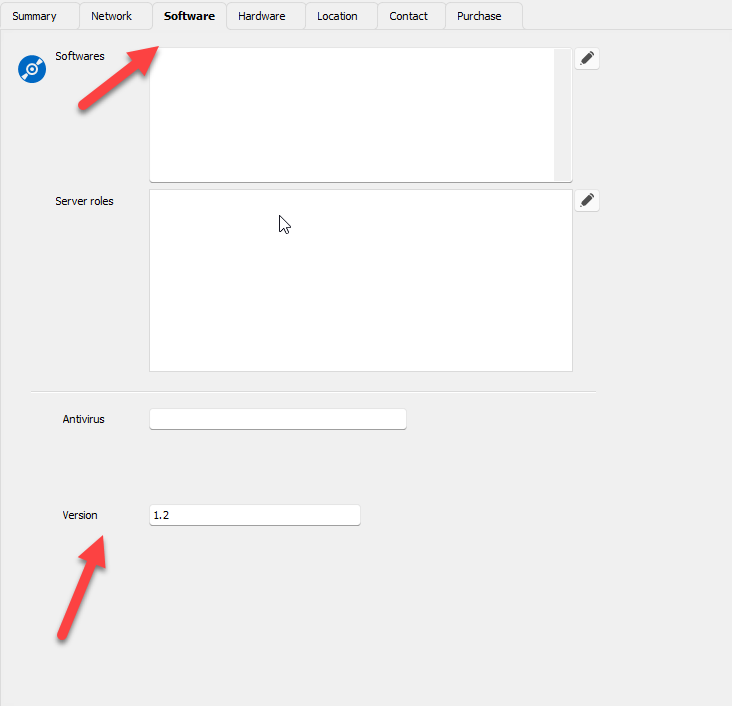
Regards
David Hervieux
c229f964-8905-4d0c-9e73-bd0eec271110.png
Hello, thank you for verifying.
The problem is, after updating RDM it is no longer possible to fill in a 'Version' (for new entries or entries that had no existing value).
Previously this field was available to fill in a version for an entry, and use this asset information to search or create an overview.
Best regards.
Hello,
This field has been deprecated because its was causing confusion with the software version in Asset. I will bring it back and moved the field into the Summary tab page. Perhap I could also change the label for Asset version.
What do you think?
David Hervieux
Hello,
Okay, that explains why the 'Version' field isn't working at the moment. This seems like a great solution!