Sort "Expiring Entries" by date
0 vote

Good morning.
I would like to suggest a Feature to allow the sorting of Expiring Entries shown on the dashboard to sort by "Expiring xxx days from now".
The current way of Alphabetical is nice, but for those of us who have 40+ credentials that expire at different times, there is a good chance of missing some.
If there was a way to put it in the Options to sort by expiring days from now instead of alphabetical, that would be fantastic: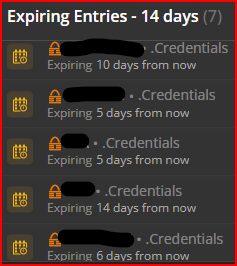
I know this seems like a trivial request, but I am sure there are quite a few others, reading this request, who would agree this would be a great option.
--- Chuck
Overgaard, AZ (-7 MST / Zulu Year-Round)
RDM Version: 2026.2.16.0 64-Bit - Free
c88fd072-2390-418d-afdc-03e5e5867f2c.png
All Comments (3)
Hello,
It's a good idea. We will change the default sort
Regards
David Hervieux
Hello,
It's a good idea. We will change the default sort
Regards
David,
Looks like the latest release did just that. Primary sort is by closest date expiring/expired, and secondary is alphabetical.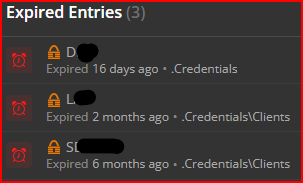
I just changed all my Expiring passwords, so I have none on the list to show for that one, but just after I downloaded the update and noticed, they were sorted the same way.
I'm sure there are quite a few others who appreciate this small little feature fix.
Have a great day!
--- Chuck
Overgaard, AZ (-7 MST / Zulu Year-Round)
RDM Version: 2026.2.16.0 64-Bit - Free
a7f54422-5601-46aa-bfe4-b4d5ea550714.png
Hello,
Looking at your latest screenshot, I'd be inclined to believe that the sorting was simply coincidental with the sorting by name. That said, we've now changed the default sorting to be done by expiration date rather than name. This should be available for 2023.3
Regards,
Jafran Majeau