Credential Sync

Ok I know this is a long shot. I have my RDM working with a Delinea Vault integration and it is working great. My question is, is there any way to automatically (once a day maybe) have RDM take my Delinea Credential entry, and sync the password to a manually created credential entry? I want to keep an emergency backup of my Delinea password copy stored just in the event that my Cloud Vault goes down I want to be able to still use my account.
For clarification my Delinea password is rotated daily so Ideally at say 7am, RDM would sync the password of my Delinea Credential to a manually defined credentials so I can grab my daily password if Delinea is down anytime.
All Comments (38)
Hello Justin,
With a Powershell script, you could accomplish your goal. For example, create a (local) PowerShell session and use the following code: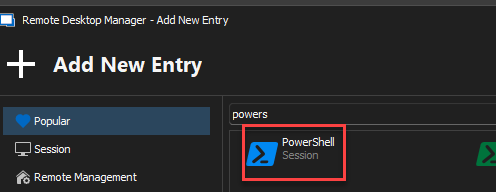
if(-not (Get-Module Devolutions.PowerShell -ListAvailable)){
    Install-Module Devolutions.PowerShell -Scope CurrentUser
}

# Adapt the data source name
$ds = Get-RDMDataSource -Name "NameOfYourDataSourceHere"
Set-RDMCurrentDataSource $ds

#retrieve credentials
$delinea = Get-RDMSession -Name "Delinea"

#create new credential
$date = Get-Date -Format "MM-dd-yyyy"
$creds = New-RDMSession -Name "backup-Delinea_$date" -Type Credential -Group "a-folder"
$creds.Credentials.UserName= (Get-RDMSessionUserName -Session $Delinea)
Set-RDMSession $creds
Set-RDMSessionPassword -ID $creds.ID -Password (Get-RDMSessionPassword -Session $Delinea) -SetSession
It will create a credential with the date, and the username/password from your Delinea credential: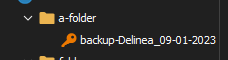
You can then "automate" this by using a startup playlist - https://docs.devolutions.net/rdm/windows/commands/edit/edit/play-list/play-list-actions/
Best regards,
Richard Boisvert
edd12364-3c5a-4a7f-9f68-806ea058b581.png
ffc3dbcc-987e-4b71-9bd1-b8f70cac929f.png
Ok I will play around with this.. Assuming I want it to simply overwrite the credential daily since I do not need a history of the past passwords.. just my daily one
Also, another stupid question, can I actually see the PowerShell code running for debugging process? I am trying to play around with this yet I see no signs of it running what so ever.
I modified your example slightly with my folder and secret name, but when I click execute I see nothing happen or run and the application logs show nothing.
When running this script, after importing the modules in powershell, i got the following errors.. 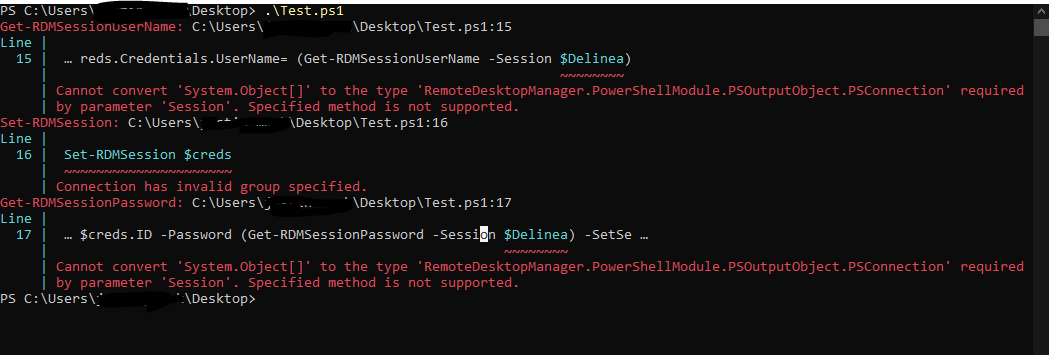
RDM.PNG
Hello,
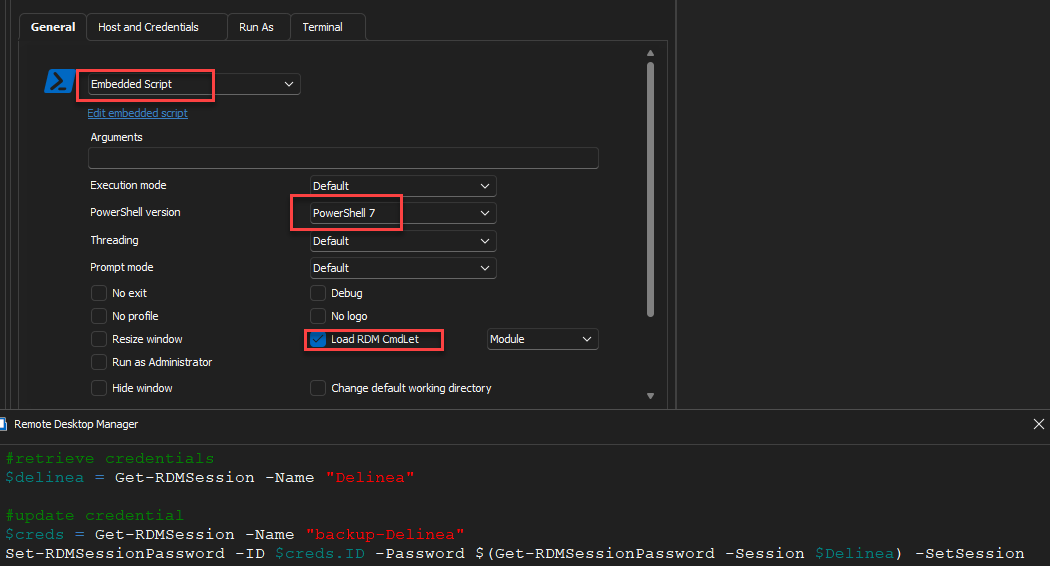
I simplified the script and used the "Load RDM CmdLet" option instead. I also changed the script only to update the password of an existing entry. Make sure you also use PS7, but you seem to be already.
#retrieve credentials
$delinea = Get-RDMSession -Name "Delinea"

#update credential
$creds = Get-RDMSession -Name "backup-Delinea"
Set-RDMSessionPassword -ID $creds.ID -Password $(Get-RDMSessionPassword -Session $Delinea) -SetSession
Best regards,
Richard Boisvert
4d8238e7-d455-4d66-9bbe-efcc712a600a.png
That actually got me further.... this is when launching the session in RDM.
I do also see a quick flash of "loading session data" or something similar it is up and gone real fast so I cannot catch a screen shot of this.
and I have updated the names of the source and target credential entry to match my end
also when running line by line manually in power shell this is what throws the error..
PS C:\Users\XXXXXXXX> Get-RDMSessionPassword -Session $Delinea
The method or operation is not implemented.
Get-RDMSessionPassword: Exception of type 'Devolutions.RemoteDesktopManager.Business.UserCancelConnectionException' was thrown.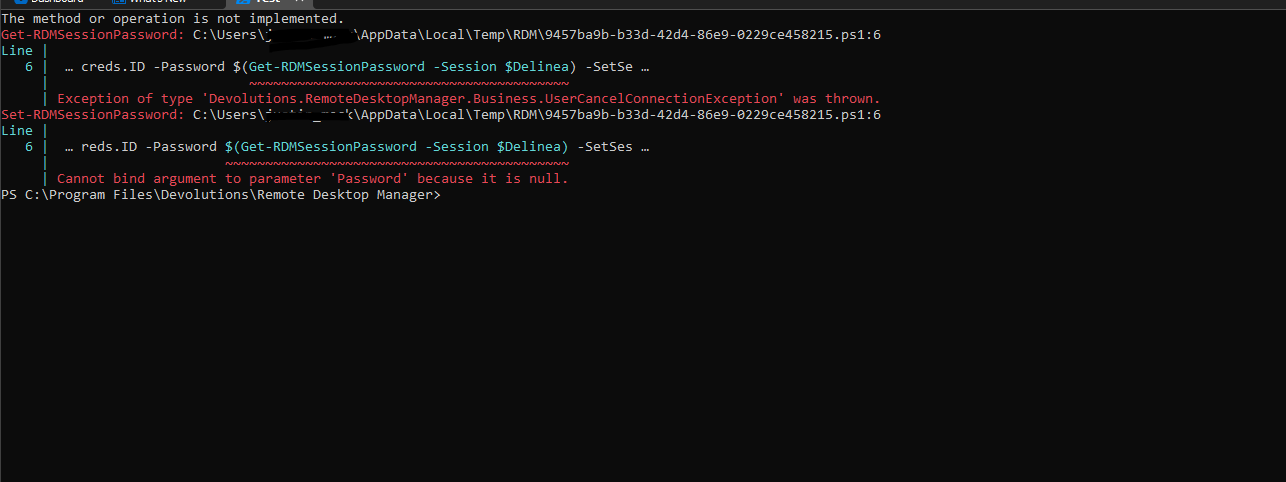
ca26dca3-c8df-4eda-a89e-4fba43bd9b08.png
Hello,
Could you go to Tools > PowerShell, run Get-RDMInstance , and let us know what version you are using. Also, what version of RDM do you have, as well as what type of data source?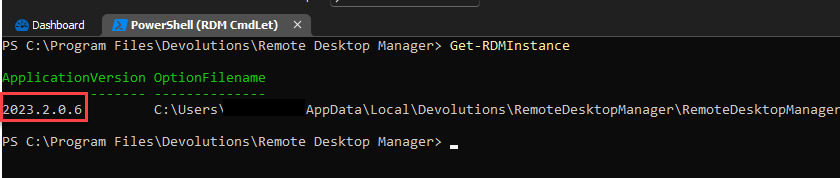
Best regards,
Richard Boisvert
9cc38c91-9b52-4d1a-8969-1c3ca5e767b6.png
Running that from within RDM
2023.2.0.6 C:\Users\XXXXXXXXX\AppData\Local\Devolutions\RemoteDesktopManager\RemoteDesktopManager.cfg
I also am running version 2023.2.25.0 64-bit
Data source is "Local Data Source"
Also when (within RDM) running each command one by one..
This is now what I get when I get to the last command, also I know it is grabbing the entry details since I can call the variable name and they both return data.
PS C:\Program Files\Devolutions\Remote Desktop Manager> Set-RDMSessionPassword -ID $creds.ID -Password $(Get-RDMSessionPassword -Session $Delinea) -SetSession
The method or operation is not implemented.
Get-RDMSessionPassword: Exception of type 'Devolutions.RemoteDesktopManager.Business.UserCancelConnectionException' was thrown.
Set-RDMSessionPassword: Cannot bind argument to parameter 'Password' because it is null.
PS C:\Program Files\Devolutions\Remote Desktop Manager>
Just a follow up.. I have done a full system restart.. I JUST installed the latest RDM Update (2023.2.27.0) and still getting this error..
The method or operation is not implemented.
Get-RDMSessionPassword: C:\Users\XXXXX\AppData\Local\Temp\RDM\2a328d70-5ae8-4d05-9f6d-afc4b958953e.ps1:6
Line |
6 | … creds.ID -Password $(Get-RDMSessionPassword -Session $Delinea) -SetSe …
| ~~~~~~~~~~~~~~~~~~~~~~~~~~~~~~~~~~~~~~~~
| Exception of type 'Devolutions.RemoteDesktopManager.Business.UserCancelConnectionException' was thrown.
Set-RDMSessionPassword: C:\Users\XXXX\AppData\Local\Temp\RDM\2a328d70-5ae8-4d05-9f6d-afc4b958953e.ps1:6
Line |
6 | … reds.ID -Password $(Get-RDMSessionPassword -Session $Delinea) -SetSes …
| ~~~~~~~~~~~~~~~~~~~~~~~~~~~~~~~~~~~~~~~~~~~
| Cannot bind argument to parameter 'Password' because it is null.
PS C:\Program Files\Devolutions\Remote Desktop Manager>
So breaking down each step component on the set password part.. and it looks like this might be why the password is null...
PS C:\Program Files\Devolutions\Remote Desktop Manager> Get-RDMSessionCredentials -Session $delinea
Get-RDMSessionCredentials: A parameter cannot be found that matches parameter name 'Session'.
Also to be clear, this is a linked Delinea Credential, so looking at the item properties, there is no defined password, however clicking copy password or show password yields the correct value so I know they are setup properly and I can also use it to access resources so I know the entry has access to the correct credentials.
Hello,
You are correct; PowerShell cannot retrieve the password since you are using a Secret Server credential. I will open an internal ticket so the engineering team can see if retrieving it from the PS module is possible.
Best regards,
Richard Boisvert
Ah ok makes sense, I know you can pull passwords via the delinea API, so I would hope it's doable. What is odd is in RDM if I right click the delinea entry and select copy password or display password it does in fact show the correct value.. it's just not stored locally on my RDM, really hope there is a way around that.
I take it there is no other way at the moment to copy the delinea entry password to a static credential entry in the event our vault goes down or some other network issue prevents RDM and Delinea talking,
Happy to do any testing on my end if that will help the development team, getting this to work would be a HUGE deal in keeping this integration running smoothly,
Any word back from the engineering team about this at all?
Like I said I can right click the entry and copy the password and it is the correct password, I can also click view and again, it grabs/displays the correct/current Delinea password so there must be a way to achieve this.
Hello Justin,
It is still in the backlog of the engineering team; I will ask them for an update.
Best regards,
Richard Boisvert
understood.. thank you for the update.
Hello Justin,
The developer started working on the issue.
Best regards,
Richard Boisvert
Hooray! Thank you for letting me know. Fingers crossed it is a quick resolution. Like I said I am more than happy to test anything or share as many details as I can about my setup to help resolve this!
Good Morning,
Figured I would just check in to see if there was any sort of update on this at all. I was out most of this week so I did not want to forget myself.
Hello Justin,
Our Secret Server license expired, so we are waiting for Delinea to provide one. Once we have it, implementing this feature should be relatively quick.
Best regards,
Richard Boisvert
Ah ok.. if there is any testing I can do on this end to help please let me know.. happy to work with a developer on this side if that can help at all.
Any update on this from the devs at all?
Hello Justin,
We are still waiting for the license from Delinea, unfortunately.
Best regards,
Richard Boisvert
Bummer, ok
Is this still pending?
Also i just noticed that with the latest update 2023.3.20.0 the Delinea connection operates differently now. When viewing a secret or verifying credentials now. I am presented with a mini web log in page where I have to manually enter in my Creds and OTP in a mini Delinea page. Versus prior where it would just ask for my OTP.. Is this intended behavior with this latest update? I just didn't see anything in the change notes about this so I figured I would ask.
Hello Justin,
Yes, this is still pending.
For the OTP, I will check with the developer in charge of the Delinea integration.
Best regards,
Richard Boisvert
Thank you..
Prior to today's update. When I would use a Delinea resource it would used my already saved credentials I have setup and defined in the template. It would use those in the background and just present me with an RDM OTP window where I would provide the code for my Delinea account that would seemingly get passed/validated with Delinea in the background.
Now it loads up a mini browser window inside RDM to the Delinea URL defined in my template ignoring my defined credentials, I now have to put in my username, domain and password (I even setup a new entry with those hard defined in that entry as a test but no change), then I get the OTP screen as if I was logging into Delinea on a standalone browser (but again it is a browser window and not an RDM screen).
Once I validate it works as it did before..
I know you are waiting on a license from Delinea, but I am more than happy to provide examples or do any testing needed if that will help.
Hello Justin,
I just verified with the developers, and a new authentication method for Delinea/Secret Server was implemented in the 2023.3.20 version. It is not showing in the release notes; they are currently looking into why it is missing.
The behavior you are experiencing is normal; it is in preparation to support the SAML authentication.
Best regards,
Richard Boisvert
Got it. ok thank you.. Just wanted to make sure this was the intended behavior. Do you happen to know how long a Delinea session will stay validated with this new method?
Hello Justin,
I asked the developer, and he was uncertain, unfortunately.
To correct what I said, the SAML authentication is working now if you use the Cloud version and the URL to your instance contains "secretservercloud".
Best regards,
Richard Boisvert
Great. Thank you for the clarification.
Hello Justin,
Just to let you know, the new version of RDM will bring back the old OTP screen for Secret Server if you are using the on-premise version.
The browser authentication will still be used for the Cloud version.
Best regards,
Richard Boisvert
That is funny, our Delinea instance is cloud based and operated like it did previously with the RDM OTP screen.. It works fine with this new method just with the new workflow.
Hello Justin,
The newest version of Devolutions.PowerShell now support Secret Server credentials - https://forum.devolutions.net/topics/40590/version-202331-10th-november-2023
Could you please try it out and let us know if you have any issues?
Best regards,
Richard Boisvert
Ok I just updated..
Same error..
$delinea = Get-RDMSession -Name "SourceAccount"
$creds = Get-RDMSession -Name "DestinationAccount"
These both run fine for obvious reasons..
But the next step. Still fails..
Set-RDMSessionPassword -ID $creds.ID -Password $(Get-RDMSessionPassword -Session $delinea) -SetSession
And running JUST the Get-RDMSessionPassword -Session $delinea command still fails
The method or operation is not implemented.
Get-RDMSessionPassword: Exception of type 'Devolutions.RemoteDesktopManager.Business.UserCancelConnectionException' was thrown.
WHen running the whole line I get this
The method or operation is not implemented.
Get-RDMSessionPassword: Exception of type 'Devolutions.RemoteDesktopManager.Business.UserCancelConnectionException' was thrown.
Set-RDMSessionPassword: Cannot bind argument to parameter 'Password' because it is null.
This is assuming the commands are the same post update.. this is just what was given last time we worked on this.
Would the commands differ for dealing with a Delinea entry? As it stands now, the script provided earlier performs the exact same way with the same errors happening.
Hello Justin,
Is the authentication method of the Secret Server entry configured to SSO or SAML? If it is not SAML, could you try it that way?
If you want to keep using SSO, are you using My Account Settings for your credentials? If so, that method is not yet implemented.
Best regards,
Richard Boisvert
Hello Justin,
Is the authentication method of the Secret Server entry configured to SSO or SAML? If it is not SAML, could you try it that way?
If you want to keep using SSO, are you using My Account Settings for your credentials? If so, that method is not yet implemented.
Best regards,
I have the connection setup with our Cloud URL, but it is still using the RDM style OTP password entry so I am not sure. And yes, I am using a defined "My Credential" Entry for username/password to Delinea.
Hello Justin,
That is why it is failing. Adding the "My accounts settings" is phase 2 of this request; the developer is working on implementing it.
Best regards,
Richard Boisvert
Hello Justin,
That is why it is failing. Adding the "My accounts settings" is phase 2 of this request; the developer is working on implementing it.
Best regards,
Good to know.. Thank you for the update..
Is there any ETA at this point?
Hello Justin,
No ETA, but the developer was working on it.
Best regards,
Richard Boisvert