Using PVWA Credential to launch SSMS (and other applications) is failing.
Using PVWA Credential to launch SSMS (and other applications) is failing.

We have successfully been using PVWA Credentials to launch SSMS (and other applications like Chrome), we were using the RADIUS authentication method without any problems. Now we have a use case where we need to use PVWA Credentials to do the same thing but using LDAP authentication and it is failing. There error message says Unable to execute the command line, "The stub received bad data".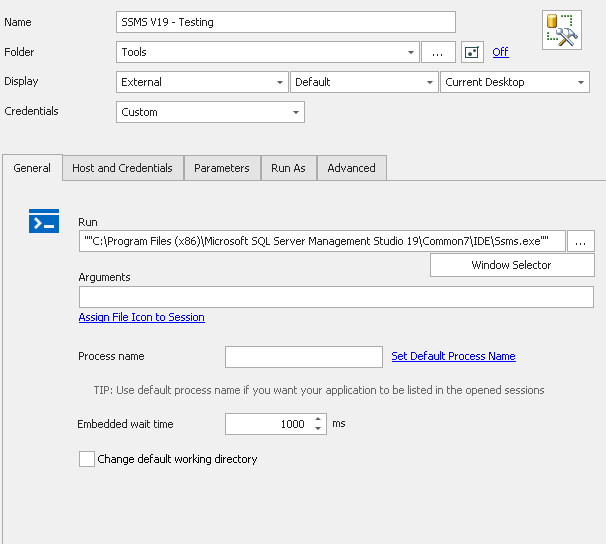
Only other changes are to set Run As to Current Session and the launch the entry with the PVWA credentials. The same credential entry works fine to launch Remote Desktop session.
4157d9f1-7433-4e87-a529-7f224bb92f25.png
All Comments (7)
Hello George,
Thanks for reaching out.
I'm wondering, if you copy / paste the credentials from the account on CyberArk PVWA instead of using the PVWA credential entries, do you experience the same behavior?
You should try different username format (Netbios, short, UPN)
With this information, this should narrow down the possibilities.
Thanks for your cooperation.
Best regards,
Alex Belisle
Outside of RDM I can do a Run As and use the credentials and it works.
Under the Run As tab, if I choose Credentials = None... then the app opens but it has the credentials of the current windows user rather than the Privileged Account I am trying to use.
I'm not sure where you are suggesting that I copy/paste the Privileged Account info... can you clarify please?
Hello,
I was wondering if the link to the credential is broken, or if it's something to do with how RDM handles the "run as" feature.
What I meant by copy pasting from PVWA in RDM is :
- Get to your CyberArk PVWA
- Find the Account and copy the username and the password
- Paste the username and the password in the Run As section of the entry
- Try again.
If this works, it will mean that the credential fetching is somehow not working, it it doesn't we'll see why SSMS cannot be run as a different user in RDM.
I hope this clarifies my angle.
Best regards,
Alex Belisle
Alexandre,
I am a team mate of George. We are both having the same issue. I tried your suggestion to paste the username and password in and it worked. Thoughts?
Hello,
Good, thanks for testing, so this rules out the "run as" in general.
We can now focus on what's going on with the CyberArk PVWA Credential entry.
I think George already confirmed that the credential entry already works on other sessions, so my take on this would be that either :
- The password is not injected in the "run as" context
- I'll look internally into this
- The username format is incorrect
You can force a different username format from the CyberArk PVWA credential entry, from the Advanced properties of the entry (I would suggest to clone the entry so you don't affect what may already be working)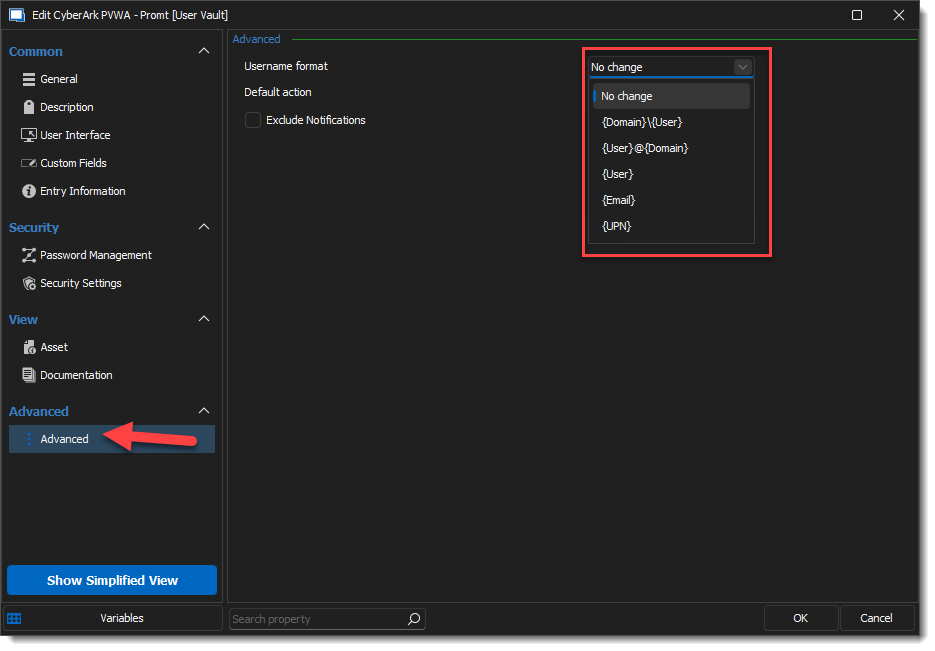
There is also a chance that this is caused by the domain not being fetched properly (for example, it would be stored in a different field on CyberArk's side)
I suggest you also try the CyberArk PVWA credential entry property Domain Search Method, located in the General section > Advanced Tab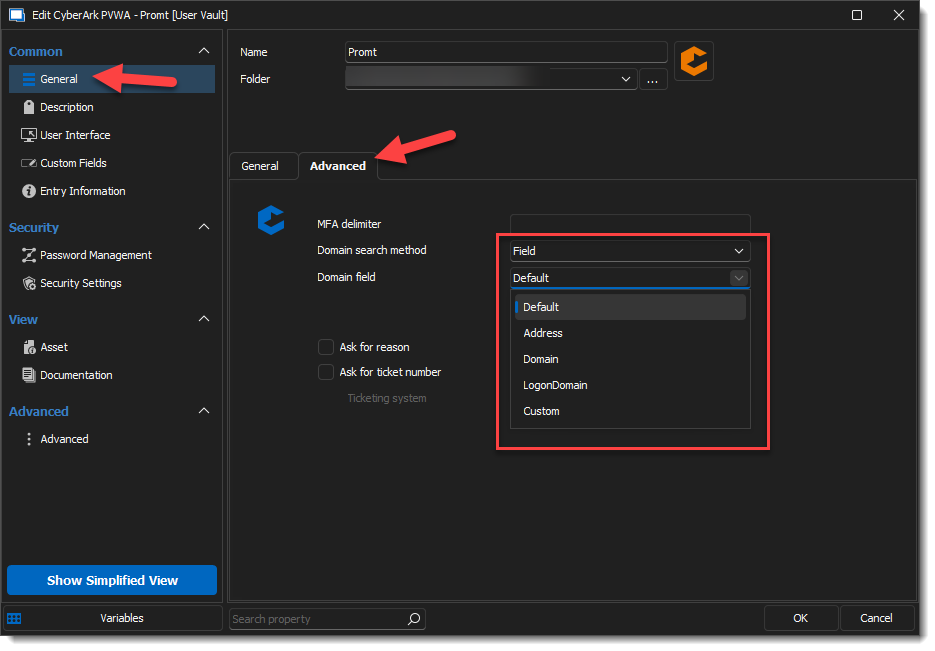
I hope this helps, thanks for letting us know.
Best regards,
Alex Belisle
8894e205-cffe-4488-9570-1006053b3381.png
3d16b8a0-1996-40d7-8e60-78a103909b8c.png
We tried numerous permutations of the advanced tab options within RunAs without success, then we ran into another user on our team who was working and noticed that the Advanced Tab on his PVWA credential was Field/Address and he was working... ours was Field/Domain and worked for RD connections but not RunAs connections... he switched and his also failed, we switched an ours also worked. So that seems to be the solution for both to work you need to be set as Field/Address on the credential. Thanks for your help.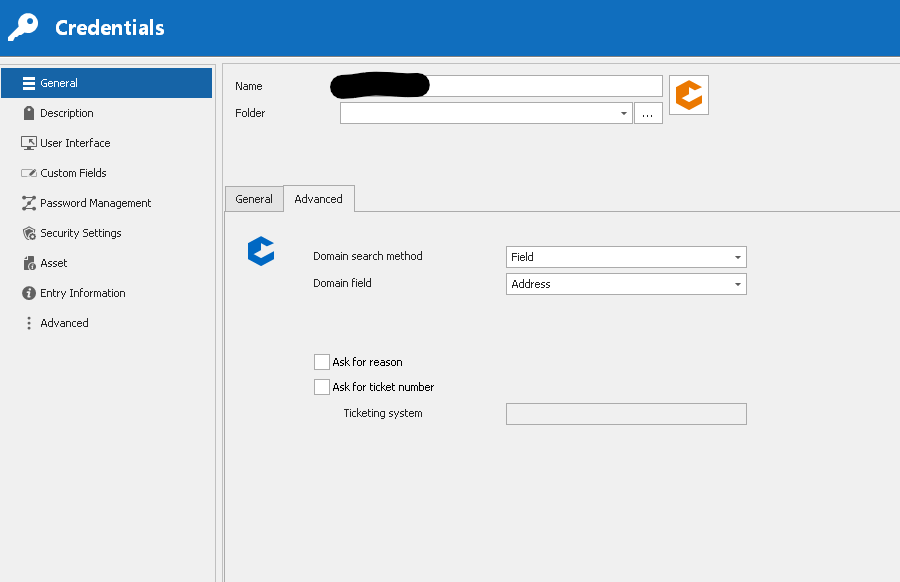
b1ab6401-31d1-40c0-9f44-94c903b290f1.png
Hello,
You're welcome, I'm glad I could help!
Best regards,
Alex Belisle