Can I use the Import Computer Wizard and specify a specific OU?
Can I use the Import Computer Wizard and specify a specific OU?
0 vote

When I use an AD Synchronizer, there's a field to specify which OU to look in. This field doesn't exist in the Import Computer Wizard for some reason. IF it could be added, it would be a huge help.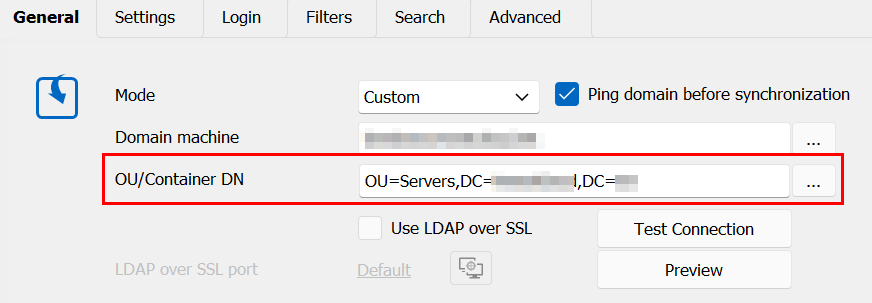
Anyway, since it's not there, how can I reproduce the same end result? When using the ICW, there's a box for "Other filter" that could probably be used but I'm not sure of the syntax. I currently use the Other Filter group to filter only Windows Servers by entering operatingSystem=*windows server*. This works fine, but brings in servers in Test OUs which I don't want.
I thought maybe I could I do something similar with the Distinguished Name field since that contains the OU. I tried using distinguishedName=*Servers* but that gave me no results. I saw a different post about putting the OU in the Domain field but that didn't seem to give me any results either.
Anyone have any other ideas on how I can import out from a specific OU?
cdbefc79-7bb4-4c34-8d92-b54c4d79d6dd.png
All Comments (2)
Hello,
To my knowledge, the only to have the specified behaviour is through the AD Synchronizer.
Upon looking into the Import Computer Wizard, it doesn't appear to have a way to gain the desired behaviour that you mentioned.
Since this seems to be a feature request, I will transfer this to the Feature Request forum.
Best regards,
Hello,
Thank you for the request. We'll open a ticket and see what we can do to add this to the wizard.
Regards,
Hubert Mireault