Ribbon not showing in RDM 2023.2.25.0 64bit

I freshly installed the Remotedeskopmanager (Free) and have the issue, that the ribbon wont show.
I tried couple of things like written here:
https://forum.devolutions.net/topics/2311/rdm-8050--ribbon-disappeared#12852
Top Pane - Devolutions
https://forum.devolutions.net/topics/32910/cannot-show-the-ribbon-after-upgrade-to-2019220#135090
- reinstall RDM
- Reset view (Window>Reset layout)
Version: 2023.2.25.0 64bit (Used with Windows 11 x64 22H2 22621.2134
It should look like this: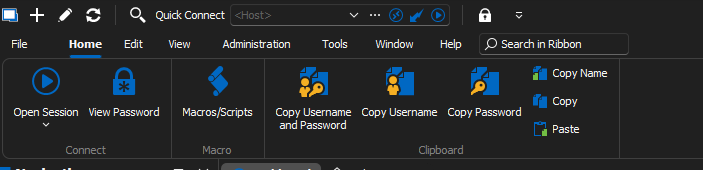
How can i achieve this?
best regards
6ad3d5be-5dca-4271-a33e-4b8dc488fd76.png
image.png
All Comments (2)
Hello,
The default view was modified; it now only shows the tabs now. To change the view, please refer to https://docs.devolutions.net/kb/remote-desktop-manager/how-to-articles/ribbon-default-visibility/
You would need to select Always Show Ribbon.
Best regards,
Richard Boisvert
Hi richard
I have only this options 
Edit:
i was able to resolve this by deleting the devolutions folder under %appdata%
2023-08-28_16-30-49.png