Overview tab disappeared after latest version upgrade.

Good morning, folks.
After the latest upgrade to 2023.2.24.0 64-Bit, the "Overview" information tab is completely blank for all assets, including the Dashboard. I verified this with an upgrade on a 2nd machine as follows:
This version shows the information: 

After upgrading to:
Everything now shows as this:
On the machine I noticed it 1st, I have 884 entries affected.
The VM these screenshots are from has 267 entries.
All have the same affect.
Edit > Properties shows all the information if you flip through all the different tabs.
Thanks for looking in to this.
--- Chuck
Overgaard, AZ (-7 MST / Zulu Year-Round)
RDM Version: 2026.3.2.0 64-Bit - Free
All Comments (9)
Hello,
We're aware of the issue you're encountering and have identified a workaround. Kindly follow the steps below:
1. Close RDM.
2. Open File Explorer and navigate to the local AppData.
3. Go to the "Devolutions" folder.
4. Access the "RemoteDesktopManager" directory.
5. Create a new folder and name it "Backup."
6. Move the file "RemoteDesktopManager.cfg" to the "Backup" folder.
7. Restart RDM; this should rectify the issue.
For a clearer understanding, please watch this video tutorial: https://devolutions.sharefile.com/d-s377081a216af49cabcc1f6f443d485a6
If the above steps don't resolve the issue, or if you have any other questions or concerns, don't hesitate to contact us.
Lastly, could you please send the backup folder to us? Our engineers would like to analyze it further. I've privately sent you a link where you can upload the folder.
Best regards,
Carl Marien
Hello,
We're aware of the issue you're encountering and have identified a workaround. Kindly follow the steps below:
1. Close RDM.
2. Open File Explorer and navigate to the local AppData.
3. Go to the "Devolutions" folder.
4. Access the "RemoteDesktopManager" directory.
5. Create a new folder and name it "Backup."
6. Move the file "RemoteDesktopManager.cfg" to the "Backup" folder.
7. Restart RDM; this should rectify the issue.
For a clearer understanding, please watch this video tutorial: https://devolutions.sharefile.com/d-s377081a216af49cabcc1f6f443d485a6
If the above steps don't resolve the issue, or if you have any other questions or concerns, don't hesitate to contact us.
Lastly, could you please send the backup folder to us? Our engineers would like to analyze it further. I've privately sent you a link where you can upload the folder.
Best regards,
Good morning.
This did in fact fix the issue. However, now all configuration options are gone and have to spend time going back in to set up RDM the way it was.
Will this issue be fixed quickly in an update so all folks don't need to wipe out their configs?
--- Chuck
Overgaard, AZ (-7 MST / Zulu Year-Round)
RDM Version: 2026.3.2.0 64-Bit - Free
Hello Chuck,
Our engineers are currently working to determine the cause of the issue. This is why we've requested the file "RemoteDesktopManager.cfg" – it will help us get to the root of the problem.
We will keep you updated about advancement in this case.
Best regards,
Carl Marien
Hi Chuck,
We are still investigating the issue but we believe we have a workaround.
Can you please try the following:
- Close RDM
- Revert to your old .cfg file
- Keep a backup of your current working .cfg just in case this doesn't work
- Start RDM
- File > Devolutions Account > Uncheck "Automatically sing-in at startup"
- Close RDM
- Start RDM
All should be good.
Please let me know if this resolves it for you.
Best regards,
Stéfane Lavergne
Hi Chuck,
We are still investigating the issue but we believe we have a workaround.
Can you please try the following:
- Close RDM
- Revert to your old .cfg file
- Keep a backup of your current working .cfg just in case this doesn't work
- Start RDM
- File > Devolutions Account > Uncheck "Automatically sing-in at startup"
- Close RDM
- Start RDM
All should be good.
Please let me know if this resolves it for you.
Best regards,
Yes, that works.
There is another thread regarding this exact topic, and the young lady found that fix last week.
--- Chuck
Overgaard, AZ (-7 MST / Zulu Year-Round)
RDM Version: 2026.3.2.0 64-Bit - Free
Perfect thank you for the confirmation.
Stéfane Lavergne
We have a fix for this issue. We will finalize it in the next few days and get a build out as soon as we can.
Best regards,
Stéfane Lavergne
Well...Did not see anything official yet...but latest update appears to have fixed these issues for me
2023.2.27.0
Thank you for the update, I can confirm this build does in fact have the fix for your issue.
Best regards,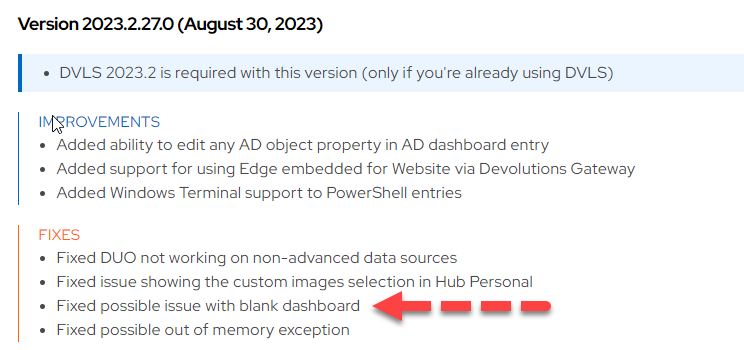
Stéfane Lavergne
8de204a8-b69e-46e3-9208-b1fd738b4864.png