Use "videoplaybackmode:i:0" For RDP Connections Within RDM

Hi,
Our RDM users are experiencing the following issue when starting an RDP connection from RDM:
the RDP window is always on top - Microsoft Q&A
Is there a way to adjust the connection within RDM so that the suggested fix (You can change this behavior by modifying the .RDP file for your connection.
the value is the setting "videoplaybackmode:i:1" to "videoplaybackmode:i:0".) is applied automatically?
Best regards
All Comments (6)
Hello,
At the moment it isn't possible, but we will open a ticket to add an option for this.
Regards,
Hubert Mireault
Hello,
It turns out that we already support this setting. You can find "Redirect video playback" in the Experience tab. Unchecking it will set the videoplaybackmode to 0.
Regards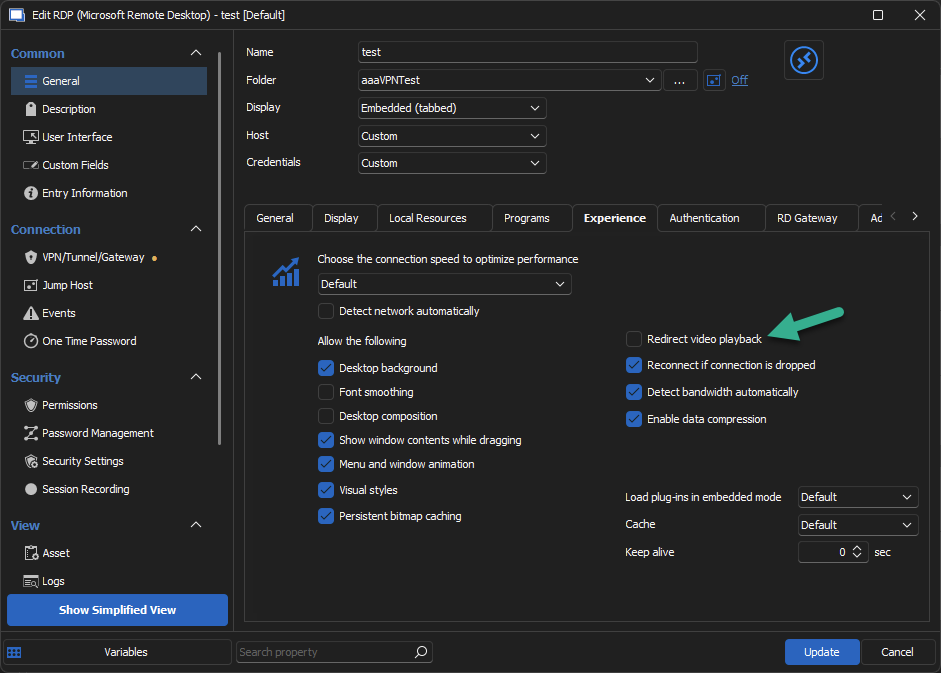
Jonathan Del Signore
0226dffe-1520-4eb1-b7c0-41410cfcc9cb.png
Hi,
thank you very much for the fast response. The option was already unticked, but our users are experiencing the following issue:
1) RDP connection is opened in full screen mode (external)
2) Another Application is opened → opens in front of the RDP connection → OK
3) The RDP connection is minimized and maximized → all other applications are opened in the background and the RDP connection always stays in the foreground
RDM Version: 2022.3.32.0
Best regards
Hello,
If you update to version 2023.2.24.0 of RDM, do you receive the same behaviour ?
Note that a database upgrade may be necessary, if this is the case follow this help article to see how to proceed before updating RDM and during the update process:
https://docs.devolutions.net/rdm/windows/installation/database-upgrade/
Best regards,
Hi,
Apparently a similar issue happens with Royal TS, where a customer reported it consistently happens only when his laptop is connected to a docking station with external monitors. If you use a docking station or attach external monitors to a laptop, could you try disconnecting them to see if the issue still happens with only the laptop built-in screen, if this is a laptop? I have been trying to reproduce the issue on my side without success, so it looks like it may happen only with specific hardware configurations.
Best regards,
Marc-André Moreau
Hi,
I asked our end user that has the problem and got the following response:
1) Happens also with RDM version 2023.2.24.0
2) "You cannot reproduce the issue with only one monitor because you have to minimize the RDP connection that is in full screen first in order to get access to the task bar to then select a different app. The issue appears when the RDP connection is in full screen, and you select an app from a task bar that now is on the same screen as the RDP connection. This app does not appear in front of the RDP connection."