Run CMD Command Upon RDP Connection

How can I set the software to automatically run a CMD command when connecting to any/all RDP machines and also be able to see the output in the app?
All Comments (3)
Hello,
You can configure this within the RDP entry properties: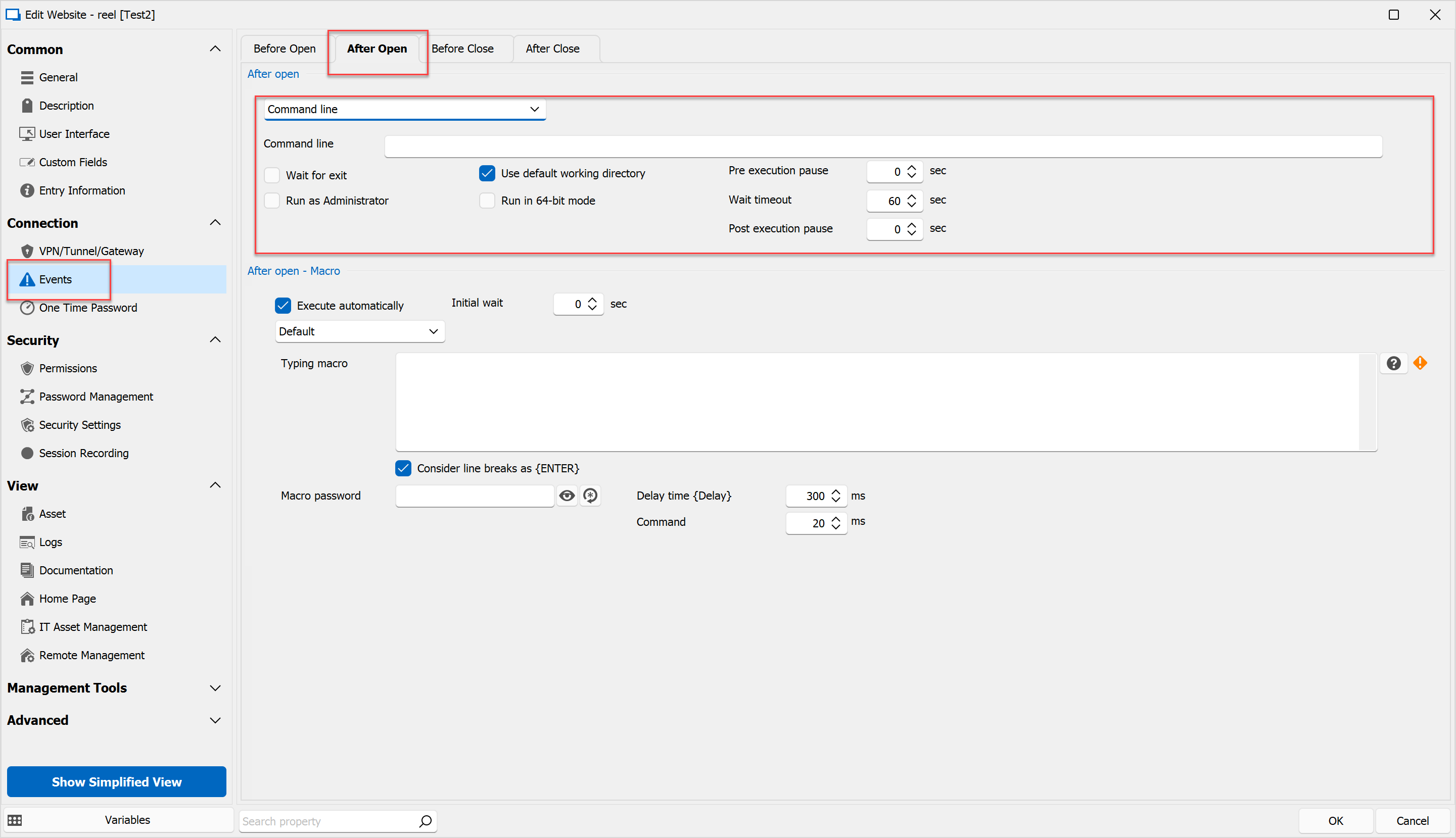
If you'd like to have to change multiple entries at once you can us the batch edit feature for your RDP entries to perform this change to multiple entries at once.
Batch Edit: https://docs.devolutions.net/kb/remote-desktop-manager/how-to-articles/batch-edit-rdm/#batch-edit
Specifically, the Event option will be in the "Edit Entries (General Settings)" option.
Best regards,
565ea10c-1dfc-4834-86e6-083529b630f9.png
Is it possible to set it that if there's a certain word in the response given in CMD it can abort the connection?
Hi,
If by this you mean capturing the textual output from the command injected into an RDP session, that is not technically feasible with realistic means.
Best regards,
Marc-André Moreau