Allow Users To See Who Else Is Connected Before Connecting
Allow Users To See Who Else Is Connected Before Connecting
0 vote

If you run "query user /server:servername" in CMD, it will show you who is connected to that server via RDP. It would be great if this functionality was included with RDM and was triggered upon every connection. Simply running the command in RDM as an entry doesn't suffice. It should show an alert box letting you know if anyone is connected, and who, with the option to proceed with connection and kick them off anyway if the user chooses to do so. This should also be an option in Bulk Edit so it can be changed for all added connections. I don't want to use the built-in "Warn if already opened" feature as that requires everyone in the team to use RDM which won't always be the case.
All Comments (3)
Hello,
From what I know, what you're asking for should be possible to achieve, but it requires the appropriate privileges on the remote machine, which might require you to configure the entry's tool section to point to the correct credentials to execute the command under. We will add this to our todo list, but it comes with its challenges.
In the mean time, if all of your users are using RDM, you could check the "warn if already opened" box on your RDP entries. If someone else is using this entry in RDM, it will warn you before trying to connect.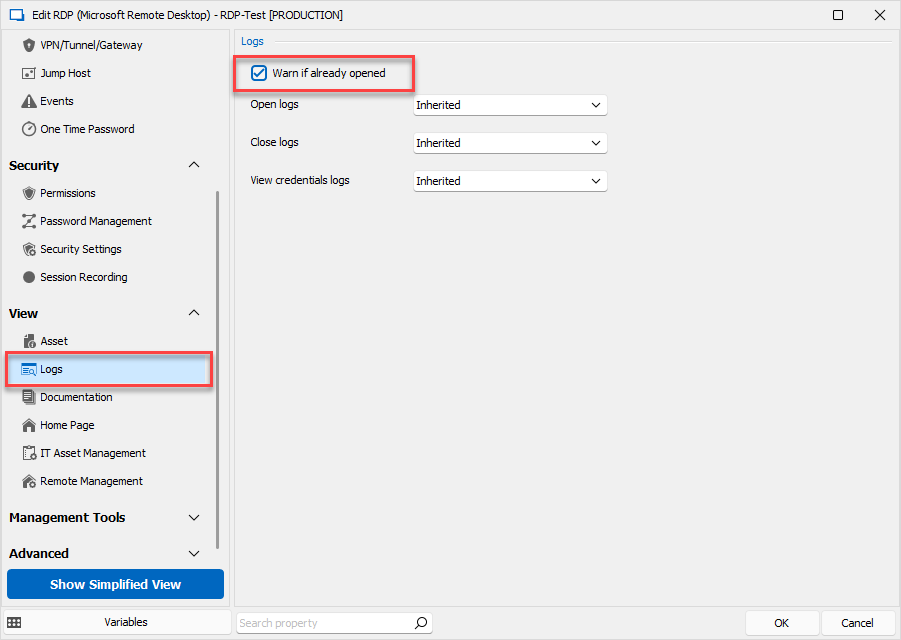
The positive about using this feature is that it will work no matter the permissions on the remote machine, since it's using the logs in the datasource to know whether someone is connected to the machine or not.
The negative is, as mentioned, that this will only work great if everyone using the machine is using it through RDM with the same RDP entry.
Regards,
Hubert Mireault
e9b64b66-9d58-4d3c-9734-b4a0fbd0bad0.png
But that would require everyone in the team to use RDM which won't always be the case. My feature request still applies and I want it to be passed on please. :)
As I mentioned, it is on our todo list, my workaround was not meant to be a final solution to your scenario, but a way to improve your workflow in the mean time.
Regards,
Hubert Mireault