Media keys redirection

Hello,
Is there a way to prevent media keys (play, pause, volume etc.) from being redirected to RDP sessions?
Thanks
All Comments (10)
Hello Sulley,
Thank you for contacting us on that matter.
All those options are under the entry properties -> General -> Local Resources.
Best regards,
Patrick Ouimet
localressources.png
Thanks! I didn't realise that this option would include media keys.
Dear Sulley,
Thank you for providing us with your feedback. If you have any further questions or concerns regarding our product, please feel free to reach out to us at any time. We are always happy to assist you in any way we can.
Best regards,
Patrick Ouimet
Thank you, I didn't know that before.
What if I want to use ALT-TAB on RDP and Media Pause on host? Is it possible anyhow in RDM? I've even tried some AHK scripts and they don't work for me.
Hello Woo-Cash,
Thank you for this feedback.
By default, the session configuration is set so that your keyboard is applied to the local computer.
However, it could be changed under the entry properties -> General -> Local resources -> Keyboard.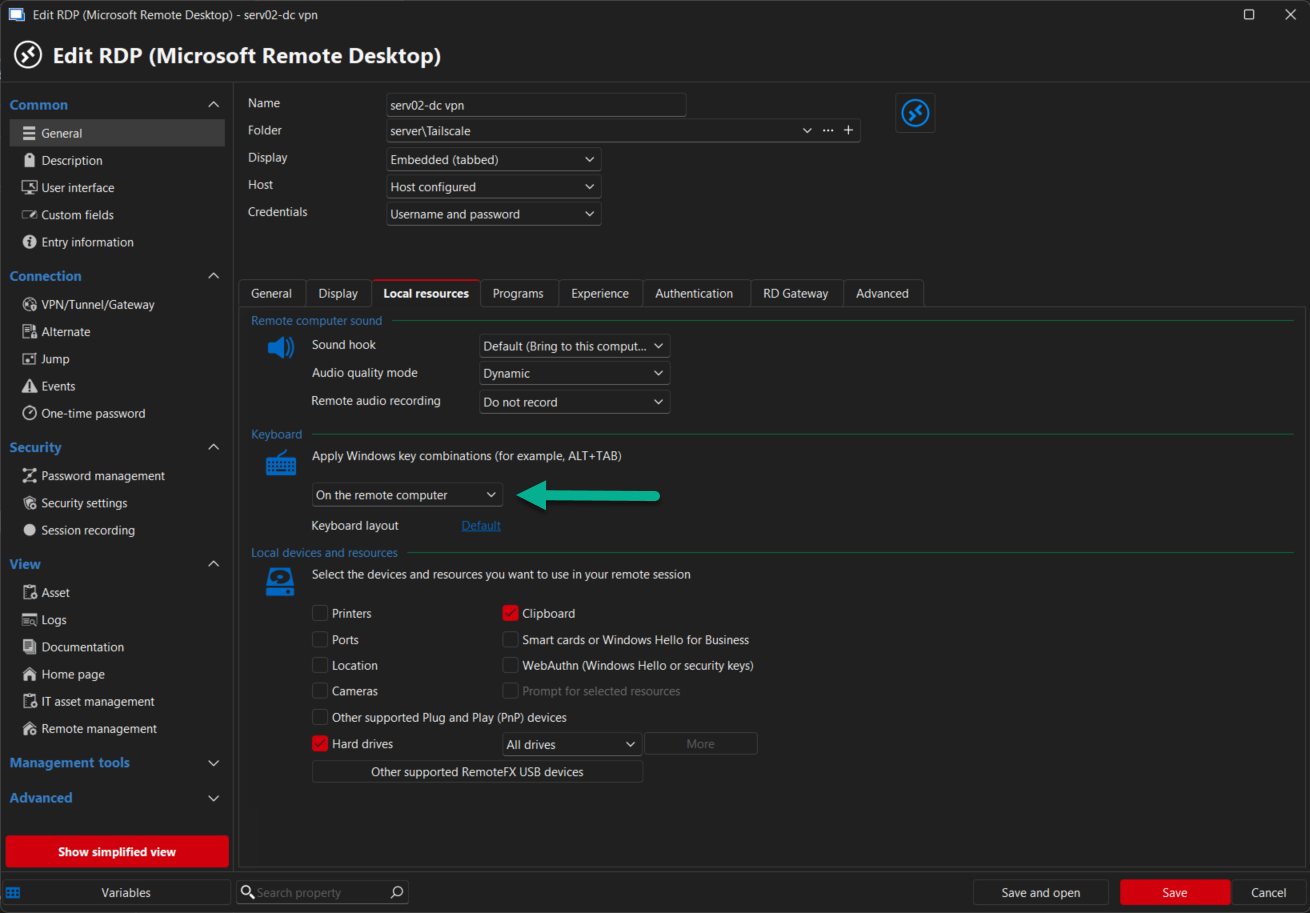
Best regards,
Patrick Ouimet
2025-09-08_13-53-07.png
Hello Woo-Cash,
Thank you for this feedback.
By default, the session configuration is set so that your keyboard is applied to the local computer.
However, it could be changed under the entry properties -> General -> Local resources -> Keyboard.
Best regards,
@Patrick Ouimet
Thanks but it's not the answer to my question. I want to use ALT-TAB on RDP and Media Pause locally without minimizing RDP. This setting changes both to RDP or both to local computer.
Hello Woo-Cash,
Unfortunalty, this is not supported in RDM.
Its either on the local or the remote computer.
What could be done, is to use local computer for your RDP, and use the shortchut ALT - PGUP or ALT - PGDN.
This is the shortcut for ALT - TAB on remote session.
https://learn.microsoft.com/en-us/windows/win32/termserv/terminal-services-shortcut-keys
Best regards,
Patrick Ouimet
Alt-Tab was just an example. I want every shortcut to run on RDP, because I work this way, but the media keys, there's like 6 of them, because my music player is running locally. Is there any way I can bypass this? Any script, application, remapping keyboard, AHK, anything?
Hello,
Unfortunately, it is currently not possible to differentiate media keys from shortcuts in Remote Desktop Manager.
However, we encourage you to submit a feature request on our forum, where our development team reviews user suggestions.
You can create your feature request using the following link:
https://forum.devolutions.net/forums/17/remote-desktop-manager--feature-request
Best regards,
Carl Marien